
What Is Group Admin Manager? Control Roles and Permissions Across All Your Facebook Groups
Managing a single Facebook group is straightforward. You know your admins, you know your moderators, and you can adjust permissions with a few clicks inside Facebook's native settings. But the moment you scale to five, ten, or fifty groups, the administrative overhead becomes a serious operational problem.
Every group has its own admin panel. Every group has its own moderator list. Every group has its own set of permissions and moderation rules. There is no native Facebook interface that lets you see all your groups' admin structures in one place, let alone manage them together. You are left clicking through each group individually, trying to remember who has what role where, and hoping nothing falls through the cracks.
Group Admin Manager is a FaceBot tool that centralizes the management of admin roles, moderator assignments, and group permissions across every group you control. Instead of navigating to each group's settings separately, you manage your entire admin structure from a single dashboard.
Why Admin Management Matters at Scale#
The Fragmentation Problem#
Facebook treats each group as an isolated unit. If you admin fifteen groups and want to promote the same person to moderator in all of them, that is fifteen separate trips to fifteen separate group settings pages. If you want to audit who has admin access across all your groups, you need to check each one manually and compile the results yourself.
This fragmentation creates real risks:
- Stale permissions. A former team member still has admin access to six groups because you forgot to remove them from all of them.
- Inconsistent moderation. Some groups have three active moderators and others have zero because you lost track of the assignments.
- Security gaps. You do not know which groups have admins you did not authorize because you have not checked the admin list in months.
The Time Cost#
Each admin change on Facebook takes about thirty seconds to two minutes, depending on page load times and how deep the setting is buried. Multiply that by the number of groups and the number of changes, and routine admin maintenance can consume hours. That is time taken directly from content creation, engagement, and growth activities.
The Risk of Manual Errors#
When you manage admin roles manually across many groups, mistakes happen. You promote someone to admin when you meant moderator. You remove the wrong person. You forget to apply a change to three of your twelve groups. These errors can have consequences ranging from mild inconvenience to a rogue admin changing group settings or removing members.
🚀 Group Admin Manager
Manage admin and moderator roles at scale
Try it Free Now — 24h Gold, 70+ Tools →How Group Admin Manager Works#
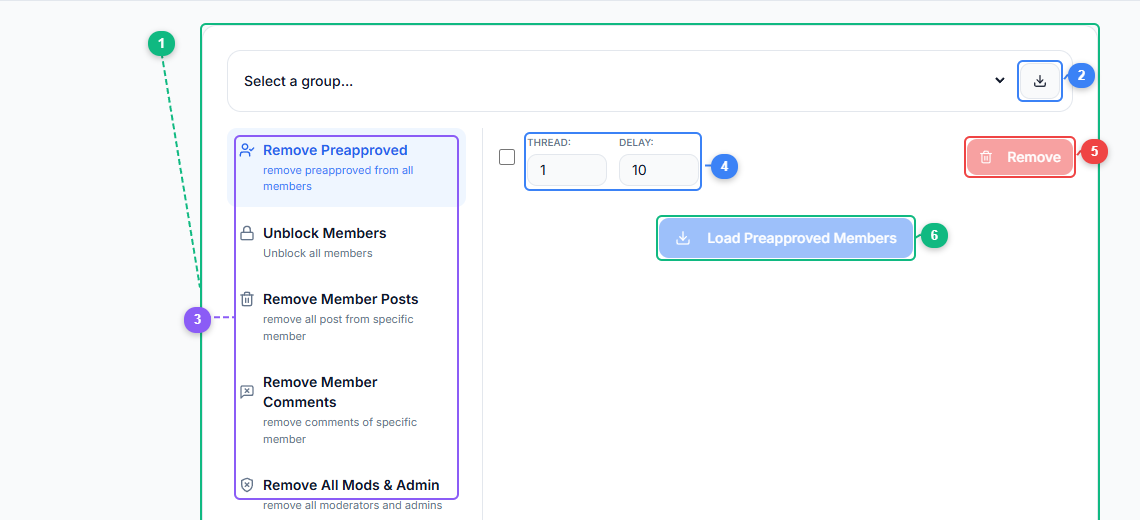
The Group Admin Manager interface puts all admin operations in one place. Select a group (1), refresh your group list (2), choose an action from the menu — Remove Preapproved members, Unblock Members, Remove Member Posts, Remove Member Comments, or Remove All Mods & Admin (3), configure thread count and delay between operations (4), execute the removal action (5), or load preapproved members for review (6).
The tool connects to your Facebook account through the FaceBot browser extension, giving it access to the same group management capabilities you have when using Facebook directly. The difference is the interface -- instead of Facebook's per-group settings pages, you get a consolidated view.
Group Overview Dashboard#
When you open Group Admin Manager, it scans all the groups where you have admin privileges and presents them in a single list. For each group, you can see:
- Group name, size, and privacy setting (public or private).
- Current admins with their names, roles, and when they were assigned.
- Current moderators with the same detail.
- Pending admin or moderator invitations that have not been accepted.
This overview alone is valuable. Many admins managing ten or more groups have never seen their entire admin structure laid out in one view. It often reveals surprises -- people who still have access who should not, groups with no active moderators, or duplicate admin assignments that were created accidentally.
Role Management#
From the dashboard, you can perform standard role operations:
- Promote a member to moderator or admin in one or multiple groups simultaneously.
- Demote an admin to moderator or remove their elevated role entirely.
- Remove a moderator from one or all groups.
- Invite new admins or moderators by providing their profile URL or user ID.
The key advantage is the bulk capability. If you need to add a new team member as a moderator across all your groups, you do it once. If someone leaves your team and you need to revoke their access everywhere, that is also a single operation.
Permission Auditing#
Group Admin Manager includes an audit view that helps you answer questions like:
- Which groups does a specific person have admin access to?
- Which groups have only one admin (a single point of failure)?
- Which groups have admins who have not been active in the group for over thirty days?
- Are there any groups where someone has admin access but is not actually a member of your team?
These audit queries are difficult to answer using Facebook's native tools but straightforward with a centralized view.
Practical Use Cases#
Agency Managing Client Groups#
Social media agencies often manage groups on behalf of clients. Each client might have one to three groups, and an agency with twenty clients could be managing forty or more groups. Staff turnover at the agency means frequent admin changes -- new hires need access, departing employees need removal, and the agency needs to ensure no former employee retains access to client communities.
Group Admin Manager turns what would be a multi-hour offboarding checklist into a five-minute operation.
Brand with Regional or Topic-Based Groups#
Large brands sometimes create multiple groups organized by region, product line, or customer segment. A fitness brand might have separate groups for weightlifting, running, nutrition, and general fitness. Managing moderators across all four groups -- ensuring each has adequate coverage and that moderation quality is consistent -- requires visibility that Facebook does not natively provide.
Community Builders with Multiple Niches#
Entrepreneurs who build communities as a business model often operate groups across several niches. Each group has its own moderator team, its own rules, and its own dynamics. Keeping the administrative infrastructure organized is essential to maintaining quality across all communities.
Moderation Team Coordination#
For groups with large moderation teams (ten or more moderators), tracking who has what level of access becomes its own management task. Group Admin Manager provides the visibility needed to ensure moderators are properly assigned without gaps or redundancies. If you need to understand how to manage Facebook groups at scale, centralized admin management is one of the foundational capabilities.
Best Practices for Group Admin Management#
Apply the Principle of Least Privilege#
Not everyone who helps with a group needs admin access. Facebook distinguishes between admins and moderators for a reason:
- Admins can change group settings, approve or deny membership, manage other admins and moderators, and delete the group.
- Moderators can approve or deny posts, remove posts and comments, mute or remove members, but cannot change group settings or manage other roles.
Give moderator access by default. Only promote to admin when someone genuinely needs the ability to change settings or manage other team members. This limits the blast radius of mistakes or compromised accounts.
Conduct Regular Access Reviews#
Set a recurring schedule -- monthly or quarterly -- to review admin and moderator lists across all your groups. Look for accounts that should no longer have access, groups that are under-moderated, and any access you did not authorize. The audit feature in Group Admin Manager makes this a ten-minute task instead of an hour-long manual check.
Document Your Admin Structure#
Maintain a simple record of who has what access and why. When your future self or a colleague asks why a particular person is an admin of a particular group, having a documented reason saves confusion and prevents unnecessary access revocations.
Remove Access Promptly#
When someone leaves your team, remove their admin and moderator access immediately. Delayed revocation is one of the most common security gaps in group management. With Group Admin Manager, there is no excuse for delays -- bulk removal takes seconds.
🚀 Ready to try Group Admin Manager?
Manage admin and moderator roles at scale
Try it Free Now — 24h Gold, 70+ Tools →How Group Admin Manager Fits the Broader Toolkit#
Admin management is one piece of the group operations puzzle. FaceBot provides complementary tools for other aspects of group management:
- Group Auto Poster handles content distribution across your groups.
- Spam Post Remover keeps group content clean by detecting and removing spam.
- Extract UID from Group pulls member data for audience research.
Together, these tools form a group management stack that handles the operational side of running multiple communities, freeing you to focus on content and engagement strategy.
Limitations to Know#
- You must be an admin. Group Admin Manager can only manage groups where you already have admin access. It cannot grant you access to groups you do not control.
- Facebook rate limits apply. Bulk operations are paced to avoid triggering Facebook's rate-limiting mechanisms. Making hundreds of role changes in seconds would flag automated behavior.
- Private group admin approvals still require the group admin. If you promote someone in a private group, that group's existing admins may need to confirm depending on the group's settings.
- Role changes are logged by Facebook. Every admin and moderator change appears in the group's activity log. This tool automates the actions but does not hide them from Facebook's audit trail.
Frequently Asked Questions#
Can Group Admin Manager make someone an admin of a group I do not own?#
No. You can only manage roles in groups where you already have admin privileges. The tool operates with your existing permissions -- it does not bypass Facebook's access controls.
Will Facebook flag my account for using this tool to manage admin roles?#
The tool performs the same actions you would perform manually, with appropriate delays between operations. It does not exploit any API loopholes or perform actions faster than a human could. That said, making a very large number of role changes in a short period on any platform carries some risk, so pace your operations reasonably.
Can I use this to manage moderators for groups where I am only a moderator, not an admin?#
No. Only admins can manage roles in Facebook groups. If you are a moderator, you cannot promote or demote other moderators or admins. You would need to be promoted to admin first.
Does the tool work with both public and private groups?#
Yes. Group Admin Manager works with any group where you have admin access, regardless of the group's privacy setting.
Can I schedule admin changes to happen at a specific time?#
The current version performs role changes on demand rather than on a schedule. If you need to coordinate role changes with team transitions, run the tool at the appropriate time.
Conclusion#
Group Admin Manager solves a specific but critical problem: the operational overhead of managing roles and permissions across multiple Facebook groups. For anyone running more than a handful of groups, the native Facebook interface is inadequate. It forces you into repetitive, per-group workflows that waste time and invite errors.
FaceBot's Group Admin Manager consolidates that work into a single dashboard where you can see your entire admin structure, make bulk changes, and audit access. It is not glamorous work, but it is foundational -- every other group management activity depends on having the right people with the right access in the right groups.
Try Group Admin Manager to take control of your admin infrastructure.