How to Extract User IDs (UIDs) from a Facebook Group in 2026 — Safely & Compliantly
A single niche Facebook group can hold thousands of people who've self-selected into one topic — fitness, real-estate investing, SaaS founders, local parents. That makes group membership a genuinely useful dataset for research and audience understanding. But Facebook gives you no native export, and scrolling the member list by hand yields names and avatars, not structured data.
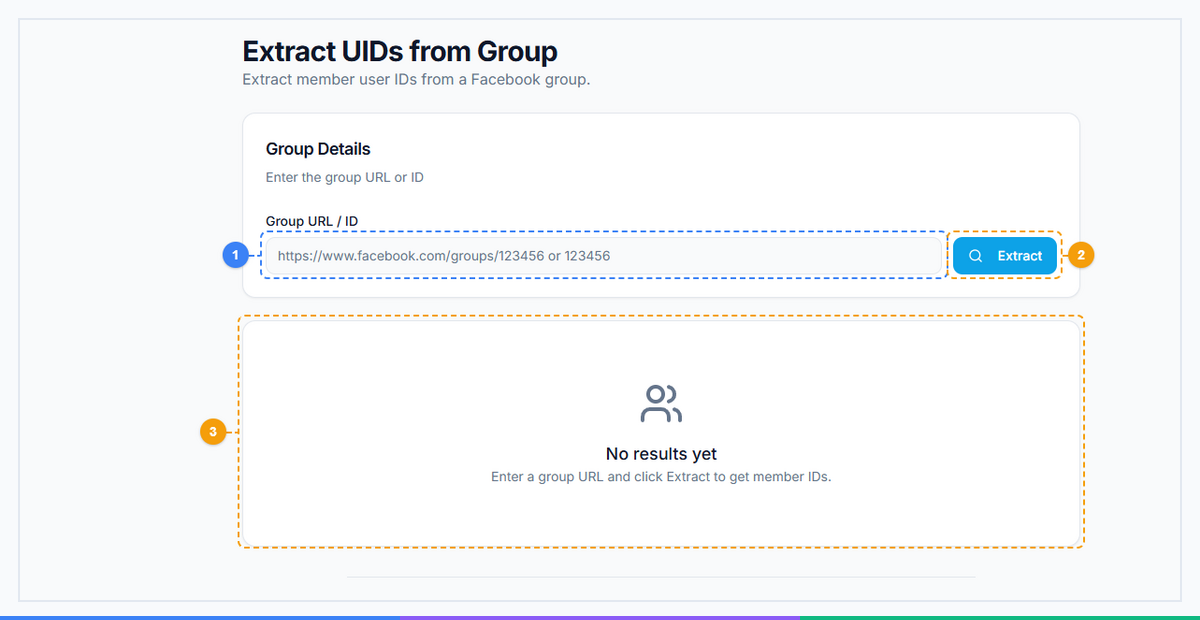
FaceBot's Extract UID from Group pulls member user IDs (UIDs) from a group you have access to and delivers them as a clean, structured list. This guide explains what a UID is, the legitimate things you can do with one — and, just as importantly, the privacy and Facebook-policy limits that decide what you shouldn't. Read the compliance section before you use any of this; it's not boilerplate, it's the part that keeps you out of trouble.
What Is a Facebook UID?#
Every Facebook account has a permanent numeric identifier — the UID — that Facebook's systems use internally, separate from the display name or vanity URL (which can change). Because it's stable and unique, a UID is the reliable way to reference an account in structured data: deduplicating a list, matching records, or analyzing an audience at the aggregate level.
⚖️ Read This First: The Compliance Line#
UIDs are personal data. That means real rules apply, and this tool is only appropriate for lawful, policy-compliant uses. Be honest with yourself about which side of the line you're on:
Legitimate uses:
- Your own group's analytics — understanding the size, overlap, and growth of communities you run.
- Aggregate research — measuring audience size/overlap across groups in your niche, without targeting individuals.
- Deduplication / list hygiene on data you already hold lawfully.
Not okay — don't use it for these:
- Cold DMs / unsolicited outreach to people who never contacted you — that's spam, gets accounts banned, and annoys everyone.
- Uploading harvested UIDs as a Facebook Custom Audience — Meta's terms require that custom-audience data be collected with proper notice/consent; scraped group members don't qualify, and doing this can get your ad account disabled.
- Anything violating privacy law (GDPR, CCPA, and similar) — which generally requires a lawful basis and notice before processing someone's personal identifiers for marketing.
The tool gives you data; the responsibility for using it lawfully is yours. When in doubt, use it for aggregate research, not individual targeting.
🚀 FaceBot Tools
60+ tools to grow and automate your Facebook presence
Try it Free Now — 24h Gold, 70+ Tools →How to Use Extract UID from Group#
- Open the tool in the FaceBot dashboard (Data Extraction).
- Select the group you have legitimate access to and a lawful reason to analyze.
- Run the extraction — it collects member UIDs and structures them into a clean list.
- Export the structured output for your (compliant) analysis.
It works through your own logged-in session and the groups you can access; it reads what's visible to a member, structured.
What You Can Legitimately Do With the Data#
- Size and overlap analysis. How big is a niche's community? How much do two groups overlap? Useful for deciding where to invest time — at the aggregate level, no individual targeting.
- Community health for groups you run. Track membership and growth of your own communities over time.
- Research signals. Combine with Group Viral Finder to understand not just who is in a niche but what content they reward — then create for that audience and reach them the compliant way: by posting valuable content into the group with Group Auto Poster, not by DMing strangers.
The compliant growth path is almost always publish where the audience already is, not harvest and cold-contact. The former scales and compounds; the latter gets you banned.
Pacing & Account Safety#
Even for legitimate extraction, don't hammer Facebook with rapid automated requests — aggressive scraping can trigger a temporary block on your account. Extract at a reasonable pace, and if Facebook ever throttles you, stop and wait rather than pushing harder. A maintained tool paces these reads; reckless speed is what trips flags.
Where It Fits#
Extraction is a research input, not a growth tactic by itself. The healthy loop is: understand the audience (this tool + Group Viral Finder) → create content they reward → distribute it into the groups with Group Auto Poster → engage with Group Auto Commenter. See the full system in best FewFeed alternative.
🚀 Ready to try FaceBot Tools?
60+ tools to grow and automate your Facebook presence
Try it Free Now — 24h Gold, 70+ Tools →The Compliant Audience Workflow, Step by Step#
Used correctly, extracted UIDs are an audience-research and targeting input — not a contact list. The compliant workflow:
- Extract UIDs from groups you're a member of, at a sensible pace, from your own session.
- Study the audience — because group membership is self-selected interest, the people in a tightly-relevant group tell you a lot about your ideal customer's traits and language.
- Use the characteristics to build an evidence-based ad seed, then let Facebook's lookalike modeling expand it — a far stronger starting point than guessing interest categories.
- Reach the audience through legitimate ads, not unsolicited messages.
The value is understanding and modeling an audience to target your ads better — which is both effective and allowed. See the companion workflow on building a converting lookalike from group data.
What You Cannot Do (and Why It Matters)#
Being blunt here protects your account and keeps you on the right side of the law:
- You cannot DM extracted UIDs with unsolicited messages. Cold-blasting people whose IDs you pulled is spam — it violates Facebook's terms and, in many regions, data-protection law (GDPR/CCPA and equivalents).
- You cannot reliably upload raw UIDs as a Custom Audience. Facebook's Custom Audiences match on contact info (email/phone) you've collected with consent, not scraped group UIDs.
- You cannot treat this as a shortcut to private contact details — Facebook doesn't expose emails or phone numbers, and any tool claiming otherwise is lying or illegal.
- You cannot sell or traffic the data. That's a clear violation and a serious legal risk.
The mental model: UIDs are for research and lookalike modeling, reached via legitimate ads — never a harvested list to message. Stay on that line and the tool is powerful and defensible; cross it and it's a ban (and potentially a legal) risk. Pace extraction sensibly and use it only on groups you belong to.
Aggregate Metrics Worth Computing (Without Touching Individuals)#
The defensible, high-value use of extracted UIDs is aggregate analysis — turning a membership list into market intelligence without ever targeting a single person. A few metrics that actually inform decisions:
- Cross-group overlap. Pull UIDs from two or three groups in your niche and compute how many members appear in more than one. High overlap means a tight, saturated community (reach a few groups and you've reached most of the market); low overlap means fragmented audiences worth addressing separately.
- Community size ranking. Comparing the extracted member counts of candidate groups tells you where the attention actually is — often not the group with the loudest name.
- Growth velocity. Re-extract your own group monthly and track net membership change; a flattening curve is an early warning long before engagement visibly drops.
- Niche concentration. If 80% of your target audience clusters in three groups, your distribution strategy writes itself — focus your valuable content there rather than spreading thin across twenty.
Every one of these is computed on counts and set-overlap, never on individual identities — which is exactly what keeps the work on the right side of privacy law.
A Privacy-First Audience Modeling Playbook#
The single most valuable compliant thing you can do with group-audience understanding is improve your ad targeting through modeling, not messaging. The playbook:
- Characterize, don't contact. Use the group's self-selected membership to understand the audience's traits, language, and problems — group membership is a strong interest signal precisely because people opted in.
- Build an evidence-based seed. Translate what you learned into a well-defined seed audience (interests, demographics, behaviors) for your ad account — grounded in a real community rather than guesswork.
- Let the platform's lookalike modeling expand it. Facebook's lookalike engine, fed a strong seed, finds similar users at scale through the ad system — the compliant, effective path to reach, with no scraped list ever uploaded.
- Reach people with ads and with value, not cold DMs. Serve ads to the modeled audience, and publish genuinely useful content into the groups themselves — the two legitimate channels that compound instead of getting you banned.
This is the mental model that keeps the tool powerful and safe: UIDs inform understanding and modeling; the actual outreach always happens through legitimate ads and in-group publishing. See the companion workflow on building a converting lookalike from group data.
Frequently Asked Questions#
What is a Facebook UID?#
A permanent unique numeric identifier for a Facebook account, used internally by Facebook and reliable for structured data (deduplication, matching, aggregate analysis) because it doesn't change like a name or vanity URL can.
How do I extract user IDs from a Facebook group?#
Open Extract UID from Group in FaceBot, select a group you legitimately have access to, run the extraction, and export the structured list of member UIDs — for lawful, policy-compliant uses.
Can I upload these UIDs as a Facebook Custom Audience?#
No — Meta requires custom-audience data to be collected with proper notice/consent. Scraped group-member UIDs don't meet that, and uploading them can get your ad account disabled. Use the data for aggregate research, not individual ad targeting.
Can I DM the people whose IDs I extract?#
Don't. Cold, unsolicited DMs are spam, violate platform rules, and get accounts banned. Reach these audiences by posting valuable content into their groups instead.
Is extracting group UIDs legal?#
It depends on jurisdiction and use. UIDs are personal data, so privacy laws (GDPR/CCPA and similar) generally require a lawful basis and notice before using them for marketing. Aggregate, non-targeting research is far safer than individual outreach. When unsure, consult your own legal guidance.
Will this get my account blocked?#
It can if you extract too aggressively. Keep the pace reasonable, and stop if Facebook throttles you rather than retrying harder.
What's the compliant way to reach a group's audience?#
Publish genuinely useful content into the group with Group Auto Poster, where members already are — not by harvesting IDs and cold-contacting them. It's both compliant and more effective.
Do I need the FaceBot extension?#
It runs from the FaceBot dashboard on your logged-in session. See the getting-started guide.
Conclusion#
Extract UID from Group turns a Facebook group's membership into structured data — powerful for understanding an audience's size, overlap, and makeup. Used the right way (aggregate research, your own communities, informing content you then publish into the group), it's a legitimate research edge. Used the wrong way (cold outreach, non-consented ad targeting), it violates platform rules and privacy law and gets accounts banned. Keep it on the right side of that line, pair it with Group Viral Finder for the "what to post" half, and let Group Auto Poster do the compliant distribution.