
What Is Spam Post Remover? Clean Up Your Facebook Groups Automatically
Running a Facebook group sounds simple until spam arrives. And it always arrives. Within weeks of growing past a few hundred members, every group attracts a steady stream of irrelevant promotions, scam links, crypto schemes, adult content, and repetitive self-promotion from people who joined solely to advertise. Left unchecked, spam drives away legitimate members, kills engagement, and turns a thriving community into a wasteland.
Manual moderation is the traditional answer, but it does not scale. A group with 10,000 members might receive fifty to a hundred new posts per day. Reviewing each one for spam takes real time — time that most admins and moderators do not have. The lag between a spam post going live and a moderator removing it is the window in which members see the spam, lose trust in the community, and disengage.
Spam Post Remover is a FaceBot tool designed for group admins who need to keep their communities clean without spending hours on moderation. It scans group posts, identifies spam and low-quality content, and lets you remove offending posts in bulk.
How Spam Post Remover Works#
The tool combines detection and action into a single workflow.
Detection#
When you run the Spam Post Remover on a group you admin, it scans recent posts and flags content that matches spam indicators.
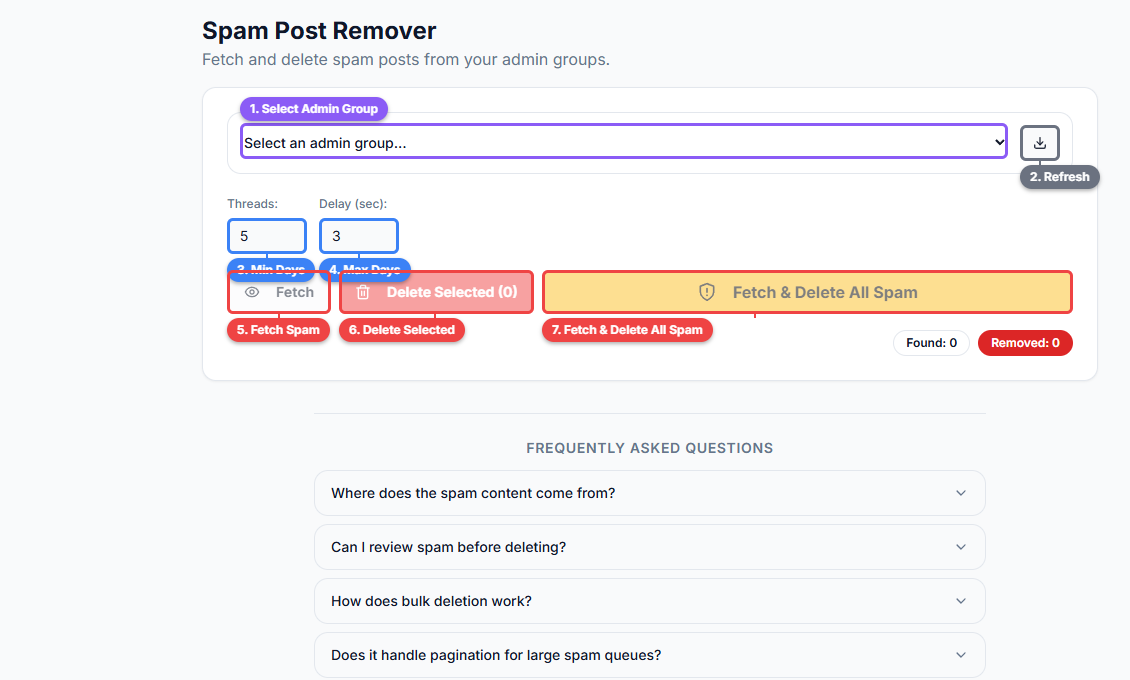
The Spam Post Remover interface lets you select a group (1), refresh your group list (2), choose the types of spam to detect via checkboxes (3), configure post age and limit filters (4), and run the scan (5). Everything is controlled from a single panel — pick your group, set your detection criteria, and scan.
These indicators include:
- Repetitive posting. The same user posting identical or near-identical content multiple times.
- Link-heavy posts. Posts that are primarily external links with minimal or no commentary, especially to known spam domains.
- New member promotional posts. Users who joined recently and immediately posted promotional content without any prior engagement.
- Keyword patterns. Posts containing common spam language — "DM me for details," "limited time offer," cryptocurrency pitches, and other patterns associated with group spam.
- Reported posts. Posts that have been flagged by group members.
Review#
After the scan, you see a list of flagged posts with the content preview, the author, and the reason it was flagged. This review step is important — no automated system is perfect, and you want to confirm that flagged posts are actually spam before removing them.
Removal#
Once you have reviewed the flagged posts, you can remove them individually or in bulk. Bulk removal is where the real time savings come in — instead of clicking into each post, confirming the removal, and moving to the next one, you select the posts you want gone and remove them in a single operation.
🚀 Spam Post Remover
Detect and remove spam from groups in bulk
Try it Free Now — 24h Gold, 70+ Tools →Why Group Spam Management Matters#
Member Retention#
Members leave groups that feel spammy. They may not announce their departure — they simply stop visiting, mute notifications, or quietly leave. By the time you notice dropping engagement, the damage is already done. Consistent spam removal keeps the group feeling like a curated community rather than an open dumpster.
Engagement Quality#
Spam posts dilute the feed. When a member opens a group and sees three promotional posts for every genuine discussion, they are less likely to scroll further, less likely to comment, and less likely to post their own content. Clean feeds encourage participation.
Algorithm Impact#
Facebook's algorithm considers group quality when deciding how to distribute group content in members' main feeds. Groups with high spam rates, low engagement ratios, and frequent member reports get less algorithmic distribution. Keeping spam low directly impacts how many members see your group's content outside the group itself.
Admin Reputation#
Your reputation as a group admin affects how members perceive the community. Groups known for responsive moderation attract higher-quality members. Groups known for being overrun with spam attract more spammers and repel serious participants.
Who Needs Spam Post Remover#
Admins of Growing Groups#
The spam problem scales with group size. A group with 500 members might get one or two spam posts per week. A group with 50,000 members might get dozens per day. The transition from manageable to overwhelming happens faster than most admins expect. Having automated detection in place before you reach that tipping point prevents the quality collapse that kills many mid-sized groups.
Admins Managing Multiple Groups#
If you admin more than one group — which is common for brands, agencies, and community builders — the moderation workload multiplies. Spam Post Remover lets you maintain quality across all your groups without proportionally increasing the time you spend on moderation.
Groups with Limited Moderator Teams#
Large groups ideally have multiple active moderators covering different time zones. In reality, most groups rely on one or two moderators who check in periodically. During the gaps, spam accumulates. Automated scanning covers those gaps and keeps the queue manageable.
Niche Groups with High Spam Targets#
Some niches attract more spam than others. Finance groups get cryptocurrency scams. Health groups get supplement promotions. Buy-and-sell groups get off-topic advertising. If your group is in a high-spam niche, manual moderation alone is a losing battle.
Best Practices for Group Spam Management#
Set Clear Group Rules#
Before relying on removal tools, make your rules visible. Pin a post explaining what is and is not allowed. Many people who post spam-like content do not realize they are violating norms. Clear rules reduce spam at the source and give you a defensible basis for removal.
Use Screening Questions#
Private groups can require members to answer screening questions before being approved. Questions like "Have you read the group rules?" and "What do you hope to contribute?" filter out a significant percentage of accounts that join solely to spam.
Combine Automated and Manual Moderation#
FaceBot's Spam Post Remover handles volume and catches pattern-based spam. Manual moderation handles edge cases — posts that are technically not spam but are low-quality, off-topic, or borderline. The combination covers the full spectrum.
Remove Early and Consistently#
A spam post that stays up for an hour does more damage than one removed in five minutes. The longer spam sits in the feed, the more members see it, the more it signals that the group tolerates this behavior, and the more spammers are encouraged to try again. Run the Spam Post Remover regularly — daily for active groups, a few times per week for moderate ones.
Do Not Over-Moderate#
There is a line between removing genuine spam and censoring legitimate discussion. Self-promotional posts that add value to a discussion are not spam. A member sharing a relevant link to their own blog in response to a question is not spam. Over-moderation frustrates members just as much as under-moderation.
Spam Post Remover vs. Facebook's Built-In Moderation#
Facebook offers some native moderation tools — keyword filters, post approval queues, and member-reported post flags. Here is how Spam Post Remover compares:
| Feature | Facebook Native | Spam Post Remover |
|---|---|---|
| Keyword filtering | Basic word blocking | Pattern-based detection across multiple spam indicators |
| Bulk removal | One post at a time | Select and remove multiple posts in one operation |
| New member detection | Post approval for new members only | Flags new members who immediately post promotional content |
| Repetitive post detection | Not available | Identifies users posting identical content multiple times |
| Link analysis | Not available | Flags link-heavy posts and known spam domains |
| Time investment | High — review each post individually | Low — scan, review flagged items, bulk remove |
Facebook's native tools are a starting point. For groups that receive meaningful spam volume, they are not sufficient on their own.
🚀 Ready to try Spam Post Remover?
Detect and remove spam from groups in bulk
Try it Free Now — 24h Gold, 70+ Tools →Integrating Spam Management Into Your Admin Workflow#
Spam removal is one part of comprehensive group management. FaceBot provides several tools that work together:
- Pending Post Manager — Review and approve or reject posts before they go live in the group. This catches spam before members see it.
- Spam Post Remover — Clean up spam that makes it past the pending queue or appears in groups without post approval enabled.
- Group Admin Manager — Manage your moderator team, assign roles, and coordinate moderation coverage.
- Group Post Cleaner — Remove outdated, irrelevant, or rule-violating posts beyond just spam.
Used together, these tools create a moderation system rather than a reactive cleanup routine.
Try Spam Post Remover#
If you are spending more time removing spam than engaging with your community, the balance is wrong. Spam Post Remover automates the detection and removal of low-quality posts so your group stays clean and your moderation time is spent on decisions that matter, not repetitive cleanup. For a complete admin playbook covering spam management and all other aspects of running large groups, see how to manage a Facebook group at scale.
Open Spam Post Remover in FaceBot
Frequently Asked Questions#
Does Spam Post Remover permanently delete posts or just hide them?#
The tool removes posts from the group, which is the same action as an admin manually deleting a post. The post is no longer visible to group members. The post author can still see it in their own activity log, but it will not appear in the group feed.
Can I undo a removal if I accidentally delete a legitimate post?#
Once a post is removed from a Facebook group, it cannot be restored through the group interface. This is why the review step before bulk removal is important — take a moment to confirm that flagged posts are genuinely spam before executing the removal.
Does the tool also block or ban spammers?#
Spam Post Remover focuses on post removal. Blocking or banning members is a separate admin action. However, the tool surfaces the authors of spam posts, making it easy for you to identify repeat offenders who warrant a ban from the group.
How often should I run the spam removal scan?#
For active groups receiving daily spam, running the scan daily is ideal. For smaller or less active groups, two to three times per week is usually sufficient. The key is consistency — regular scans prevent spam from accumulating to levels that drive members away.
Does this work on groups where I am a moderator, not an admin?#
Yes. The tool works for any group where you have moderation permissions. Both admins and moderators with post removal rights can use the Spam Post Remover.
Conclusion#
Spam is the slow killer of Facebook groups. It does not destroy communities overnight — it erodes them gradually as members disengage, quality contributors leave, and the group's reputation deteriorates. Spam Post Remover gives admins the ability to fight spam at scale, maintaining the community quality that keeps members active and engaged. For any group admin dealing with more spam than they can handle manually, this tool turns an unsustainable burden into a manageable routine.