
What Is Bulk Group Finder? Search and Discover Facebook Groups by Keyword
Facebook has over 1.8 billion people using Groups every month. Within that ecosystem, there are groups for nearly every niche, industry, hobby, and geographic area imaginable. The problem is not that relevant groups do not exist. The problem is finding them efficiently.
Facebook's native group search is basic. You type a keyword, get a list of results, and scroll. The results are sorted by Facebook's algorithm, which optimizes for groups you are likely to join based on your social graph -- not necessarily the groups that are most active, largest, or best suited for marketing. There is no way to filter by member count, activity level, or privacy setting. There is no way to export results. There is no way to search for multiple keywords at once.
Bulk Group Finder is a FaceBot tool that addresses these gaps. It lets you search for Facebook groups across multiple keywords simultaneously, surfaces detailed metrics for each result, and exports everything into a structured format you can work with.
How Bulk Group Finder Works#
Multi-Keyword Search#
Instead of searching for one keyword at a time, Bulk Group Finder accepts a list of keywords and runs searches for all of them. If you are a fitness brand, you might search for "weightlifting," "bodybuilding," "gym motivation," "powerlifting," "home gym," and "CrossFit" in a single operation. The tool collects results for each keyword and deduplicates them -- groups that appear in multiple keyword results are listed once with all matching keywords noted.
This multi-keyword approach is important because niche audiences describe themselves in different ways. A group about financial planning might use the terms "investing," "personal finance," "money management," or "FIRE movement." Searching for just one of those terms misses groups that use the others.
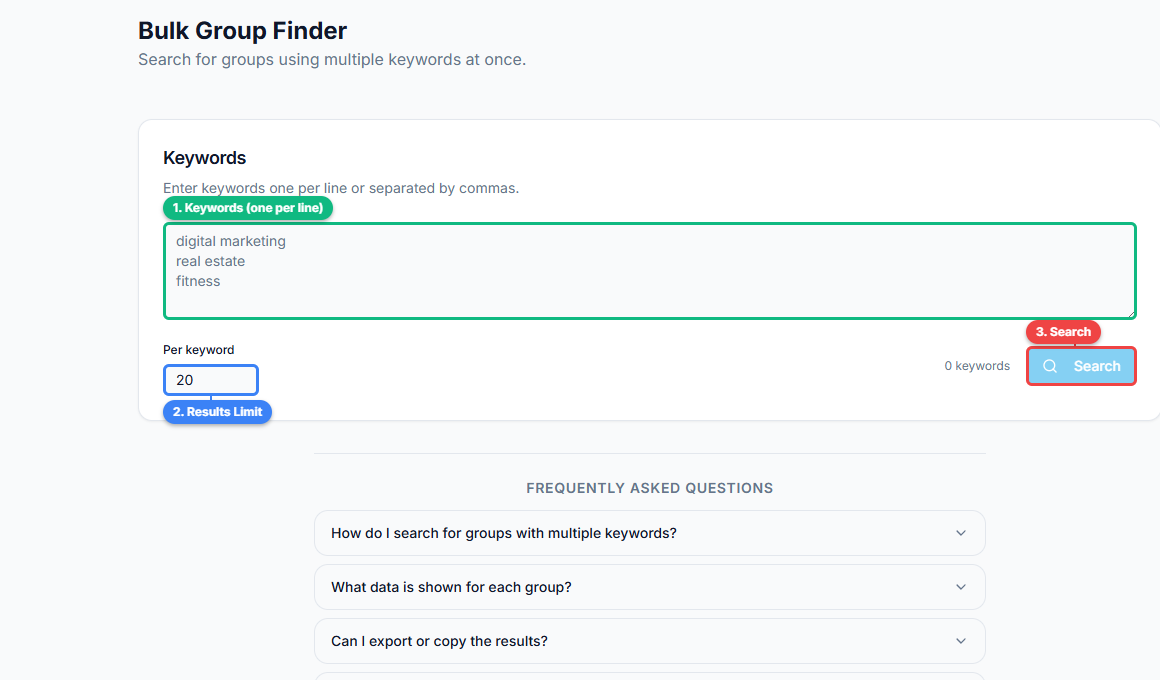
The interface is straightforward: enter your keywords one per line (1), set a results limit per keyword (2), and click Search (3). The tool handles deduplication across keywords automatically.
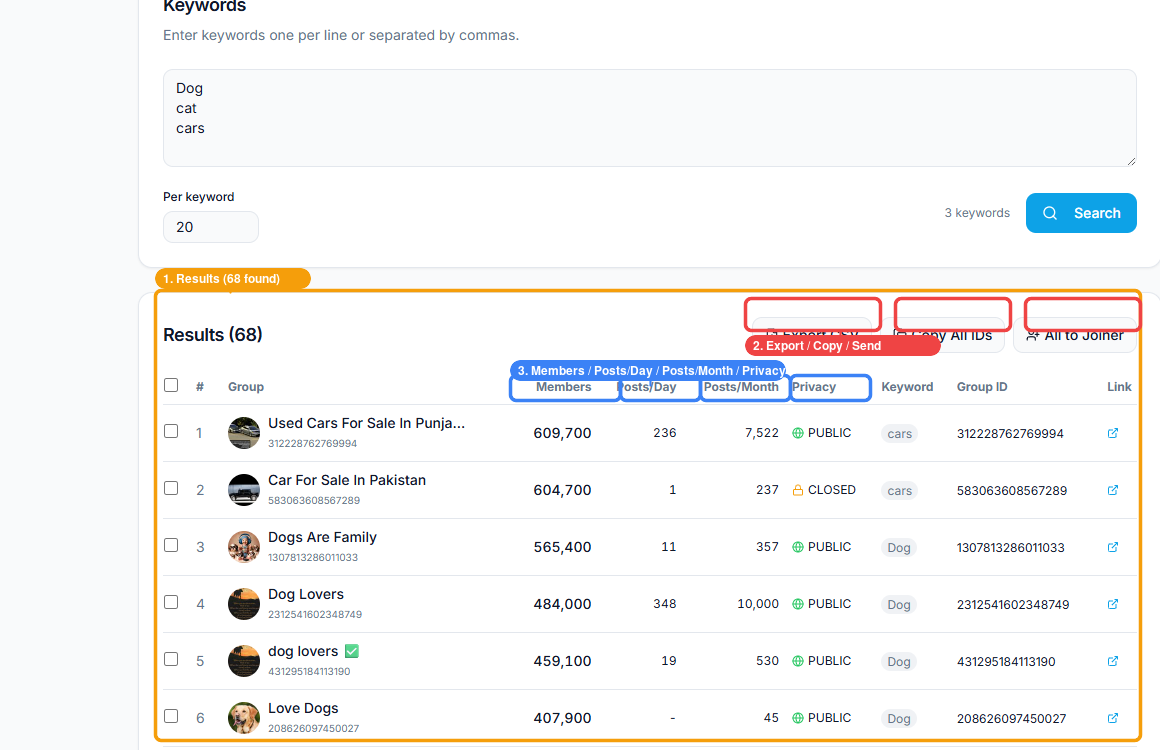
After searching for "Dog," "cat," and "cars," the tool found 68 groups. The results table (1) shows detailed metrics per group. Export actions (2) let you download CSV, copy all IDs, or send groups directly to the Auto Joiner tool. Each row displays key data columns (3) — Members, Posts/Day, Posts/Month, and Privacy — so you can evaluate groups at a glance before joining.
Metrics Collection#
For each group found, Bulk Group Finder pulls available metrics:
- Member count. The total number of members. This is the most basic indicator of a group's reach.
- Privacy setting. Public or private. This affects both your ability to see content before joining and the perceived exclusivity of the group.
- Activity indicators. How recently posts were made and the approximate posting frequency. A group with 100,000 members and no posts in the last week is very different from one with 10,000 members and fifty posts per day.
- Admin and moderator count. Groups with multiple active admins tend to be better moderated and have higher engagement quality.
- Creation date. Newer groups may be growing rapidly but are less established. Older groups tend to have stable member bases.
- Group description and rules. The text the admins have set to describe the group's purpose and guidelines.
These metrics let you evaluate groups before you invest time joining and engaging. Without them, you are guessing based on the group name and a thumbnail image.
Filtering and Sorting#
After collecting results, you can filter and sort by any metric:
- Show only groups with more than 10,000 members.
- Show only public groups (useful if you want to preview content before joining).
- Show only private groups (often higher quality due to the approval gate).
- Sort by activity level to find the most active groups first.
- Exclude groups you are already a member of.
Filtering turns a raw list of hundreds of groups into a shortlist of the twenty or thirty most promising ones.
Export#
Results can be exported as a list of group URLs, IDs, and associated metrics. This export feeds directly into other tools in the FaceBot workflow -- particularly the Auto Group Joiner, which accepts group URL lists as input.
🚀 Bulk Group Finder
Search and discover Facebook groups at scale
Try it Free Now →Why Group Discovery Deserves Dedicated Tooling#
The Hidden Audience Problem#
Most marketers underestimate how many relevant groups exist for their niche. A quick manual search might turn up ten groups. A systematic multi-keyword search might reveal a hundred. The difference between reaching the audiences in ten groups versus a hundred groups is an order of magnitude more visibility -- all organic, all free.
The groups you do not know about contain audiences you are not reaching. Every undiscovered group is a missed distribution channel.
Quality Variance#
Not all groups are equal. A group with 200,000 members might have almost no engagement because the admins abandoned it years ago. A group with 5,000 members might have a highly engaged community where every post gets comments and reactions. Without metrics, you have no way to distinguish between these before joining.
Bulk Group Finder gives you the data to make informed decisions about where to invest your group marketing effort. For a broader look at how group discovery fits into strategy, see the complete guide to Facebook group marketing.
Time Economics#
Manual group research typically follows this pattern: search a keyword, scroll through results, open a promising group in a new tab, check the member count, check recent posts, decide whether to join, go back, scroll more, repeat. Each group evaluation takes two to five minutes. Evaluating fifty groups takes two to four hours.
Bulk Group Finder compresses this into minutes. The search, metric collection, and filtering happen automatically. You spend your time evaluating a pre-filtered shortlist instead of sifting through raw results.
Practical Use Cases#
Entering a New Niche#
When you expand into a new market or niche, you start with zero group memberships and zero knowledge of the landscape. Bulk Group Finder gives you an immediate map of the group ecosystem for that niche -- how many groups exist, how large they are, how active they are, and what the community dynamics look like.
This research phase should happen before you join a single group. Understanding the landscape first prevents you from joining mediocre groups just because they appeared first in a manual search.
Competitive Research#
Your competitors are in groups too. Searching for competitor brand names, product names, or key personnel can reveal which groups they are active in. This intelligence helps you understand their distribution strategy and identify groups where your presence would be strategically valuable.
Local Market Mapping#
For businesses with a geographic focus, Bulk Group Finder can map the local group ecosystem. Searching for "[city name] + [industry]" across multiple cities reveals the density and quality of local groups. A real estate agent expanding to a new city can quickly identify every relevant local group before starting outreach.
Audience Research#
Groups are a proxy for audience interests. The groups that exist around a topic, their sizes, and their activity levels tell you something about demand. If you search for a niche keyword and find 200 active groups, that niche has strong community engagement. If you search and find 3 inactive groups, the community may not live on Facebook.
Combining group research with UID extraction from the most relevant groups gives you both qualitative and quantitative audience intelligence.
🚀 Ready to try Bulk Group Finder?
Search and discover Facebook groups at scale
Try it Free Now →Building a Research Workflow#
Step 1: Keyword Brainstorm#
List every term your target audience might use to describe their interest, problem, or identity. Include:
- Direct industry terms ("digital marketing," "SEO").
- Problem-based terms ("how to get more clients," "lead generation").
- Identity terms ("solopreneurs," "freelance designers").
- Tool or platform names ("Shopify sellers," "WordPress developers").
- Geographic variants ("digital marketing London," "SEO Pakistan").
Step 2: Run the Search#
Load your keyword list into Bulk Group Finder and execute. Let the tool collect results across all keywords.
Step 3: Filter Aggressively#
Start with your minimum viable group criteria. For most marketing purposes, a reasonable starting filter is:
- Member count above 5,000 (enough reach to matter).
- Activity within the last 7 days (not abandoned).
- Privacy setting: any (both public and private groups can be valuable).
Step 4: Score and Prioritize#
From your filtered results, rank groups by a combination of size, activity, and relevance. The group that best matches your ideal audience with the highest engagement should be at the top of your join list.
Step 5: Export to Auto Group Joiner#
Export your prioritized list and import it into Auto Group Joiner to begin the joining process. Use the pacing guidelines from that tool to submit requests safely.
Step 6: Ongoing Discovery#
Group discovery is not a one-time task. New groups form constantly, and existing groups grow or decline. Run Bulk Group Finder monthly to catch new opportunities and reassess groups that may have become inactive since your last search.
What Bulk Group Finder Does Not Do#
Understanding the tool's boundaries prevents mismatched expectations:
- It does not join groups. Discovery and joining are separate operations. Bulk Group Finder finds and evaluates; Auto Group Joiner handles joining.
- It does not show private group content. For private groups, you see metadata (name, member count, description) but not posts or member lists. You need to join to see inside.
- It does not predict group quality perfectly. Metrics like member count and recent activity are strong signals but not guarantees. A group might have high activity but low-quality content, or a small member count but exceptionally valuable discussions.
- It cannot find hidden or secret groups. Facebook groups that are set to "hidden" do not appear in search results for anyone. These groups can only be found through direct invitations.
- Results depend on your search terms. The tool finds what you search for. If your keyword list is narrow, your results will be narrow. Invest time in the keyword brainstorm step.
Frequently Asked Questions#
How many keywords can I search at once?#
Bulk Group Finder supports multiple keywords per search session. The practical limit depends on how many results you want to process -- twenty keywords might return thousands of groups. Start with 5-10 keywords and expand as you refine your targeting.
Does Bulk Group Finder work for non-English groups?#
Yes. The tool searches for groups matching whatever keywords you provide, in any language. If you search in Arabic, French, or Urdu, you will find groups in those languages. The metrics (member count, activity) are language-independent.
Can I see which groups my competitors are in?#
Not directly. Bulk Group Finder searches by keyword, not by user membership. However, searching for competitor brand names or products may surface groups associated with those brands. For deeper competitive intelligence, combine group search with group viral content analysis.
How often should I run group discovery searches?#
Monthly is a good cadence for most use cases. The Facebook group landscape changes slowly enough that weekly searches yield mostly duplicate results, but quickly enough that quarterly searches miss meaningful new groups.
Is there a limit to how many groups the tool can find per search?#
The tool returns all groups that Facebook's search surfaces for your keywords. Facebook itself limits search results, so very broad keywords may hit Facebook's result cap. More specific keywords typically return more complete results.
Conclusion#
Group discovery is the foundation of every group marketing strategy. You cannot post in groups you have not joined, and you cannot join groups you have not found. Bulk Group Finder automates the research phase, turning hours of manual searching into a structured, data-driven process.
The tool does not replace strategic thinking -- you still need to decide which niches to target, which group characteristics matter for your goals, and how many groups constitute a manageable portfolio. What it replaces is the tedious, manual search-scroll-evaluate loop that makes group research feel like busywork.
FaceBot's Bulk Group Finder is the starting point for building a group portfolio that is deliberately targeted rather than randomly assembled.
Start discovering groups with Bulk Group Finder.