How to Find Viral Posts in Any Facebook Group (2026) — Group Viral Finder
Every Facebook group has posts that get three comments and posts that get three hundred — and the difference is rarely random. Top group posts follow patterns: specific topics, formats, timing, and emotional triggers that consistently outperform. Identify those patterns for the groups you're in and you stop guessing what to post; you post what the audience has already proven it rewards.
Group Viral Finder in FaceBot does exactly that — it scans a group's posts and ranks the top performers by engagement (reactions, comments, shares) so you get a data-backed shortlist of what resonates, instead of scrolling a feed hoping to spot it. This guide shows how it works, how to turn the output into a content plan that actually lands, and where research fits in the group-growth loop.
What Is Group Viral Finder?#
It's a research tool that analyzes the posts inside a Facebook group you're a member of and sorts them by engagement, showing you the content, author, format, and metric breakdown for each top performer. Think of it as reverse-engineering a group's "what works" list — the single highest-leverage thing you can do before you ever post.
It runs on your own session and the groups you belong to; it reads public in-group engagement, it doesn't fabricate anything.
How Group Viral Finder Works#
- Select a group you're a member of (paste the group URL or numeric ID).
- Set the window — last week, last month, or a custom range.
- Run the analysis — it scans posts in that window and collects engagement data.
- Review the ranked results — sorted by total engagement (reactions + comments + shares) or by individual metric, with content, author, format, and breakdown per post.
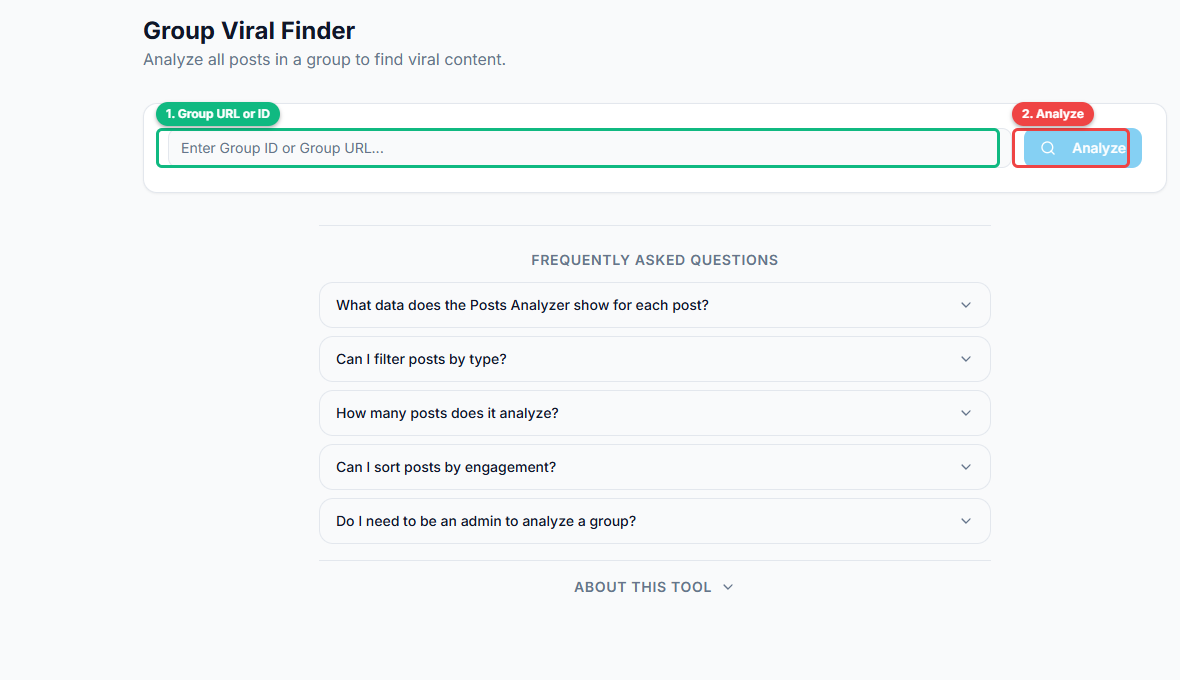
Enter any group URL or numeric ID (1) and click Analyze (2) to scan and rank the group's posts by engagement.
For each post you get: total reactions, comment count, share count, the post format (text / image / video / link / poll), the author, and the actual content — so you can see not just that it won, but why.
🚀 Group Viral Finder
Find top-performing posts in any group
Try it Free Now — 24h Gold, 70+ Tools →What Actually Makes Group Posts Go Viral#
Across groups, the winners cluster around a few repeatable levers — and the tool lets you confirm which ones apply to your specific audience rather than guessing:
- Format. In many groups, native photo and short-video posts and polls out-reach plain text and link posts. The ranking shows you the format mix of the top posts instantly.
- Topic/angle. Problems, wins, before/afters, strong opinions, and "ask the group" questions tend to spike comments.
- Emotional pull. Relatable frustration, aspiration, surprise, or a genuinely useful tip earns shares.
- Timing. Note the post times of the winners — that's when the group is awake and active.
- First-comment behavior. Posts that seed discussion in the comments keep climbing.
Turning the Data Into a Content Plan#
The analysis is only valuable if it changes what you post. The workflow:
- Analyze your 3–5 most important groups over the last 30 days.
- List the top ~10 posts per group and tag each by format, topic, and time.
- Find the overlap — the formats/topics that win across multiple groups are your safest bets.
- Model, don't copy. Recreate the pattern (format + angle + timing) with your own original content — never lift someone's post verbatim.
- Post it with Group Auto Poster, scheduled to the active windows you observed.
- Re-analyze monthly — groups shift; refresh your "what works" list.
Model Winners the Right Way (Ethics + Effectiveness)#
Copying a top post word-for-word is both wrong and ineffective — members recognize recycled content, and admins remove duplicates. The point of the data is the pattern, not the text. Take the winning format and angle, then bring your own example, story, data, or product perspective. Original content built on a proven structure is what earns the engagement; a copy earns a report.
Where Research Fits in the Group-Growth Loop#
Viral Finder is the research stage of the loop — do it before you distribute:
- Find groups — Bulk Group Finder
- Join them — Auto Group Joiner
- Research what wins — Group Viral Finder
- Post the proven formats — Group Auto Poster
- Engage to compound — Group Auto Commenter
Skipping research is why most group posting flops — you're guessing. Research first and every later step performs better. Full picture: best FewFeed alternative.
Common Mistakes#
- Analyzing once and never again — groups evolve; refresh monthly.
- Copying posts verbatim — model the pattern, not the words.
- Ignoring format — if video wins in a group, stop posting plain text there.
- Overlooking timing — the winners' post times are a free schedule.
- Only analyzing your own group — your competitors' and target groups teach you more.
🚀 Ready to try Group Viral Finder?
Find top-performing posts in any group
Try it Free Now — 24h Gold, 70+ Tools →The Metrics That Signal a True Winner#
Not every high-number post is worth modeling. Group Viral Finder surfaces the metrics that separate genuine resonance from vanity:
- Comment-to-reaction ratio. A post with 40 comments and 60 reactions is far more instructive than one with 500 reactions and 3 comments — comments mean the post started a conversation, which is exactly what group distribution rewards.
- Comment depth. Threaded replies (people responding to each other) signal a topic that genuinely hit a nerve, not just a passing tap.
- Shares within the niche. The highest-intent signal — content useful or relatable enough to pass on.
- Engagement velocity. How fast a post accumulated engagement reveals how hot the topic is; a post that got 100 comments in two hours beats one that reached the same total over a week.
- Recency. Weight recent breakouts over old ones — they reflect what the group responds to now, not a trend that's passed.
Rank a group's posts by these and you separate the true models from the noise.
A 20-Minute Group-Decoding Routine#
Here's how to turn the tool into a content brief for any group in about 20 minutes:
- Pull the top posts of the last 90 days, sorted by engagement velocity.
- Log the top 10 — hook, format, angle, engagement ask, and metrics — in a simple sheet.
- Spot the pattern. You'll often find most winners share a structure (e.g. plain-text "mistake" stories opening with a specific number and ending with a question). That pattern is your brief.
- Write three originals on that pattern — your substance, the group's proven structure.
- Schedule and distribute them (value-first, paced) with the Group Auto Poster, then reply to early comments to drive velocity.
Twenty minutes of research replaces weeks of guessing — you post what the group has already proven it engages with. Refresh the research every 4–6 weeks, because group preferences drift and a format that crushed in spring can fatigue by autumn.
Turning Winners Into a Repeatable Content Calendar#
The gap between knowing what works and consistently posting it is a system. Once Viral Finder has handed you a group's proven patterns, convert them into a calendar you can run on autopilot:
- Bucket the winners by format. Group your top-ranked posts into three or four buckets — e.g. "mistake stories," "ask-the-group questions," "before/after wins," "quick tips." These buckets become your recurring content types.
- Assign buckets to days. Map each bucket to a slot in the week (e.g. question posts Monday, win stories Thursday). A predictable rhythm trains the audience to expect and engage with you.
- Batch-write a month in one sitting. With the proven structures in front of you, drafting ten originals that follow the winning patterns takes an afternoon, not a month of daily scrambling.
- Schedule to the active windows you observed in the winners' post times, using Group Auto Poster so each piece lands when the group is awake.
- Reserve the first comment. The winners that kept climbing almost always had an early comment that re-opened the conversation — pre-write a seed comment for each post.
A calendar built from evidence beats a calendar built from inspiration every time, because every slot is filled with a format the audience has already rewarded.
Group-Specific Signals Most People Miss#
Two groups in the same niche can reward completely different content, and the subtle signals are where the edge is:
- The admin's own posting style. In many groups the admin implicitly sets the tone; posts that echo the admin's preferred format (long-form story vs. quick poll) tend to ride along rather than fight the culture.
- The ratio of question-posts to broadcast-posts among winners. A group whose top posts are mostly questions is a discussion community — broadcast-style promotional posts will flop there no matter how polished.
- Comment sentiment, not just count. Fifty comments of genuine discussion is a model worth copying; fifty comments of "following" or tagged friends is noise that won't translate to your results.
- Day-of-week clustering. Some groups spike hard on specific days (weekend hobby groups, weekday B2B groups). The winners' timestamps reveal the group's true active days, which are often not the generic "best time to post" advice.
- Length tolerance. Check whether the winners are short and punchy or long and detailed — groups self-select for one, and matching it matters more than any headline formula.
Decode these per group rather than applying one universal playbook, and your posts stop feeling like outsiders dropping in and start feeling like a native member the algorithm and the audience both favor.
Frequently Asked Questions#
How do I find the most viral posts in a Facebook group?#
Use Group Viral Finder: select the group, set a time window, run the analysis, and it ranks the posts by engagement (reactions + comments + shares) with the content and format for each — so you can see exactly what performed.
Can I analyze any group or only my own?#
Any group you're a member of. It reads the in-group engagement that's visible to members and ranks it.
What engagement data does it show?#
Per post: total reactions, comment count, share count, the post format (text/image/video/link/poll), the author, and the post content.
How do I use viral post data to grow?#
Find the formats, topics, and timing that win across your target groups, then create your own original posts in those proven patterns and distribute them with Group Auto Poster at the active times you observed.
Is it okay to copy a viral post?#
No — copying verbatim gets removed and reported, and performs poorly. Model the pattern (format + angle + timing) with your own original content.
How often should I run the analysis?#
Monthly for your core groups, or before any new campaign. Group behavior shifts, so refresh your "what works" list regularly.
Does analyzing a group break Facebook's rules?#
No — it reads engagement data visible to group members, the same information you'd see scrolling the feed, just ranked and organized.
What's the fastest way to know what to post in a new group?#
Run Viral Finder on it before posting anything — the top 10 posts tell you the format, topics, and timing the audience rewards, so your first post isn't a guess.
Do I need the FaceBot extension?#
It runs from the FaceBot dashboard on your logged-in session. See the getting-started guide.
Conclusion#
Group Viral Finder replaces guesswork with evidence: it shows you exactly what a group's audience rewards, so every post you make afterward is modeled on something that already worked. Pair it with Group Auto Poster to distribute those proven formats at the right times, and research becomes the quiet advantage behind consistent group growth. Build your group list first with Bulk Group Finder, then let the data tell you what to say.