
How to Auto-Post to Multiple Facebook Groups in 2026 (Group Auto Poster)
Posting to Facebook groups by hand is one of the biggest time sinks in social media marketing. Active in ten groups? That's open group, compose, tweak, publish — ten times over. Scale to thirty or fifty and you've lost a morning to repetitive clicking. Yet Facebook groups are where free organic reach still lives for accounts without a huge following, so skipping them isn't the answer.
Group Auto Poster in FaceBot fixes the tedium: compose one post, publish it to many groups in a single, paced operation — as you, through your own memberships. This guide covers exactly how it works, how to use it without tripping Facebook's spam detection, how many groups is safe, what to actually post, and where it fits in a complete group-growth system.
What Is Group Auto Poster?#
Group Auto Poster lets you write a post once and publish it across multiple Facebook groups you belong to, with per-post delays and optional content variation so the activity looks natural. It runs on your own logged-in session and your existing group memberships — no fake accounts, no API exploits, no third-party credentials. You're posting as yourself, to groups where you're already a member.
It's built for anyone whose reach depends on groups: product sellers, local service businesses, course creators, community builders, and marketers who've realized one relevant group can hold more of the right audience than their own page does.
How Group Auto Poster Works#
You provide the content — text, images, links, or a mix — and select which groups receive it. The tool submits the post to each selected group in sequence, respecting the delays you set.
Typical workflow:
- Open Group Auto Poster in the FaceBot dashboard.
- Compose your post — text, plus any images or links.
- Select target groups from the list you're a member of (all, specific ones, or by category if you've organized them).
- Configure posting settings — delay between posts, content shuffle, post now or schedule.
- Execute — it posts to each group in order, honoring your delays.
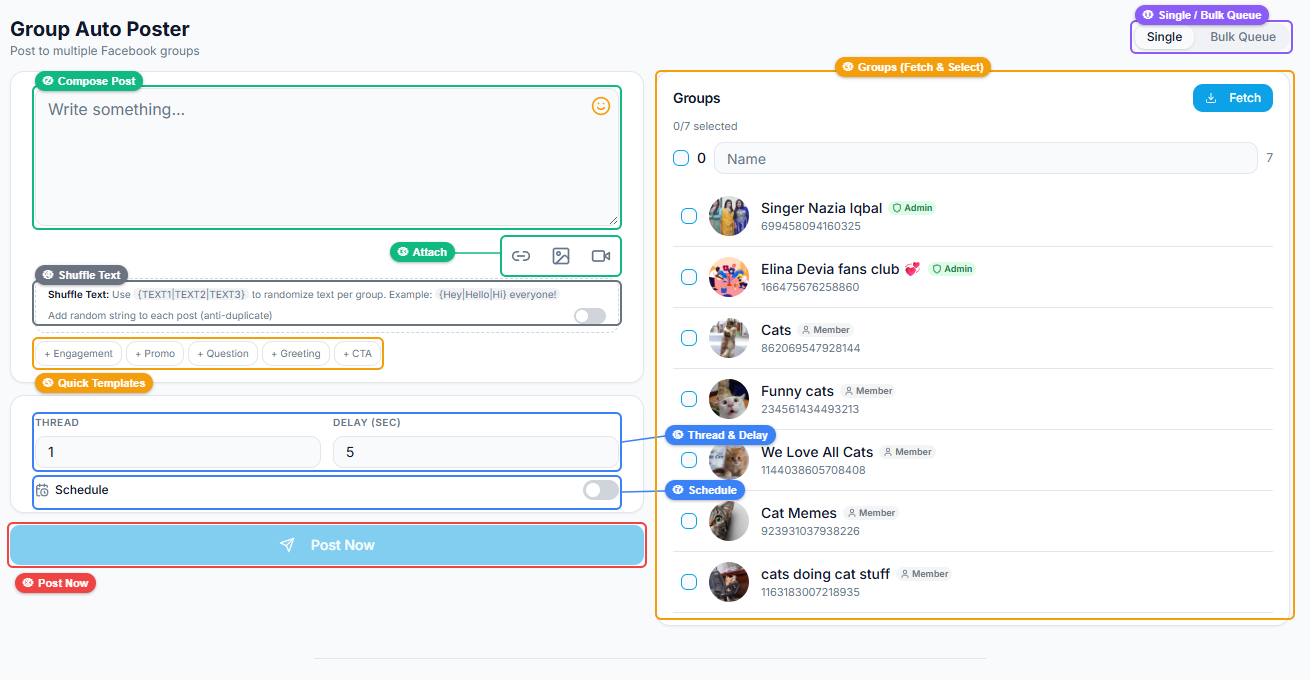
The interface has two panels: the left is your composer (media attachments, quick templates, a shuffle-text toggle for anti-duplicate protection, thread and delay controls, and scheduling); the right lists your groups with checkboxes and a Fetch button to load them.
🚀 Group Auto Poster
Post to 200 groups on autopilot
Try it Free Now →Native Facebook vs Group Auto Poster#
| Posting by hand | Group Auto Poster | |
|---|---|---|
| Post to 30 groups | 30 manual trips | One operation |
| Pacing between posts | You watch the clock | Automatic delays |
| Content variation (anti-duplicate) | Rewrite each time | Shuffle toggle |
| Scheduling | Not really | Yes |
| Posts as you, your memberships | Yes | Yes |
| Looks natural to Facebook | Depends on you | Built-in pacing |
For two or three groups, manual is fine. Past that, the manual route is where consistency dies — and consistency is what actually grows group reach.
The #1 Rule: Pace It, or Facebook Will Flag You#
This is the part most people get wrong, so it's worth being blunt. Facebook watches for the fingerprint of spam: identical content blasted to many groups in seconds. Do that and you earn a temporary posting block — momentum gone. Group Auto Poster gives you the controls to avoid it; use them:
- Delays between posts. Don't fire 50 groups in five minutes. Stagger across minutes/hours. The tool's delay speed controls exist precisely for this.
- Vary the content. Turn on the shuffle/anti-duplicate option. Identical text everywhere is the clearest spam signal there is; small variations read as human.
- Keep volume sane. 20–40 relevant groups posted to consistently beats blasting 200 once. Sustainable pacing compounds; reckless volume gets you blocked.
- Respect each group's rules. Post promotional content only where it's allowed; lead with value everywhere else. Admins remove and report rule-breakers.
Treat it as a diligent human working at scale — that's exactly what keeps it safe.
How Many Groups, and How Often?#
There's no official public number, and it varies with account age and history, but a safe, sustainable rhythm looks like:
- Newer accounts: start small — a handful of groups a day — and ramp gradually.
- Established accounts: a few dozen relevant groups a day, spread across the day, is reasonable.
- Always: lighter on some days to mimic natural patterns, and stop immediately if you ever hit a temporary block (wait it out; don't push).
Quality of group matters more than raw count. Ten active, on-topic groups will out-earn a hundred dead or irrelevant ones.
Scheduling Strategy by Group Type#
The scheduling feature isn't just for convenience — it's for relevance. Different groups peak at different times:
- Buy-and-sell / deal groups — often evenings and weekends.
- Professional / B2B groups — weekday mornings.
- Hobby / community groups — lunchtime and late evening.
Stagger your posts to hit each group near its active window, and you get two wins at once: better engagement and a natural-looking posting pattern instead of a 9:00 AM blast.
🚀 Ready to try Group Auto Poster?
Post to 200 groups on autopilot
Try it Free Now →What to Actually Post (So It Works, Not Just Sends)#
Reaching many groups only helps if the content earns engagement instead of removal. Bare promo links are the fastest route to being ignored and reported; value-first content spreads. Before you post:
- Lead with something genuinely useful — a tip, a result, a relatable story, a helpful answer — with any promotion woven in naturally.
- Model what already works. Use Group Viral Finder to see the formats already performing in your target groups, then post your own version.
- Rule of thumb: a post should be worth engaging with even if the reader never clicks your link.
Where It Fits: The Full Group-Growth Loop#
Auto-posting is the distribution stage of a five-step loop — and it only performs when the earlier stages are in place:
- Find relevant groups — Bulk Group Finder
- Join them at a safe pace — Auto Group Joiner
- Research what performs — Group Viral Finder
- Post consistently — Group Auto Poster
- Engage to keep momentum — Group Auto Commenter
Distribution without the right groups is noise; distribution of researched, valuable content across the right groups is a genuine free-reach channel — the same engine behind accounts that grow to 10,000 followers without ad spend. For the complete playbook, see best FewFeed alternative.
Measuring Results#
Track the things that actually indicate the channel is working:
- Reach/engagement per group — which groups pull, which don't (prune the dead ones).
- Click-through on your links (use the first-comment or tracked-link approach).
- Follower/customer growth attributable to group activity over weeks, not hours.
Drop groups that never engage, double down on the ones that do — the tool makes that iteration cheap.
Writing Group Posts That Get Approved and Engaged#
Auto-posting handles the delivery; the content still decides whether a post gets approved, engaged with, or removed. The posts that work across groups share a recognizable shape:
- Lead with value, not a link. Open with something genuinely useful or interesting — a tip, a result, a question. A bare promotional link is the fastest route to removal and the slowest to engagement.
- Match the group's proven format. Study what already wins in each group with Group Viral Finder and mirror the structure — question posts where the group discusses, story posts where it engages with narrative.
- Write one clear idea per post. Dense, multi-topic posts get scrolled past. A single point, cleanly made, travels further.
- Put any link in the first comment, not the body. Facebook tends to suppress posts with outbound links in the body; leading with native value and dropping the link below preserves reach.
- Open a loop. A first line that creates curiosity ("the mistake I made cost me three months") earns the read that a flat statement doesn't.
- Respect each group's promo rules. Where promotion isn't allowed, post pure value and let your profile do the selling — forcing a pitch where it's banned burns the group.
The through-line: auto-posting scales reach, but only genuinely useful, group-appropriate content converts that reach into engagement and results. Treat the tool as distribution for content worth distributing, not a megaphone for links.
Frequently Asked Questions#
How do I post to multiple Facebook groups at once?#
Compose the post once in Group Auto Poster, select the groups you're a member of, set a delay between posts, and publish. It posts to each group in sequence as you, paced to look natural.
Will auto-posting to groups get my account banned?#
Not if you pace it, vary the content, and keep volumes sane. Blocks come from spam patterns — identical text blasted to many groups in seconds. Use the delay and shuffle controls and post value-first content.
How many groups can I safely post to per day?#
There's no fixed public number; it varies by account. A sustainable approach is a handful/day for new accounts, up to a few dozen for established ones, spread across the day, with lighter days mixed in.
Does it use my account or fake accounts?#
Your own account and your existing memberships — no fake accounts, no API exploits, no shared credentials. You post as yourself to groups you've already joined.
Can I schedule group posts in advance?#
Yes. You can post immediately or schedule for later, which also naturally paces the posts and lets you hit each group's peak activity window.
How do I avoid the "duplicate content" spam flag?#
Turn on the shuffle/anti-duplicate option so each post varies slightly, and don't post identical text everywhere. Varied, relevant content reads as human.
What should I post to Facebook groups?#
Value-first content that fits each group's topic — a tip, result, or helpful answer with promotion woven in, not a bare link. Study what already performs with Group Viral Finder first.
Can I post different content to different groups?#
Yes — vary the text per run or use the shuffle option, and tailor to each group's niche and rules. Relevance is what keeps admins and members from reporting you.
What happens if I hit a posting block?#
Stop and wait it out — temporary blocks clear on their own, usually within hours to a day. Pushing harder only extends them. Then resume at a gentler pace.
Do I need the FaceBot extension installed?#
Group Auto Poster runs on your logged-in session via FaceBot. See the getting-started guide to set up.
Conclusion#
Group Auto Poster turns the unsustainable chore of manual group posting into a real, repeatable distribution channel — but only when you pace it, vary it, and lead with value. Find the right groups, join them, learn what works, then post consistently and engage. Done with judgment, it's one of the most effective free growth channels on Facebook. Start by building your target list with Bulk Group Finder and Auto Group Joiner, then let Group Auto Poster handle distribution.