What Is Bulk Downloader? Download Multiple Videos at Once in 2026
Downloading videos one at a time is tolerable when you need three or four files. It becomes a serious problem when you need 50, 100, or 500. Content creators pulling reference material, marketers archiving competitor libraries, researchers preserving social media records before accounts go dark — they all share the same bottleneck: every platform forces you to click, wait, and repeat for each individual file. A bulk video downloader breaks that cycle. FaceBot's Bulk Downloader lets you paste a list of URLs or point to a profile, hashtag, or playlist and download the entire batch in a single session — multiple files in parallel, at original quality, across seven major platforms.
What Is Bulk Downloader?#
A Bulk Downloader is a tool that accepts multiple video URLs, profiles, hashtags, or playlists as input and retrieves every file in that collection without requiring you to act on each one individually. Instead of the standard one-URL-in, one-file-out workflow, a bulk downloader queues every item, manages parallel download threads, handles failures automatically, and delivers all files organized and ready when the session ends.
FaceBot's Bulk Downloader is browser-based — no desktop software to install, no browser extensions beyond what FaceBot already requires. It runs directly from the dashboard at fb0t.com/securebot.
The problems it solves are concrete:
- Download 10, 50, 100, or 500+ videos in a single session — paste a URL list or point to a source and let the queue handle the rest
- Supports multiple platforms: Facebook, Instagram, TikTok, YouTube, Twitter/X, Pinterest, Snapchat — one interface instead of a different tool for every platform
- Preserves original quality (HD/4K where available) — files are pulled at source resolution with no quality loss
- Parallel downloads — multiple files download simultaneously so batch time scales with connection speed, not session length
- Queue management — pause the batch, resume it later, or retry specific failed items without restarting the whole job
- No per-file limit on the free tier — the daily quota governs how many files you can download in a day, not how many can run in a single batch
🚀 Bulk Downloader
Paste 100 URLs and download them all at once
Try it Free Now — 24h Gold, 70+ Tools →Why Use a Bulk Downloader in 2026?#
The case for batch downloading is straightforward: social platforms are increasingly volatile. Content disappears without warning, accounts get suspended, and platform policies change overnight. The reasons people reach for a batch video downloader fall into six consistent categories.
-
Content archival — Backup entire accounts before platform changes or deletions. When a creator goes private, deletes their account, or a platform restricts access in a region, any content you did not save locally is gone. Bulk downloading builds a local archive that no platform decision can touch.
-
Marketing research — Download competitor content libraries for analysis. Studying what formats, lengths, and topics perform well in your niche is far easier when you can review 200 videos offline in your own player rather than scrubbing through a live feed one post at a time.
-
Content repurposing — Grab source material for compilations, reviews, and reaction content. Batch-downloading a hashtag or a creator's full archive gives you a complete working library without the manual overhead of hunting individual clips.
-
Event documentation — Download all videos from a hashtag, event page, or group before they age out of the algorithm and become hard to find. Conference sessions, live coverage, user-generated content from a product launch — all of it is retrievable in a single batch if you act while it is still indexed.
-
Migration — Move content between platforms or to local storage. Creators who want to cross-post their entire back-catalog to a new platform need the source files first. A bulk downloader turns what would be a week of manual work into an afternoon task.
-
Efficiency — 100 videos in 5 minutes vs. 100 individual downloads taking 2+ hours. The time math is not close. Even at a generous 60 seconds per manual download (click, wait for page to load, find the download option, save, rename), 100 files is nearly two hours of repetitive clicking. Parallel batch downloading collapses that to roughly five minutes.
For a deeper look at how individual platform downloaders work before you batch them, the complete guide to downloading social media content covers every platform and format in detail.
What Platforms Does Bulk Downloader Support?#
Platform support is where a mass video downloader either proves its value or reveals its limits. FaceBot's Bulk Downloader covers seven platforms across the content types each platform actually serves.
| Platform | Video | Image | Stories | Reels / Shorts | Profiles | Hashtags |
|---|---|---|---|---|---|---|
| Yes | Yes | Yes | Yes (Reels) | Yes | No | |
| Yes | Yes | Yes | Yes (Reels) | Yes | Yes | |
| TikTok | Yes | N/A | N/A | N/A | Yes | Yes |
| YouTube | Yes | N/A | N/A | Yes (Shorts) | Yes (channel) | No |
| Twitter/X | Yes | Yes | N/A | N/A | Yes | Yes |
| Yes | Yes | N/A | Yes (Idea Pins) | Yes (boards) | No | |
| Snapchat | Yes | Yes | Yes | Yes (Spotlight) | No | No |
A few practical notes on the table above:
Facebook supports profile-level batch downloads for public pages and groups but does not index content by hashtag the way Instagram and TikTok do. The practical input method is a profile URL or a manual list of post URLs.
Instagram offers the broadest combination of input methods — profile URLs, hashtags, individual post URLs, and Reel URLs all work. For a focused deep-dive on single-file Instagram downloads, see the Instagram Downloader guide.
TikTok batch downloads work best by profile URL or hashtag. The TikTok Downloader guide explains watermark-free downloading in more detail, and bulk downloading an entire TikTok profile covers the profile-level batch workflow specifically.
YouTube channel downloads retrieve all public uploads from a given channel URL. The YouTube Downloader covers format and quality options for individual videos.
Pinterest board-level batch downloads work by pasting the board URL — every Pin on that board is queued automatically. The Pinterest Downloader guide covers the single-Pin workflow in depth.
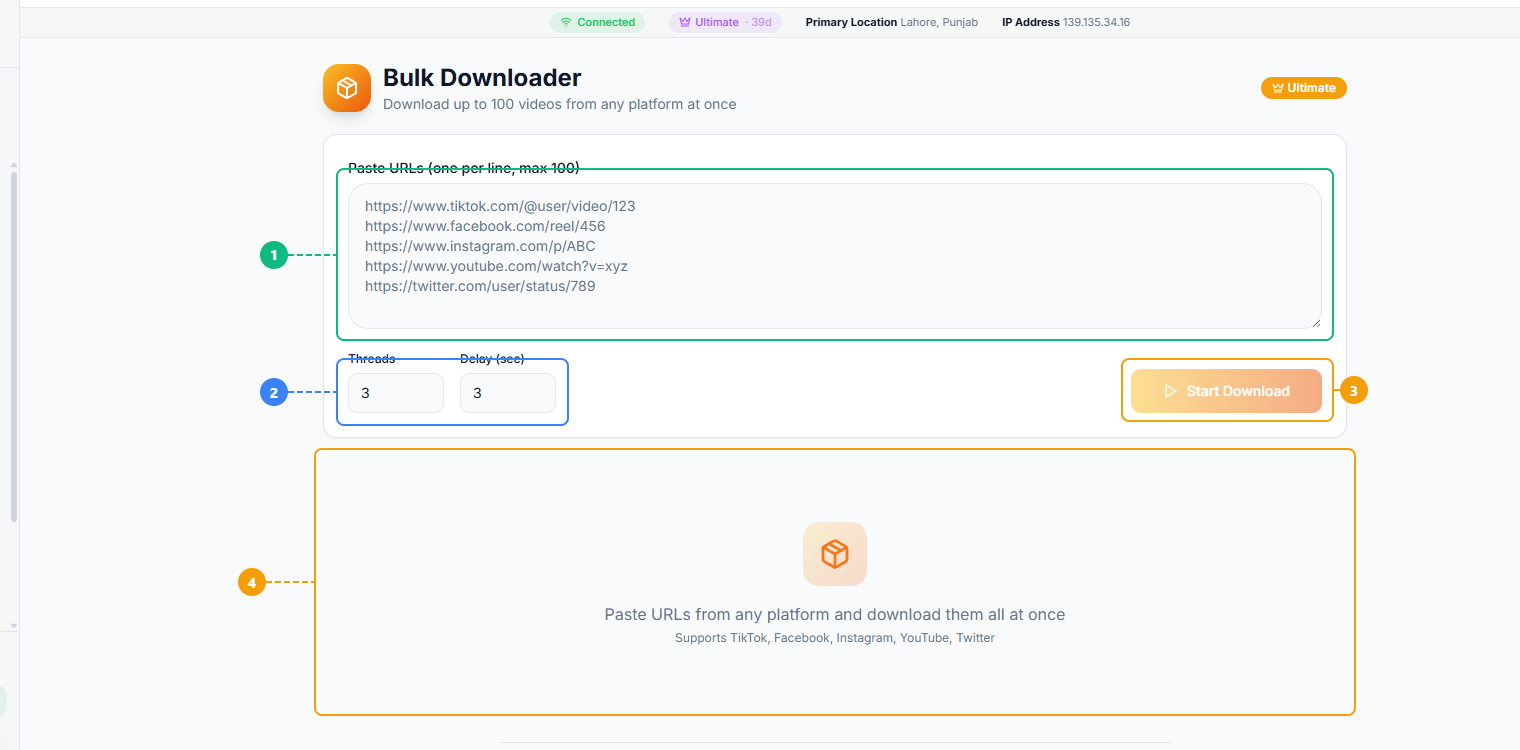
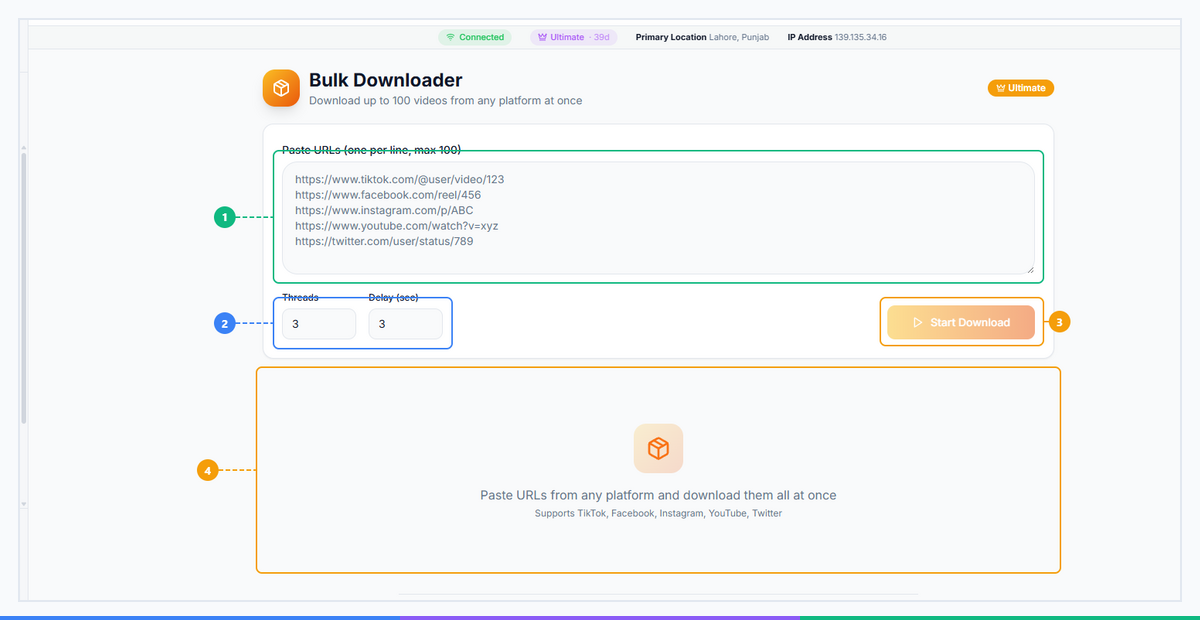
The Bulk Downloader provides a streamlined batch interface. Paste multiple video URLs into the input area — one per line (1), configure platform-specific settings and quality preferences (2), click the Download button to start the batch queue (3), and monitor download progress with per-file status in the results area (4).
How Bulk Downloader Works#
The process from input to downloaded files follows five steps. Each step is designed to minimize the decisions you need to make while giving you full control over the ones that matter.
Step 1: Choose Your Source#
Open the Bulk Downloader in the FaceBot dashboard. Select the platform you want to pull from and choose your input method: profile URL, hashtag, playlist or channel URL, or a manual list of individual post URLs.
The input method determines what the tool queues. A profile URL queues all public videos from that account. A hashtag queues the most recent posts under that tag up to your configured limit. A manual URL list queues exactly the posts you specify, in the order you provide them.
Step 2: Paste URLs or Select Content#
For manual lists, paste your URLs one per line into the input field. For profile, hashtag, and playlist inputs, enter the source URL and set the item limit — for example, "download the 200 most recent videos from this profile" or "download all videos under this hashtag up to 500 items."
The tool scans the source, identifies all downloadable items, and builds the queue. You can review the queue before starting and remove any items you do not want.
Step 3: Configure Download Settings#
Set your preferences for the entire batch:
- Quality — SD (480p), HD (720p/1080p), or 4K where the source supports it
- Format — MP4 for video (WebM available for some platforms), JPEG/PNG for images
- Naming convention — original filename, creator username + date, sequential numbering, or custom pattern
- Download folder — your browser's default download location or a specified subfolder
Step 4: Start the Batch Download#
Click start. The queue begins processing immediately, running multiple parallel download threads. The progress panel shows each item's status in real time: queued, downloading, complete, or failed. Failed items auto-retry up to three times before being flagged for manual review — you do not need to monitor the session actively.
For large batches (200+ items), the queue runs in the background. You can navigate to other FaceBot tools or leave the tab open while the batch completes.
Step 5: Review and Organize#
When the batch finishes, the session summary shows total files downloaded, any items that failed with the reason (private post, content removed, platform error), and the total data size. All files are saved with original metadata embedded — title, upload date, creator username, and source URL — making them searchable and sortable immediately without manual tagging.
Bulk Downloader vs. One-at-a-Time Downloading#
The efficiency gap between downloading videos in bulk and the manual one-at-a-time approach grows sharply as file counts increase.
| Feature | Bulk Downloader | Individual Downloads |
|---|---|---|
| Time for 100 videos | ~5 minutes | ~2+ hours |
| Quality consistency | Uniform HD across all files | Varies by tool and method used |
| Queue management | Pause, resume, retry failed items | Start over on failure |
| Metadata preserved | Yes — title, date, creator, source URL | Depends on which tool you use |
| Multi-platform | Single interface for all platforms | Different tool required per platform |
| Naming convention | Auto-organized by configurable pattern | Manual rename required for each file |
| Cost | Free tier available (daily quota applies) | Free but time-expensive at scale |
The time comparison deserves emphasis. At one minute per video — a realistic estimate for clicking through to a post, finding the download option, waiting for the file to process, and saving it — 100 videos is 100 minutes of focused, repetitive manual work. A batch downloader running 10 parallel threads on a standard broadband connection processes the same 100 videos in approximately five minutes of zero effort.
At 500 videos, the gap is 8+ hours of manual work versus roughly 25 minutes of automated batch downloading.
🚀 Ready to try Bulk Downloader?
Paste 100 URLs and download them all at once
Try it Free Now — 24h Gold, 70+ Tools →Who Should Use Bulk Downloader?#
A video batch download tool serves a specific set of use cases, and the people who benefit most fall into four clear categories.
Social media managers — Download competitor content libraries for analysis and reporting. Reviewing what formats, topics, and posting cadences perform well for competitors is a standard part of strategy development, and doing that research offline is dramatically faster than scrolling a live feed.
Content creators — Grab reference material and inspiration in batches. Whether you are building a compilation, analyzing a trend, or sourcing B-roll references for an upcoming project, downloading a relevant hashtag or creator's archive in one session saves hours compared to bookmarking and returning to individual posts.
Archivists and researchers — Preserve social media content before deletion. Academic researchers, journalists, and digital archivists routinely need to capture public social media content as evidence or source material. Bulk downloading provides a systematic way to capture entire conversations, event threads, or account histories.
Marketing agencies — Build content libraries across client accounts. Agency teams managing multiple clients often need to compile content audits, pull asset libraries for repurposing, or document campaign performance with actual downloaded files. A batch downloader eliminates the per-file overhead that makes this work prohibitively slow at scale.
How to Get Started with Bulk Downloader#
Getting started takes less than two minutes. Open FaceBot, navigate to the Bulk Downloader tool, choose your platform and input method, paste your URLs or source, configure quality settings, and start the batch. Free-tier accounts have access to the full feature set within their daily download quota — no credit card required to test the tool with a small batch.
Frequently Asked Questions#
Q: How many videos can I download at once?#
There is no hard per-session limit on the number of files you can queue. The practical constraint is your daily download quota, which varies by plan tier. Free accounts can download a substantial number of videos per day — enough for most research and archival tasks. Paid plans unlock higher daily limits for heavy workloads like full-channel archives or large hashtag collections.
Q: Does Bulk Downloader work with private accounts?#
No. Bulk Downloader only retrieves content from public accounts and public posts. Private accounts, protected tweets, and restricted content require authentication to access — which is not supported for privacy and platform compliance reasons. If you want to download your own private content, you need to be logged into the relevant platform through the normal FaceBot connection flow.
Q: What video quality does Bulk Downloader preserve?#
Bulk Downloader fetches files at the highest quality available from the source platform — typically up to 1080p HD on Facebook, Instagram, Twitter/X, and TikTok, and up to 4K on YouTube where the original upload was 4K. The quality selector lets you cap downloads at a lower resolution if you are managing storage or bandwidth. All files in a batch use the same quality setting for consistency.
Q: Is bulk downloading videos legal?#
Downloading publicly available content for personal use, research, archival, and non-commercial purposes is generally permitted under fair use principles in most jurisdictions. Downloading content and redistributing it commercially, removing watermarks and re-uploading under your own brand, or harvesting content to train AI models without rights-holder consent raises legal and platform ToS issues. This tool is designed for legitimate use cases — archival, research, reference material, and content management — and users are responsible for ensuring their use complies with applicable laws and platform terms.
Q: Can I download an entire YouTube channel or TikTok profile?#
Yes. For YouTube, paste the channel URL and set an item limit — the tool queues every public upload on that channel up to the limit you specify. For TikTok, paste the profile URL and the tool retrieves that creator's public video library. Both work through the same profile-URL input method. For TikTok specifically, the bulk downloading an entire TikTok profile guide covers this workflow with step-by-step detail.
Q: Does Bulk Downloader save video metadata?#
Yes. Every downloaded file includes embedded metadata: the original title, upload date, creator username, source URL, and platform. This metadata is stored in the file itself (where the format supports it, as in MP4 containers) and also written to a companion CSV file for the session — so you can cross-reference every file in your batch against the original source without relying on the filename alone.#
Conclusion#
A bulk video downloader is the practical answer to the gap between how content creation, research, and archival actually work and what social platforms natively provide. Downloading 100 videos manually takes over two hours and produces inconsistently named, inconsistently formatted files. FaceBot's Bulk Downloader processes the same job in roughly five minutes — with parallel threads, automatic retries, preserved metadata, and consistent HD quality across every file in the batch. Whether you are archiving an account before it disappears, building a competitor analysis library, or pulling a full channel for a client content audit, the batch approach is not a convenience — it is the only workable method at scale. Start your first batch download today and see what five minutes of automation replaces.
Related reading:
- Complete Guide to Downloading Social Media Content
- Bulk Downloading an Entire TikTok Profile
- What Is Instagram Downloader?
For the full walkthrough, see how to download Twitter/X videos in HD.