What Is Instagram Downloader? Save Reels, Stories & Photos in 2026
Instagram has grown into one of the most content-rich platforms on the planet, with over 2 billion monthly active users sharing Reels, Stories, Posts, Carousels, IGTV videos, and profile pictures every single day. The sheer volume and variety of content is staggering — and yet Instagram still offers no native download button for content that isn't your own. Even when you want to save your own uploads, Instagram quietly compresses them, meaning you never get back the crisp original file you shot on your phone. That is exactly the problem an instagram video downloader solves. With the right tool, you can save any public Instagram content — Reels, Stories, photos, entire carousels — at the original uploaded quality, directly to your device, in seconds.
What Is Instagram Downloader?#
An Instagram Downloader is a browser-based tool that lets you extract and save content from Instagram without installing any app and without logging into an Instagram account. You paste a link, the tool fetches the media, and you download it directly to your device.
Modern Instagram downloaders support the full spectrum of content types the platform serves:
- Reels — short-form video up to 90 seconds (and growing)
- Stories — ephemeral 15-second photo or video clips
- Single Posts — individual photos or videos on a grid profile
- Carousel Posts — multi-slide albums (up to 10 images or videos per post)
- Profile Pictures — full-size versions of profile photos that Instagram normally crops and blurs
- IGTV / Long-form Videos — longer video uploads treated the same way as Reels in the downloader pipeline
The key differentiator from Instagram's own "Save" bookmark feature is that a downloader actually stores the file on your device at its original resolution — it does not just add a post to a private collection inside the app that vanishes when the original poster deletes it.
🚀 Instagram Downloader
Save Reels, Stories and photos in full quality
Try it Free Now →Why Download Instagram Content in 2026?#
The reasons people need an instagram video downloader have multiplied alongside Instagram's own growth. Here are the six most common use cases:
-
Content repurposing across platforms. Social media managers routinely repurpose Instagram Reels to TikTok, YouTube Shorts, Facebook Reels, and Pinterest. To do that cleanly, you need the original file — not a screen recording with degraded quality.
-
Influencer research and inspiration. Creators and brand marketers save top-performing competitor Reels to study hook structures, editing styles, caption patterns, and audio choices. This is legitimate competitive intelligence, not piracy.
-
Saving Stories before they expire. Instagram Stories disappear after 24 hours. If a brand collaborator tags you in a Story, or a customer posts an organic review, you have a narrow window to capture it. Downloading before expiry is the only way to keep that asset.
-
Archiving your own posts in original quality. When you upload a video to Instagram, the platform re-encodes it at a lower bitrate. Downloading your own posts via an instagram video downloader often gives you a cleaner file than what Instagram's "Download" option in your own archive provides.
-
Mood boards and inspiration collections. Designers, photographers, and interior decorators collect visual references. Saving directly to device beats screenshotting (which cuts off edges and loses resolution) every time.
-
Competitor analysis for marketers. Digital marketing teams track seasonal campaigns, offer announcements, and creative formats from competitors. A local file is easier to share in a Slack channel or Notion board than a link that may go dead.
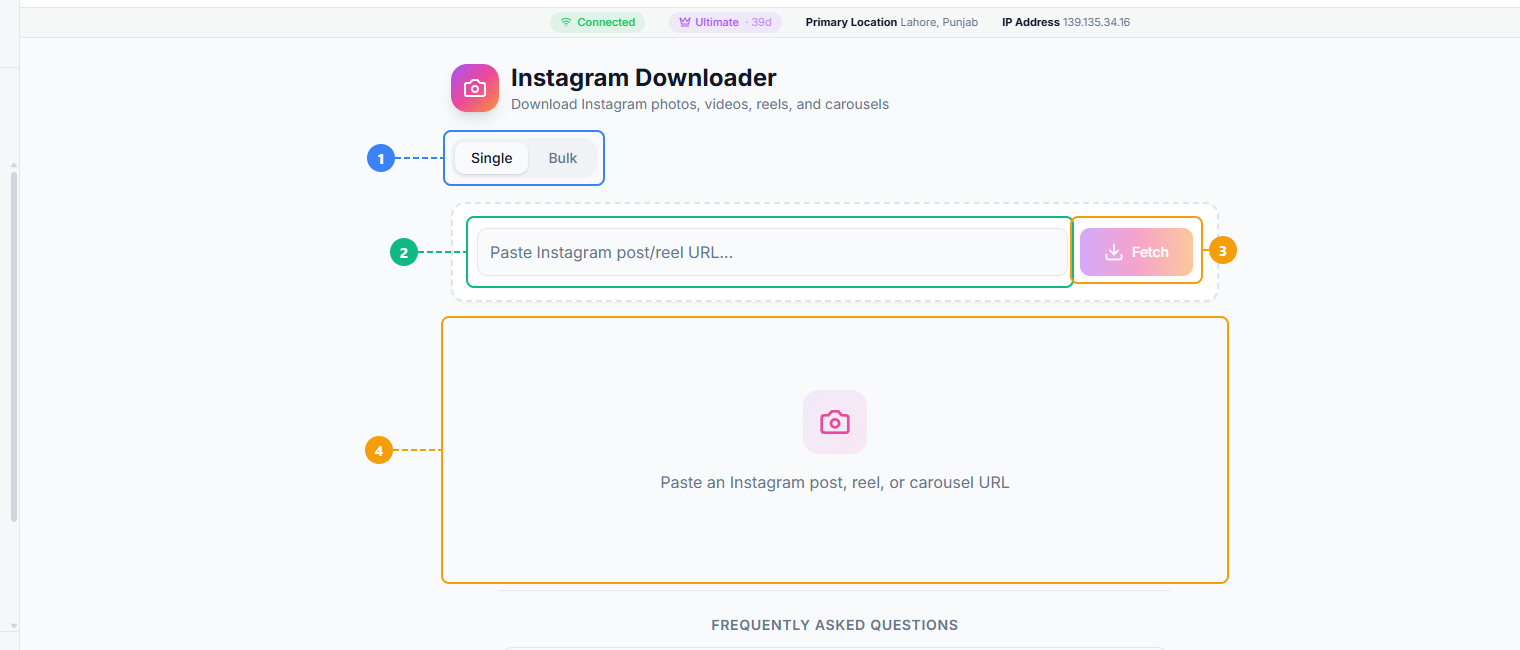
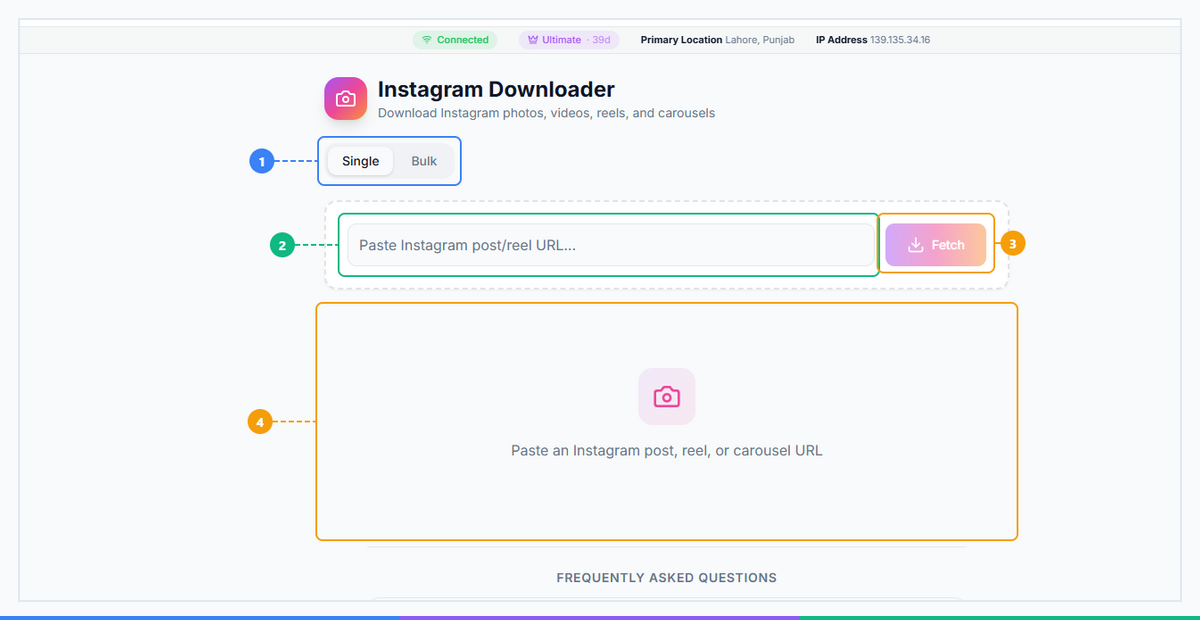
The Instagram Downloader provides a straightforward interface. Switch between Single and Bulk download modes (1), paste an Instagram post, Reel, or Story URL (2), click Fetch to retrieve the content (3), and view the download results with media preview and quality options (4).
How Instagram Downloader Works (3 Steps)#
Using an instagram video downloader takes under a minute from start to finish.
Step 1: Copy the Instagram URL
Open Instagram on your phone or browser. Navigate to the Reel, post, or carousel you want to save. Tap the three-dot menu (or the paper-plane Share icon) and select Copy Link. On desktop, you can simply copy the URL from the browser address bar. The link will look something like https://www.instagram.com/reel/AbC123xyz/ or https://www.instagram.com/p/AbC123xyz/.
Step 2: Paste into Instagram Downloader and click Process
Go to the FaceBot Instagram Downloader tool. Paste the copied URL into the input field and click the Process or Fetch button. The tool will retrieve the media metadata and generate a preview within a few seconds. No account login is required on your end.
Step 3: Preview and Download
A thumbnail preview of the content appears along with the available quality options. Select your preferred resolution and click Download. The file saves directly to your device's default downloads folder — or to your camera roll on mobile.
Note on Stories: Instagram Story URLs behave differently from post and Reel URLs. For the best results with Stories, use the dedicated Instagram Story Downloader, which is purpose-built for ephemeral content.
Ready to save your first Instagram Reel? Try FaceBot Instagram Downloader — free, no login, works on any device. Paste your link and download in seconds.
What Content Can You Download?#
Here is a clear breakdown of every Instagram content type and how the downloader handles each one:
| Content Type | Supported? | Quality | Notes |
|---|---|---|---|
| Reels | Yes | Up to 1080p | Most popular download type; audio included |
| Stories | Via Story Downloader | Original resolution | 24h expiry — download before they vanish |
| Single Posts (photo) | Yes | Original resolution | No compression, full pixel count |
| Single Posts (video) | Yes | Up to 1080p | Includes original audio |
| Carousel Posts | Yes, all slides | Original per slide | Every image and video downloaded in one go |
| Profile Pictures | Via DP Downloader | Full size | Reveals the hidden full-resolution photo Instagram crops |
| IGTV / Long Videos | Yes | Up to 1080p | Processed identically to Reels |
The carousel support deserves a special mention. Most competitor tools either download only the first slide or require you to paste each slide's individual URL separately. FaceBot's Instagram Downloader detects carousel posts automatically and packages all slides into a single download session, saving you the manual loop of repeating the process for each image.
For profile pictures, Instagram intentionally displays a small, blurred version of the DP to protect user privacy. The Instagram DP Downloader handles this specific use case with a dedicated flow built for retrieving full-size profile photos.
Who Should Use Instagram Downloader?#
This tool has genuine utility across several professional and personal contexts:
Social Media Managers. When a client's customer posts user-generated content (UGC) tagging the brand, that video becomes marketing gold — but it lives on someone else's account. Downloading it with permission allows the brand to repurpose authentic testimonials across their own channels. Managers also save competitor posts for weekly reporting decks.
Content Creators. Creators frequently need their own Reels back in original quality to re-edit, repost on other platforms, or include in a portfolio pitch. Instagram's in-app archive compresses files. A downloader bypasses that compression and retrieves what was originally uploaded.
E-Commerce Brands. A customer who posts an unboxing video or a flat-lay of your product has created free advertising. Brands save those posts, get permission from the creator, and use them in paid ads — a workflow that starts with an Instagram video downloader.
Digital Marketers. Trend tracking and competitive analysis require building a local library of what is performing in your niche. Saving Reels from top accounts and archiving seasonal campaign visuals from competitors helps teams build documented research files rather than relying on browser bookmarks that break.
🚀 Ready to try Instagram Downloader?
Save Reels, Stories and photos in full quality
Try it Free Now →Instagram Downloader vs. Alternatives#
Not all methods of saving Instagram content are equal. Here is an honest comparison:
| Method | Works on Reels? | Carousel? | Quality | Ads/Malware Risk? | Free? |
|---|---|---|---|---|---|
| Instagram's "Save" button | Bookmarks only, no file | N/A | N/A | No | Yes |
| Screenshots | No (video only captures frame) | Manual per slide | Low | No | Yes |
| Screen recording | Yes, but lossy | Cumbersome | Low | No | Yes |
| Third-party apps | Sometimes | Rarely | Varies | Often yes | Freemium |
| Browser extensions | Sometimes | Sometimes | Medium | Security risk | Free |
| FaceBot Instagram Downloader | Yes | Yes, all slides | Original HD | None | Yes |
The browser extension category is worth a specific callout. While extensions exist that claim to download Instagram content, they require broad browser permissions, they frequently get removed from the Chrome Web Store for ToS violations, and some have been found injecting tracking scripts. A browser-based web tool like FaceBot's downloader requires zero permissions — you visit the page, paste a link, download the file.
Pro Tips for Instagram Downloads#
Getting the most out of an instagram video downloader comes down to knowing a few workflow shortcuts:
-
Carousels download all slides automatically. You do not need to switch to "image mode" or paste each URL individually. Paste the carousel post link once and all slides are fetched together.
-
For private accounts you follow, copy the URL while logged into Instagram. The downloader processes the link you provide. If you are logged into Instagram in your browser and copy the URL from there, it may resolve private content you have legitimate access to. Public content works without any login.
-
Use Instagram Story Downloader for ephemeral Stories. Stories have a different URL structure and a 24-hour expiry window. The dedicated Story tool is optimized for this content type and handles the URL parsing correctly.
-
The Instagram DP Downloader reveals full-size profile pictures. Instagram blurs and crops profile photos in the UI. If you need the full-resolution image — for research, outreach personalization, or archiving a collaborator's media kit — the dedicated DP tool is built for exactly this.
-
For saving an entire profile's post history, use the Bulk Instagram Downloader. The single-post downloader is perfect for individual pieces of content. If you need to archive dozens or hundreds of posts from one account, the Bulk Downloader handles batch processing without requiring you to paste each URL one by one.
Download Instagram content in HD — free, no account needed. Open FaceBot Instagram Downloader now and save your first Reel, carousel, or photo in under 60 seconds.
How to Get Started#
Getting started with FaceBot's Instagram Downloader takes no setup and no account. Open the tool, paste any public Instagram post, Reel, or video URL into the input field, and click Process. Within seconds you will have a preview and a direct download link. The tool is free, works on iPhone, Android, Windows, and Mac, and does not require you to install anything or log into Instagram.
Try Instagram Downloader Free →
Frequently Asked Questions#
1. Is Instagram Downloader free?#
Yes, FaceBot's Instagram Downloader is completely free to use. There are no paywalls, no credit systems, and no subscription required for standard downloads. You can download Reels, photos, and carousel posts without creating an account. Premium features on the broader FaceBot platform offer additional capabilities, but the Instagram downloader itself operates as a free tool with no usage caps for typical personal and professional use.
2. Can I download Instagram Reels without a watermark?#
Yes. FaceBot's instagram video downloader retrieves the original media file — the clean version Instagram stores before any processing — which means you get the file exactly as it was uploaded. No watermark is added by the downloader, and Instagram itself does not watermark Reels. The only watermarks that appear are ones the original creator baked into the video before uploading.
3. Can I download from private Instagram accounts?#
The downloader works on publicly accessible content. For private accounts, Instagram restricts access to approved followers only. If you follow a private account and copy the post URL while logged into Instagram in your browser, some tools can process that URL using your session context — but results vary. As a practical rule, assume the tool works reliably on public accounts and treat private account downloads as a best-effort feature that depends on your login state.
4. Does it work on iPhone and Android?#
Yes, the tool is fully browser-based and works on any modern mobile browser including Safari on iPhone and Chrome on Android. No app installation is required. After downloading, the file saves to your Photos app on iPhone or your Downloads folder on Android, depending on your browser's default save location. For iPhone users, you may need to tap and hold the download link and choose "Download Linked File" in Safari if the file opens in the browser instead of saving automatically.
5. Can I download Instagram carousel posts with all images?#
Yes, and this is one of the tool's strongest features. When you paste a carousel post URL, the downloader automatically detects that it is a multi-slide post and fetches every image and video in the carousel — not just the first slide. You do not need to navigate to each slide and paste its individual URL. All slides are presented in the preview and available for download in a single session, saving significant time compared to manual methods.
6. Is it legal to download Instagram content?#
Downloading Instagram content exists in a nuanced legal space. Instagram's Terms of Service restrict automated scraping for commercial redistribution, but downloading individual posts for personal use, research, archival, or internal analysis is widely practiced and generally not pursued by platforms. The key legal considerations are copyright (the content belongs to the creator, not Instagram) and how you use the downloaded file. Saving a Reel to study editing techniques or archive a customer testimonial with the creator's permission is a fundamentally different act than downloading someone's content to republish it commercially without credit. Always respect creators' rights and obtain permission before repurposing someone else's content publicly.
Conclusion#
Instagram is home to billions of pieces of content, and the platform's lack of a native download button for other people's posts has created a clear need for a reliable instagram video downloader. Whether you are a marketer saving competitor Reels for analysis, a creator archiving your own content in original quality, or a brand capturing customer UGC before it disappears, a dedicated downloader gives you instant access to HD files across every content type Instagram serves.
For a broader look at saving content across all social platforms, check out our complete guide to downloading social media content. And if you want to compare your options in depth, the best Instagram downloaders comparison puts the top tools side by side so you can choose the one that fits your workflow. Also saving content on other platforms? See our guide on how to download Instagram Reels in HD and our TikTok Downloader overview for cross-platform workflows.