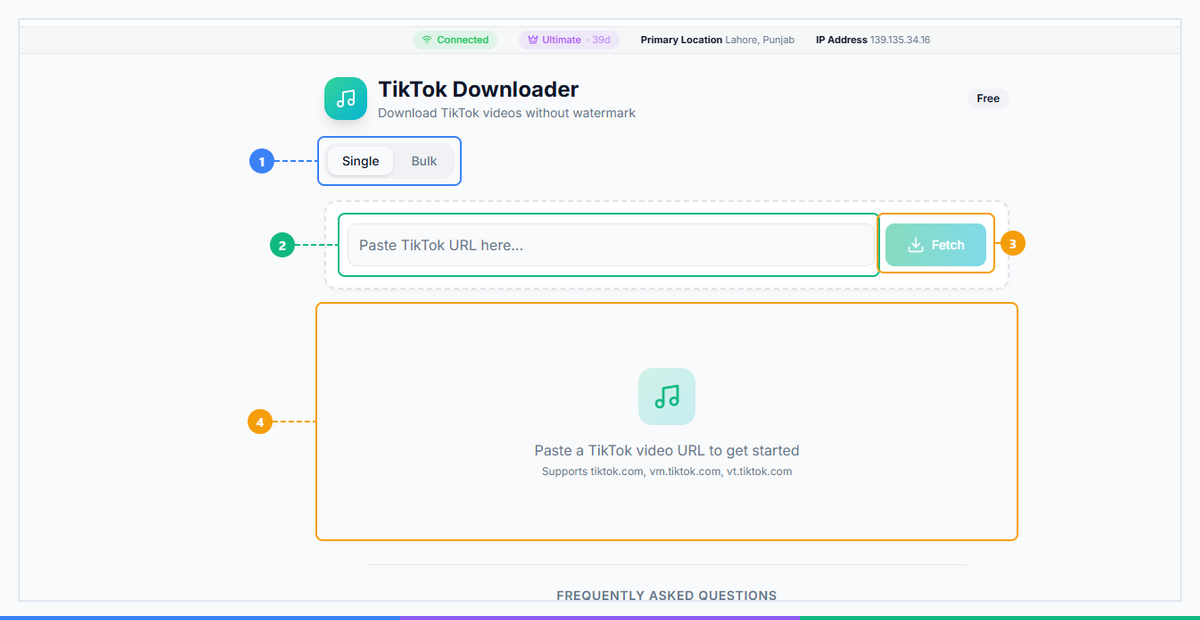
What Is TikTok Downloader? Save Videos Without Watermark in 2026
TikTok is the most-downloaded app on the planet, with over 1.5 billion monthly active users generating hundreds of millions of videos every single day. Videos go viral in hours — tutorials, dances, recipes, comedy skits — and yet TikTok makes it deliberately difficult to save those videos cleanly. Their built-in save feature stamps a watermark across every downloaded clip, making it useless for professional repurposing. Whether you're a content creator archiving your own work, a marketer building a swipe file, or someone who just wants to save a funny video offline — you need a TikTok downloader no watermark solution. That's exactly what we'll break down here — or jump straight to our step-by-step guide on how to download TikTok videos without watermark.
What Is TikTok Downloader?#
A TikTok Downloader is a browser-based tool that lets you save TikTok videos directly to your device in HD quality — without the TikTok watermark burned across the footage. It's fundamentally different from TikTok's own "Save Video" option, which compresses the file, reduces resolution, and overlays the platform's logo so prominently that the footage is barely usable anywhere else.
Here's what sets a proper TikTok downloader apart:
No app install required. The entire process runs inside your browser. There's nothing to download, no permissions to grant, and no storage eaten up by yet another app.
No account required. You don't need to log into TikTok, create a FaceBot account for basic use, or hand over any personal information. Paste a link, get a file.
Works on every device. iPhone, Android, Windows, Mac, Linux — if your device has a browser, TikTok Downloader works on it. The experience adapts to your screen automatically.
Your data stays private. Unlike shady "free downloader" sites that route your request through overseas ad servers, FaceBot's tool processes requests efficiently without exposing your data to unnecessary third parties.
Broad format support. Regular TikTok videos, slideshows (photo carousels), and audio-linked clips are all supported. The tool detects the content type automatically and serves the appropriate file.
The result is the full-resolution, clean video the creator actually uploaded — no watermark, no quality loss.
🚀 TikTok Downloader
Save any TikTok in HD without the watermark
Try it Free Now →Why Download TikTok Videos Without Watermark?#
The demand for a clean tiktok downloader no watermark tool isn't casual — there are real professional and practical reasons millions of people search for this every month. Here are the five most common scenarios:
1. Content Repurposing Across Platforms#
Social media managers and creators routinely repurpose trending TikTok content for Instagram Reels, YouTube Shorts, and Facebook. A watermarked TikTok video looks unprofessional on another platform — and Instagram's algorithm is known to suppress cross-posted content that carries a competitor's watermark. Clean downloads solve both problems simultaneously.
2. Professional Presentations and Marketing Materials#
Viral TikTok videos regularly capture cultural moments, product reactions, or industry commentary that's genuinely useful in marketing decks, agency pitches, or client reports. A "TikTok" watermark splashed across your slide deck looks unprofessional. Downloading the clean version and citing the source properly is the standard practice.
3. Archiving Before Content Disappears#
TikTok accounts get banned, suspended, or simply deleted at a rate that would surprise most people. Creators pivot, businesses close, controversial content gets taken down. If you're tracking a competitor's content strategy, building a trend database, or just want to keep a creator's work before it vanishes — saving TikTok without watermark lets you archive a clean, usable copy.
4. Compilation and Reaction Content#
"Best of" compilations and reaction videos are a proven content format on YouTube and Facebook. Building a compelling compilation from watermarked clips creates a visual mess — every different creator's logo stacked up makes the video unwatchable. Clean downloads let you edit compilations properly and apply consistent branding.
5. Offline Viewing#
Not everything has to be strategic. Sometimes you want to download TikTok videos for a long flight, a commute through a dead zone, or to show something to a friend without burning data. Offline access is a perfectly valid use case, and having a high-quality file on your device beats relying on a spotty connection.
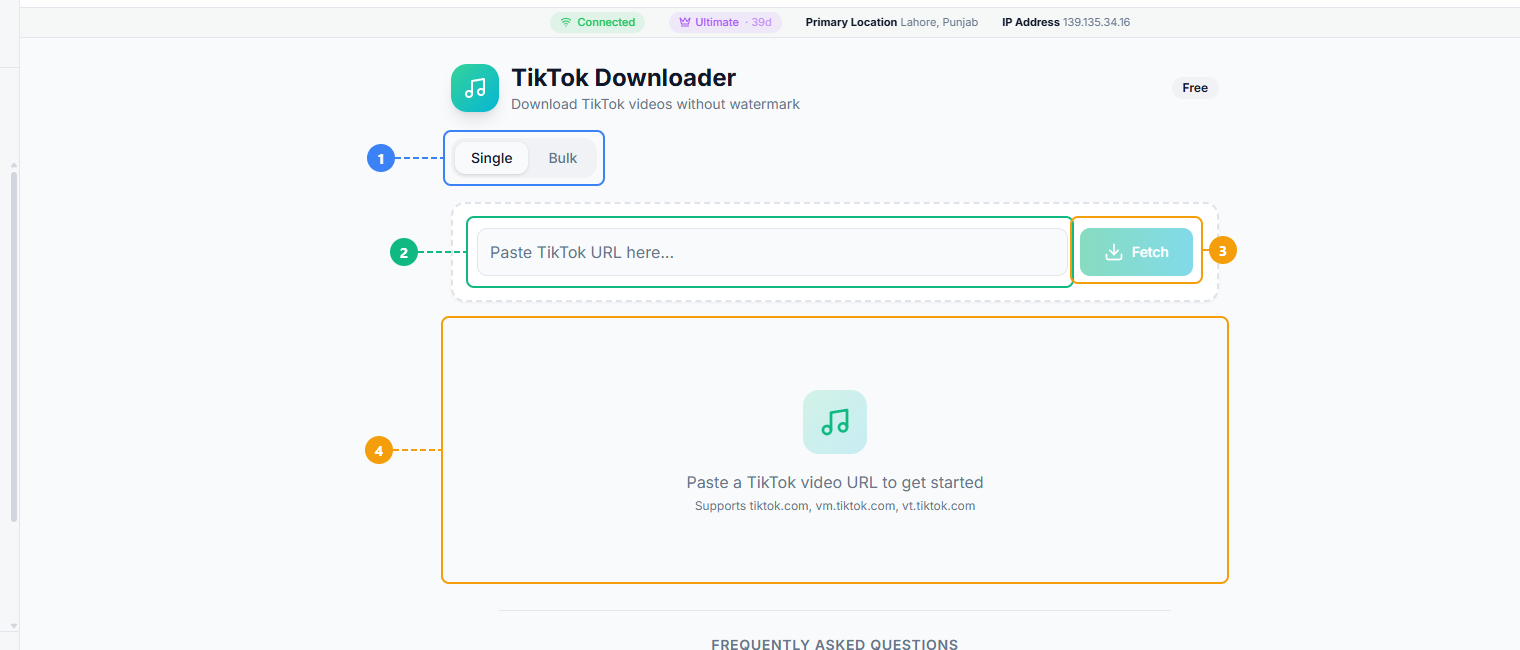
The TikTok Downloader provides a clean two-step interface. Switch between Single and Bulk download modes (1), paste a TikTok video URL into the input field (2), click Fetch to retrieve the video (3), and view the download results with video preview and watermark-free download options (4).
How TikTok Downloader Works in 2026#
The process takes under 30 seconds. Here's the exact sequence:
Step 1: Copy the TikTok Video Link#
Open TikTok — either the mobile app or the web version at tiktok.com. Find the video you want to save.
- On mobile (iOS/Android): Tap the Share arrow (usually on the right side of the video or below the caption). In the share sheet that appears, tap "Copy Link." The URL is now in your clipboard.
- On desktop (browser): Right-click the browser address bar on the TikTok video page and copy the URL directly. Alternatively, click the Share icon on the video and copy the link from there.
The link will look something like: https://www.tiktok.com/@username/video/7123456789012345678
Step 2: Paste the Link into TikTok Downloader#
Navigate to FaceBot and open the TikTok Downloader tool under the Downloaders category. You'll see a clean input field front and center. Paste your copied TikTok URL into it and click "Download" (or press Enter).
The tool will fetch the video metadata, detect available quality options, and display the results within a few seconds. No redirects, no captcha walls, no "click 5 ads to continue."
Step 3: Choose Quality and Save#
Select your preferred quality — HD 1080p is recommended in almost every case, as it preserves the original resolution the creator uploaded in. Click the Download button next to your chosen quality. The file saves directly to your device:
- iPhone: Saves to Files app or Camera Roll depending on your browser settings
- Android: Saves to your Downloads folder
- PC/Mac: Saves to your Downloads folder like any other file
The downloaded file has no watermark, no TikTok logo, and no quality loss from screen recording.
Try TikTok Downloader free — no signup needed → FaceBot TikTok Downloader
Who Should Use TikTok Downloader?#
Three core user types get the most value from this tool:
Social Media Managers#
If you manage multiple client accounts across Instagram, Facebook, and YouTube, TikTok is your content goldmine. Trending formats on TikTok routinely migrate to other platforms 2–4 weeks later. By identifying and downloading TikTok videos of formats that are gaining traction, you can adapt them for your clients before the format saturates. The watermark-free download means your client's branding can go front and center — not TikTok's.
Volume matters here too. When you're managing 8 client accounts and need 30 pieces of content per client per month, manual screen recording is a time sink. A fast, reliable downloader with bulk capabilities (see the Bulk Downloader for saving entire profile archives) is a professional necessity.
Content Creators#
You made the video. You should have a clean copy of it. TikTok's own export quality is compressed, and their watermark makes it hard to repurpose your own content for your website, portfolio, or other platforms. Saving TikTok without watermark is especially useful when you want to submit your work to brand partnership portals or agency databases that require clean footage — not social-media-branded clips.
It's also a safeguard. TikTok accounts get restricted or banned for reasons that are sometimes opaque and hard to appeal. Having local backups of your own content means you never lose your library entirely.
Researchers and Marketers#
Trend analysis, competitor monitoring, ad creative swipe files — all of these require archiving content at scale. When you're tracking how a competitor's product launch is landing on TikTok, or building a database of high-performing ad formats, you need clean files you can timestamp, categorize, and reference later. A tiktok video saver tool that strips watermarks makes that database actually usable.
TikTok Downloader vs. Doing It Manually#
Not all download methods are created equal. Here's how the options compare honestly:
| Method | Watermark? | Quality | Speed | Bulk Support | Signup? |
|---|---|---|---|---|---|
| TikTok's "Save Video" | Yes — always | Compressed | Fast | No | Yes (TikTok account) |
| Screen recording | Partial overlay | Low (lossy) | Slow | No | No |
| Random free websites | Sometimes | Varies | Slow (ads) | No | Sometimes |
| FaceBot TikTok Downloader | No — clean | HD 1080p | Instant | Yes | No |
TikTok's built-in save is convenient but always adds the watermark, compresses the file, and only works if the creator has enabled saves on their account. Many creators disable this.
Screen recording is the most popular workaround but introduces real quality loss — especially on compressed smartphone screens — and still captures partial UI overlays like the username and song info. Editing those out adds another step and another generation of quality loss.
Random websites that top Google for "free TikTok downloader" are often ad-farm sites that redirect you through three pages before giving you a download, inject malware via ad scripts, or produce files with re-encoded quality loss. Some even add their own watermark. The risk-to-reward ratio is poor.
FaceBot's TikTok Downloader has no ads on the download path, no redirects, no re-encoding, and no malware risk. It delivers the original quality file, which is why the result is genuinely HD rather than a re-compressed version of a compressed version.
🚀 Ready to try TikTok Downloader?
Save any TikTok in HD without the watermark
Try it Free Now →Tips for Getting the Best TikTok Downloads in 2026#
A few practical tips before you start downloading at scale:
1. Always select the highest available quality. The tool will show you all available quality options. Choose 1080p if it's offered — the file size difference is modest, but the quality difference is significant.
2. Don't expect 4K from TikTok. Even if a creator shot in 4K on their iPhone, TikTok caps delivery at 1080p for most videos. The downloader gets you the best TikTok actually serves — don't blame the tool for TikTok's compression ceiling.
3. Slideshows download as video, not images. TikTok's photo carousel ("slideshow") format downloads as a video file with the photos playing sequentially. If you need individual images, you'll need to extract frames from the downloaded video using a separate tool.
4. Private videos cannot be downloaded. If a creator has set their account or a specific video to private, the tool cannot bypass that restriction — and it shouldn't. Private means private. If you get an error, check whether the account is public.
5. For entire profile archives, use Bulk Downloader. If you need to download TikTok videos from an entire account rather than one at a time, the Bulk Downloader tool under FaceBot's Downloaders category handles that workflow — you can even bulk download an entire TikTok profile with a single URL paste.
How to Get Started#
Getting your first clean TikTok download takes about 30 seconds. Head to FaceBot and navigate to Downloaders > TikTok Downloader. Paste any public TikTok video URL, click Download, select HD quality, and the file is yours. No account creation, no payment information, no email required for standard use.
For users who need higher daily download limits, bulk profile downloads, or priority processing, FaceBot's paid tiers unlock those features — but the core tiktok downloader free online functionality works for anyone, right now.
Start downloading TikTok videos without watermark → FaceBot TikTok Downloader
Frequently Asked Questions#
Is TikTok Downloader free?#
Yes, completely free for standard use. There are no hidden charges, no credit card fields, and no premium tier required to download individual TikTok videos. FaceBot offers paid tiers for users who need bulk downloads, higher daily limits, or access to other platform downloaders in the same dashboard — but the core TikTok video download function is available to everyone at no cost.
Does it actually remove the watermark?#
Yes. TikTok's built-in "Save" feature composites the watermark onto your download — the logo is baked in. FaceBot's downloader retrieves the original clean video the creator uploaded, so the result has no watermark and no quality loss from the save process.
Can I download TikTok videos on iPhone?#
Yes. Open Safari (or Chrome, Firefox, or any browser) on your iPhone, navigate to FaceBot's TikTok Downloader, paste the video link, and tap Download. The video saves to your Files app or Camera Roll depending on your browser's download settings. No app installation is required — the tool runs entirely in the browser. This is specifically useful because iOS doesn't allow third-party apps to directly access TikTok's video stream, making a browser-based tiktok video saver the cleanest solution on Apple devices.
Can I download TikTok videos on Android?#
Yes, Android is fully supported. Use Chrome, Firefox, Samsung Internet, or any Chromium-based browser. After tapping Download and selecting your quality, the file saves to your device's Downloads folder automatically. You can then move it to any album or folder using your file manager. Android users sometimes have an advantage here because Android's file system is more accessible — you can easily move downloaded TikToks into organized folders for content management.
Is it legal to download TikTok videos?#
Downloading TikTok videos for personal, private use is generally considered legal in most jurisdictions, similar to how downloading a YouTube video for offline personal viewing occupies a legal grey area but is widely practiced. Where it becomes clearly problematic is commercial redistribution: reposting someone else's content on your monetized channel, selling it, or using it in paid advertising without the creator's permission likely violates copyright law and TikTok's Terms of Service. The safest practice is to always credit original creators when sharing their content, obtain explicit permission for commercial uses, and when in doubt, reach out to the creator directly. Downloading your own content is always fine.
Can I download just the audio from a TikTok video?#
The TikTok Downloader currently downloads the full video file, which includes the audio track. If you need audio-only (MP3 or M4A), the simplest workflow is to download the video first using the tiktok downloader no watermark tool, then convert it using any free MP4-to-MP3 converter — there are several browser-based ones that require no signup. This two-step process takes under two minutes and gives you a clean audio file without the video component.
Conclusion#
TikTok Downloader is the fastest, cleanest way to save TikTok without watermark on any device in 2026 — whether you're on an iPhone, Android phone, or desktop computer. No app install, no account signup, no watermark, no quality loss. The tool fetches TikTok's original source video directly, which means you get exactly what the creator uploaded, not a re-compressed overlay of it.
For a broader look at downloading content across all social platforms, see our complete guide to downloading social media content — it covers Instagram, Facebook, YouTube, and more in the same streamlined format. If you're evaluating your options, best TikTok downloaders comparison breaks down every major alternative so you can compare features and pick the right tool for your workflow.