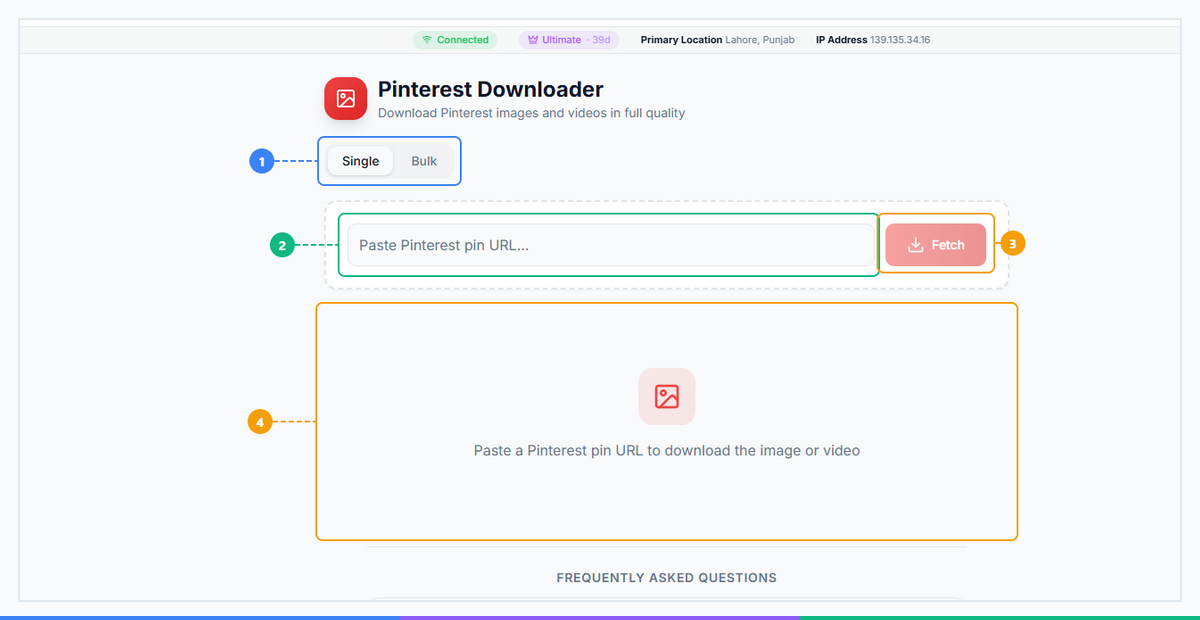
What Is Pinterest Downloader? Download Pins in HD in 2026
Pinterest hosts over 1 billion boards and serves more than 500 million monthly active users who save images, videos, GIFs, and Idea Pins from every corner of the internet. The platform is built for discovery — but it is notoriously hostile to actually keeping what you find. Right-clicking an image saves a compressed thumbnail. Mobile "saves" just add a Pin to a board that disappears if the original poster deletes it. Videos have no download button at all. A Pinterest video downloader solves every one of these problems — letting you save any public Pin directly to your device at the original uploaded quality, without installing anything or logging in. This guide explains exactly what it is, who needs it, and how to use it in under three steps.
What Is Pinterest Downloader?#
A Pinterest Downloader is a browser-based tool that extracts the original media file from any public Pinterest Pin and lets you download it directly to your device. It handles the full range of content Pinterest serves: videos in MP4 format, static images in JPEG or PNG, animated GIFs, and Idea Pins (Pinterest's multi-slide Story-style format).
The key distinction from Pinterest's native "Save" feature is that saving a Pin to a board is just a bookmark — if the original Pin is deleted or the account is suspended, your saved board loses that content. A downloader gives you an actual file stored on your device, permanently, regardless of what happens to the source account.
Here is what a proper Pinterest Downloader delivers:
- Video downloads in MP4 format — up to 1080p, matching the quality of the original upload
- Image downloads in original resolution — JPEG and PNG at full pixel count, not the compressed thumbnail Pinterest shows in the feed
- GIF downloads — the full animated GIF file, not a static preview frame
- Idea Pin support — the multi-slide format Pinterest uses for step-by-step and Story-style content
- Zero installation — runs entirely in your browser with no Chrome extension or mobile app required
- No Pinterest login needed — paste a Pin URL and download immediately
- Free to use — no credit card, no subscription, no usage caps
This is the tool designers, marketers, content creators, and researchers rely on when they need actual files — not just a board full of pins they do not control.
🚀 Pinterest Downloader
Download Pins, videos and GIFs in HD
Try it Free Now →Why Download Pinterest Content in 2026?#
Pinterest is one of the most visually rich platforms online, and its content has practical value far beyond the platform itself. Here are six concrete reasons people use a pinterest video downloader and image downloader every day:
-
Build offline mood boards and design references. Designers, architects, and interior decorators collect visual references for client projects. Saving directly to device — at full resolution — beats screenshotting every time, and it gives you files you can drop into Figma, Canva, InDesign, or a Notion board without quality loss.
-
Repurpose Pinterest video content to other platforms. A recipe video, a fitness tutorial, or a home decor walk-through that performs well on Pinterest can be reposted to Instagram Reels, TikTok, or YouTube Shorts — but only if you have the original MP4 file. Pinterest does not offer a download button for videos you find in your feed, even when you have legitimate creative rights to the content.
-
Archive your own Pins in original quality. When you upload a video or image to Pinterest, the platform re-encodes it for delivery. Using a pinterest pin downloader to retrieve your own uploaded content often recovers a cleaner file than what Pinterest's internal account tools provide. This matters for creators who use Pinterest as a distribution channel but need original-quality assets for client reports or portfolio submissions.
-
Save content before it disappears. Pinterest Pins linked to external websites break when that website goes down. Pins from accounts that get suspended vanish from boards permanently. If a reference image, tutorial video, or design concept matters to your work, downloading it is the only way to guarantee you keep it.
-
Research competitor content strategy. E-commerce brands, interior design studios, and food bloggers treat Pinterest as a search engine. Downloading top-performing competitor Pins lets marketing teams study image dimensions, color palettes, text overlay placement, and video length in detail — research that is far more actionable when done against local files than against Pinterest's compressed feed previews.
-
Download educational and tutorial videos for offline access. Pinterest hosts thousands of how-to videos covering cooking, DIY, fitness, crafts, and home improvement. Saving them to your device means you can follow along in the kitchen, workshop, or gym without an internet connection — and without Pinterest's app auto-playing unrelated content in the background.
What Types of Pinterest Content Can You Download?#
Pinterest serves four distinct media types, each with its own delivery pipeline. Here is a full breakdown of what the Pinterest Downloader handles:
| Content Type | Supported? | Output Format | Max Quality | Notes |
|---|---|---|---|---|
| Videos / Video Pins | Yes | MP4 | Up to 1080p | Includes audio; most searched download type |
| Images / Photo Pins | Yes | JPEG or PNG | Original resolution | Full pixel count, not the compressed feed thumbnail |
| GIFs / Animated Pins | Yes | GIF | Original frame rate | The complete animated file, not a static preview |
| Idea Pins (Story Pins) | Yes | MP4 / JPEG per slide | Original per slide | Multi-slide format; each slide downloaded individually |
| Board Collections | Via bulk workflow | Mixed | Original per Pin | Batch downloading requires the multi-URL workflow |
A note on quality: Pinterest compresses images when it generates feed thumbnails — the small versions you see while scrolling. The original file uploaded to the Pin is typically significantly higher resolution. A proper download pins HD tool bypasses the thumbnail pipeline and retrieves the source file, which is what you actually want. For videos, Pinterest serves 720p as the default streaming quality but retains the original 1080p file for direct download when the tool accesses the correct endpoint.
Idea Pins deserve special mention. Pinterest's Idea Pin format (formerly Story Pins) supports up to 20 slides per Pin, mixing video clips, static images, and text overlays. Each slide is stored as a separate media file. The downloader processes each slide individually and presents them in sequence — allowing you to download the complete set rather than hunting for each slide's URL manually.
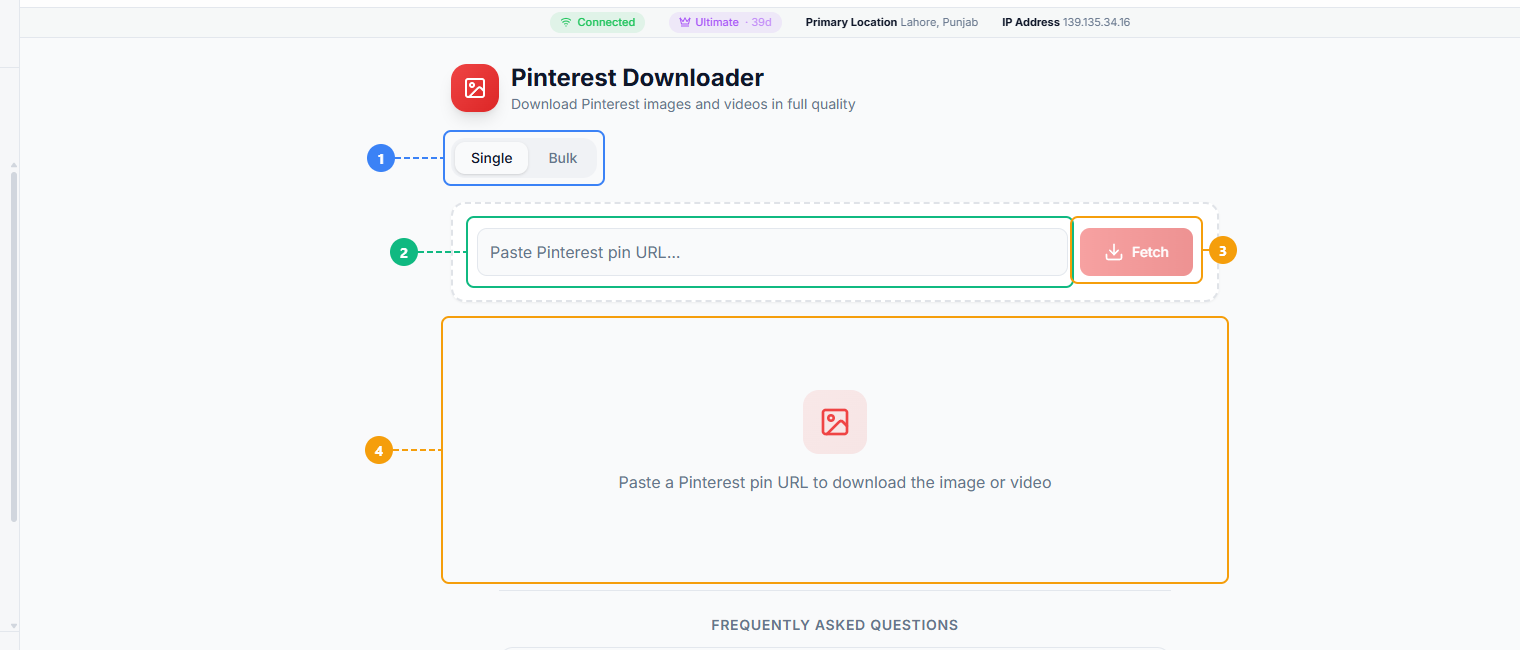
The Pinterest Downloader provides a simple interface for saving any Pin. Switch between Single and Bulk download modes (1), paste a Pinterest Pin URL (2), click Fetch to retrieve the image or video (3), and view the download results with full-size preview and download options (4).
How Pinterest Downloader Works#
Using FaceBot's Pinterest Downloader takes under a minute from start to finish. Here is the complete step-by-step process for every device.
Step 1 — Find the Pin and Copy Its URL#
Navigate to Pinterest and open the Pin you want to download. On desktop, the URL in your browser's address bar is the Pin URL — it looks like https://www.pinterest.com/pin/1234567890/. Copy it directly from the address bar.
On mobile (iOS or Android), open the Pin in the Pinterest app, tap the Share icon (the arrow pointing up), and select Copy Link. This gives you the same canonical Pin URL format. Avoid sharing from the Pinterest app's built-in share sheet to third-party apps — go for the raw "Copy Link" option to get a clean URL the downloader can process.
Step 2 — Paste the URL into the Pinterest Downloader#
Open FaceBot's Pinterest Downloader in your browser. Paste the copied Pin URL into the input field. Click the Download or Fetch button. The tool will retrieve the Pin's media metadata within a few seconds.
Step 3 — Select Quality and Download#
For video Pins, the tool displays the available quality options — typically 1080p HD, 720p, and sometimes 480p SD depending on what the original uploader submitted. Select your preferred resolution. For images, the original full-resolution file is the only option (there is no reason to download a compressed version). Click Download and the file saves to your device's default downloads folder.
Ready to save your first Pin? Try Pinterest Downloader Free → No login required. Works on iPhone, Android, and desktop. HD quality in seconds.
Step 4 — Find Your File#
On desktop (Windows or Mac), the file saves to your Downloads folder automatically. For videos, you will find an MP4 file. For images, a JPEG or PNG. For GIFs, the full animated .gif file.
On iPhone using Safari, tap and hold the download link and select Download Linked File from the popup. The file saves to your Files app under Downloads — accessible from the Files app or from within Photos if it is a JPEG. On Android using Chrome, the file downloads automatically and appears in your Downloads folder, accessible through your file manager or Google Files app.
Step 5 — Use the File Anywhere#
The downloaded file is yours. No watermark is added by the tool (Pinterest does not watermark its Pins either, unlike TikTok). You can import it into any video editor, design tool, or content management system immediately.
Pinterest Downloader vs. Doing It Manually#
There are several ways people attempt to save Pinterest content without a dedicated tool. Here is how each method compares:
| Feature | Pinterest Downloader | Manual Method |
|---|---|---|
| HD Quality Video | Yes — up to 1080p MP4 | No — screen recording is lossy; no video download button exists |
| HD Quality Images | Yes — original uploaded resolution | Partial — right-click "Save Image" gets a compressed thumbnail, not the source file |
| GIF Downloads | Yes — full animated GIF file | No — right-click saves a static JPEG frame, not the animation |
| Idea Pin / Multi-slide | Yes — all slides accessible | No — no native download; screenshots only get one slide at a time |
| Batch Downloads | Supported via multi-URL input | Manual — one Pin at a time, manually |
| Speed | Under 30 seconds per Pin | 2-5 minutes per Pin (navigate, screenshot/record, crop, rename) |
| Metadata Preserved | Yes — filename contains Pin ID | No — screenshots lose all metadata |
| No App Install | Yes — runs in browser | Partial — screen recording requires built-in app; some methods require software |
The sharpest contrast is with video. Pinterest has no "Download Video" button anywhere in its interface — not in the app, not in the desktop browser. Screen recording is the only manual option, and it produces a video that is encoded twice (once by Pinterest, once by the screen recorder), resulting in visible quality degradation, inconsistent frame rates, and file sizes that are disproportionately large for the quality delivered. A dedicated pinterest video downloader retrieves the original MP4 in a single step.
🚀 Ready to try Pinterest Downloader?
Download Pins, videos and GIFs in HD
Try it Free Now →Who Should Use Pinterest Downloader?#
This tool delivers genuine value across a range of professional and personal use cases. Here are the four groups that get the most out of it:
Content Creators and Influencers. If you create content for Pinterest — recipe videos, DIY tutorials, fashion lookbooks, fitness routines — you need your own media in original quality. Pinterest's internal download options return compressed versions. A pinterest pin downloader retrieves the source file so you can repost cleanly to Instagram, TikTok, or YouTube without the double-compression penalty that destroys video quality.
Graphic Designers and Art Directors. Mood boards and visual references are the backbone of design work. Pulling full-resolution images from Pinterest into a local folder — organized by project — is dramatically faster than screenshotting and far higher quality. For client presentations, the difference between a 300 PPI JPEG and a compressed screenshot thumbnail is immediately visible on screen.
E-Commerce Marketers and Brand Teams. Pinterest is the second-largest product discovery platform after Google Images. Brands that sell home goods, fashion, food, or beauty products study top-performing competitor Pins to understand image styling, aspect ratios, and caption structures. Downloading competitor Pins locally makes it possible to analyze them systematically rather than clicking through Pinterest's interface repeatedly.
Researchers and Educators. Academics studying visual culture, trend researchers, and educators building course materials often need to save Pinterest content for reference, citation, or classroom use. Downloading files locally ensures the reference remains available even if the original Pin is deleted — a real concern given that Pinterest accounts and external links go dead regularly.
How to Get Started with Pinterest Downloader#
Getting started requires no account, no extension, and no credit card. Open the tool, paste any public Pinterest Pin URL, click Fetch, and you will have a preview and download link within seconds. It works on every major browser — Chrome, Safari, Firefox, Edge — and on every device including iPhone, Android, Windows, and Mac.
Start Using Pinterest Downloader →
For context on how this tool fits alongside the full set of platform downloaders, see our complete guide to downloading social media content — which covers the specific behaviors, quality limits, and format differences across every major platform. If you also need to save content from other platforms, the Instagram Downloader and the Facebook Video Downloader follow the same workflow and are free to use on the same platform.
Frequently Asked Questions#
Q: Is Pinterest Downloader free to use?#
Yes. FaceBot's Pinterest Downloader is completely free. There are no download limits, no paywalls, and no credit card required. You can save as many public Pinterest videos, images, and GIFs as you need without hitting a usage cap. The tool is part of the broader FaceBot platform, which offers 77 social media automation and content tools — but the Pinterest Downloader itself is available at no cost.
Q: Can I download Pinterest videos without a watermark?#
Yes. Pinterest does not add watermarks to videos uploaded to the platform, and FaceBot's downloader does not add one either. The MP4 file you receive is the original file — no watermark, no branding, no re-encoding by the tool. The only marks that appear in the video are any that the original creator burned into the file before uploading to Pinterest.
Q: Does Pinterest Downloader work on iPhone and Android?#
Yes. The tool is fully browser-based, which means it runs on any device with a modern web browser — iPhone (Safari), Android (Chrome), iPad, Mac, Windows, or Linux. No app installation is required. On iPhone, after clicking the download link, you may need to tap and hold and select "Download Linked File" for the file to save to your Files app rather than opening in the browser tab. On Android using Chrome, the file downloads automatically to your Downloads folder.
Q: Can I download Pinterest GIFs as actual GIF files?#
Yes. This is a capability that most manual methods fail at entirely. Right-clicking a GIF Pin in a desktop browser and selecting "Save Image" saves a static JPEG thumbnail — not the animated GIF. FaceBot's pinterest gif downloader retrieves the actual .gif source file with all frames intact, preserving the animation at its original frame rate and dimensions. The file is immediately usable in design tools, messaging apps, or any platform that accepts GIF uploads.
Q: What format do downloaded Pinterest videos use?#
Downloaded Pinterest videos are saved as MP4 files, which is the format Pinterest uses natively for all video Pins. MP4 is compatible with virtually every video player, editing tool, and upload platform — including Final Cut Pro, Premiere Pro, DaVinci Resolve, CapCut, iMovie, and all major social media platforms. Audio is included in the download. The video codec is H.264, which is the standard for web video and offers excellent quality-to-file-size ratios.
Q: Can I download Idea Pins (Story Pins)?#
Yes, though Idea Pins work differently from standard video or image Pins. An Idea Pin is a multi-slide format — up to 20 slides mixing video clips, static images, and text. The downloader processes each slide as a separate media file and presents them in order. You download each slide individually. There is no single-click "download all slides" function for Idea Pins because each slide can be a different media type (some video, some image), but the process for each slide is identical to downloading a standard Pin.
Q: Is it legal to download Pinterest content?#
Downloading Pinterest content for personal use, research, mood boards, or internal reference is widely practiced and generally not pursued by the platform. Pinterest's Terms of Service restrict automated mass scraping and commercial redistribution of other users' content. The key legal consideration is copyright — the image or video belongs to the creator, not to Pinterest — and how you use the downloaded file. Saving a video tutorial to watch offline or saving an image to a design reference folder is fundamentally different from downloading someone's photography and selling it commercially. Always respect creators' intellectual property and obtain permission before repurposing anyone else's content in a public or commercial context.
Conclusion#
Pinterest's visual library is enormous, and the platform's lack of any native video download button — combined with image compression that strips quality from every save — makes a dedicated pinterest video downloader genuinely essential for anyone who works with visual content. Whether you need MP4 videos for repurposing, full-resolution images for design work, animated GIFs for presentations, or Idea Pin slides for offline reference, FaceBot's Pinterest Downloader retrieves the original file in seconds with no installation and no login required.
For a broader look at saving content across all major platforms, our complete guide to downloading social media content covers the format differences, quality limits, and platform behaviors you need to know. If your workflow spans multiple platforms, the Instagram Downloader, the Facebook Video Downloader, and the tools for bulk downloading entire profiles are all available free on the same platform — no switching tools, no account juggling.