
What Is Groups Extractor V2? Advanced Facebook Group Discovery with Filters
Finding relevant Facebook groups is not hard. Finding the right ones -- groups with enough members to be worth your time, active enough to generate engagement, and focused enough to match your niche -- is where most people struggle. Facebook's native group search returns results ranked by a combination of member count and name relevance, but it offers no filtering by activity level, no minimum member thresholds, and no way to extract the results into a usable format.
FaceBot's Groups Extractor V2 is a purpose-built group discovery tool that goes beyond basic search. It finds Facebook groups matching your criteria and lets you filter results by member count, activity level, and niche relevance. The output is a structured, exportable list of groups ready for analysis, outreach, or campaign targeting.
This is the second generation of the tool. V2 improves on the original with better filtering options, faster extraction, and more comprehensive group metadata in the output.
What Groups Extractor V2 Does#
The tool operates in two phases: discovery and filtering.
Phase 1: Discovery#
You provide a search query -- a keyword, phrase, or topic that describes the groups you are looking for. The tool searches Facebook's group directory and collects matching groups, going deeper than the first page of results that Facebook's native search shows you.
Where Facebook's search might show you 20-30 results before becoming repetitive, Groups Extractor V2 continues discovering groups beyond the initial results, capturing groups that are relevant but would not appear without extensive manual scrolling.
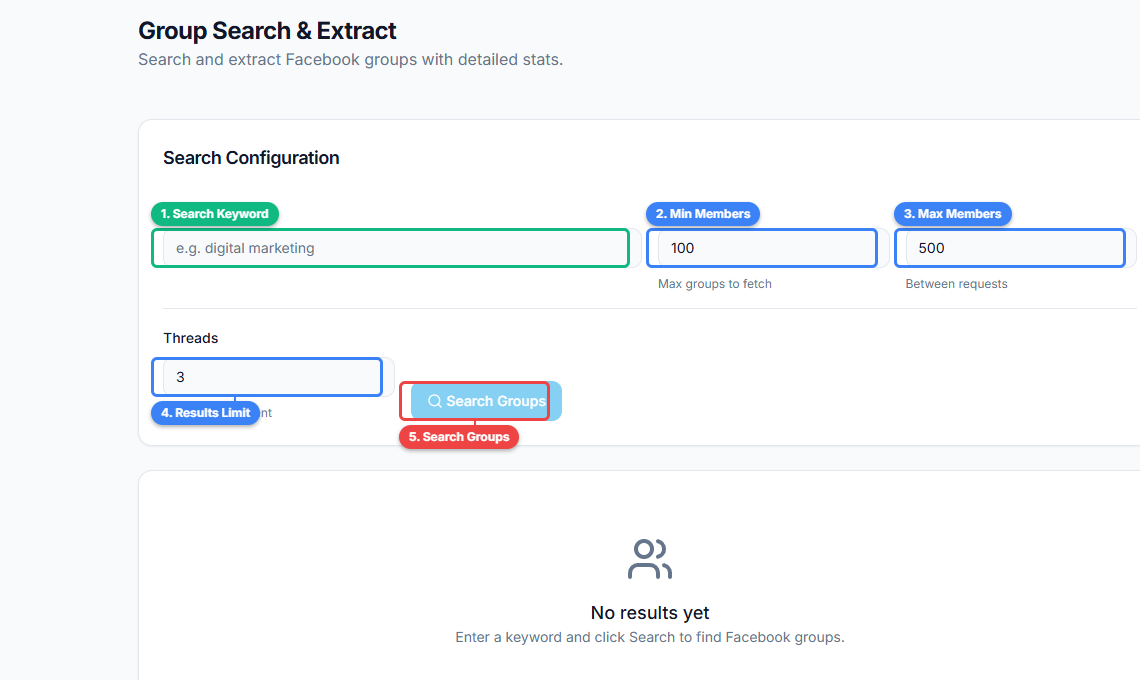
The interface lets you enter a search keyword (1), set minimum (2) and maximum (3) member count filters, define a results limit (4), and launch the search (5). The member count filters are what set this apart from basic search — you can target exactly the group size range you want.
Phase 2: Filtering#
Once the raw group list is collected, you apply filters to narrow it to the groups that match your specific criteria:
Member count range. Set minimum and maximum member thresholds. If you only want groups with 1,000-50,000 members (large enough for reach, small enough for engagement), set those boundaries and everything outside is excluded.
Activity indicators. Filter by signs of recent activity -- groups with recent posts, active discussions, or high engagement on recent content. This helps eliminate dead groups that have high member counts but no actual participation.
Privacy setting. Filter by public groups (which anyone can view and join) or private groups (which require approval). Depending on your strategy, you may prefer one over the other. Public groups are easier to evaluate before joining. Private groups often have higher engagement because the barrier to entry creates a more committed membership.
Niche relevance. The tool assesses how closely each group's description and content match your search query, allowing you to filter out tangentially related groups that matched on a keyword but are not truly relevant to your niche.
🚀 Groups Extractor V2
Advanced group discovery and data export
Try it Free Now — 24h Gold, 70+ Tools →Why V2 Matters: The Problem with Basic Group Search#
Volume Problem#
Facebook's group search returns a limited set of results. For popular topics, hundreds or thousands of relevant groups exist, but the search interface only surfaces a fraction. Groups Extractor V2 goes deeper, discovering groups that are indexed by Facebook but do not appear in the top results.
Quality Problem#
A group with 100,000 members sounds impressive until you discover it has not had a new post in three months. Member count alone is a poor indicator of group value. V2's activity filtering separates living communities from abandoned ones.
Format Problem#
Facebook shows you group results as a visual list with cards. You cannot sort, filter, export, or cross-reference this list with anything else. V2 extracts the data into a structured format that you can manipulate in spreadsheets, import into CRM tools, or feed into other FaceBot tools for further analysis.
Scalability Problem#
Manually searching, evaluating, and recording groups is viable for a handful of groups. If you need to build a list of 50, 100, or 200 groups across multiple sub-niches, manual work becomes a full-time research project. V2 handles the discovery and initial filtering, letting you focus on the evaluation and engagement phases.
Step-by-Step: Using Groups Extractor V2#
Step 1: Enter Your Search Query#
Open Groups Extractor V2 in FaceBot's Data Extraction section. Enter the keyword or phrase that describes the groups you are looking for.
Query tips:
- Use specific phrases rather than single words ("Facebook ads for dentists" rather than "dentists")
- Try multiple variations of your topic to capture groups with different naming conventions
- Include both English and localized terms if your target audience is multilingual
Step 2: Set Your Filters#
Configure the filters before running the extraction:
- Minimum members: Set a floor. Groups under 500 members may not provide enough audience to justify engagement. Adjust based on your niche -- a hyper-niche B2B topic might have valuable groups with 200 members.
- Maximum members: Optional. Some marketers prefer groups under 50,000 because engagement per member tends to be higher in smaller communities.
- Activity filter: Enable to exclude groups with no recent posting activity.
- Privacy: Select public, private, or both.
Step 3: Run the Extraction#
The tool searches and collects groups matching your query, then applies your filters. Processing time depends on the breadth of the query and the number of results.
Step 4: Review Results#
The output includes for each group:
- Group name
- Group ID (GID)
- Member count
- Privacy setting (public/private)
- Description excerpt
- Activity indicators
- Direct URL to the group
Step 5: Export and Take Action#
Export the filtered list as CSV. Common next steps:
- Join the highest-priority groups and begin engagement
- Feed GIDs into the UID extraction tool for audience analysis of specific groups
- Cross-reference with group lists from other sources (shared content analysis, hashtag research)
- Use the list as a targeting reference for content distribution campaigns
Practical Use Cases#
Building a Group Marketing List from Scratch#
You are entering a new market and need to identify every relevant Facebook community. Run Groups Extractor V2 with 5-10 keyword variations related to your niche. Combine the results, deduplicate by GID, and you have a comprehensive group landscape for your market. Filter by member count and activity to prioritize where to focus your engagement.
For strategic context on group-based marketing approaches, the complete guide to Facebook group marketing provides the framework for turning a group list into a campaign.
Competitive Landscape Mapping#
Search for your industry's key terms and identify which groups dominate the space. Are there a few mega-groups (100,000+ members) or many smaller communities (1,000-10,000)? Is the landscape fragmented or consolidated? This structural understanding informs whether you should focus on a few high-value groups or spread engagement across many smaller ones.
Client Onboarding for Agencies#
Social media agencies taking on new clients need to quickly understand the client's community landscape on Facebook. Groups Extractor V2 accelerates this research phase. Within an hour, an agency can deliver a comprehensive group audit for any niche -- something that might take days of manual research.
Event and Launch Promotion#
Launching a product, course, or event? Find every relevant group where your launch audience might be active. Time-sensitive promotions benefit from broad distribution across many groups, and having a pre-built group list means you can execute quickly when launch day arrives.
Academic and Market Research#
Researchers studying online communities can use V2 to systematically identify Facebook groups related to their research topic. The structured export makes it easy to catalog groups, track membership sizes, and build a sampling frame for qualitative research.
V2 vs. Other FaceBot Group Discovery Tools#
Groups Extractor V2 is the broadest group discovery tool in FaceBot's suite. Other tools find groups through different methods:
| Tool | Discovery Method | Best For |
|---|---|---|
| Groups Extractor V2 (this tool) | Keyword search with filters | Broad, systematic group discovery |
| Get Groups from Posts | Content/hashtag search | Finding groups actively discussing a topic |
| Extract Groups from Share | Shared post analysis | Finding groups that shared specific content |
| Extract GID from Shared | URL parsing | Extracting IDs from shared post URLs |
For the most comprehensive group research, combine V2 (keyword-based) with Get Groups from Posts (content-based) and Extract Groups from Share (behavior-based). Each method surfaces groups the others miss.
The guide to finding Facebook groups for marketing covers how to combine these approaches into a cohesive discovery strategy.
🚀 Ready to try Groups Extractor V2?
Advanced group discovery and data export
Try it Free Now — 24h Gold, 70+ Tools →Best Practices#
Start Broad, Then Filter#
It is better to discover too many groups and filter down than to set narrow criteria and miss relevant communities. Start with broad keywords and generous member count ranges. Narrow your filters after reviewing the initial results.
Use Member Count as a Guide, Not a Rule#
The "right" group size depends entirely on your niche and goals. For B2C topics (fitness, cooking, parenting), groups under 5,000 may be too small. For B2B topics (enterprise SaaS, commercial real estate), a group with 2,000 highly targeted members can be extremely valuable.
Cross-Reference with Manual Observation#
The tool provides data. Your judgment provides context. Before committing to a group, spend 10 minutes scrolling its recent posts. Is the discussion relevant? Is there spam? Are members genuinely engaged or just posting links? Data identifies candidates; observation confirms quality.
Refresh Your Lists Quarterly#
The Facebook group landscape changes constantly. New groups form, old groups die, moderation quality shifts, and member demographics evolve. Re-run your extractions every few months to keep your group lists current.
Track Which Groups Convert#
Not all groups deliver equal value. Track which groups drive the most traffic, engagement, or conversions for your content. Over time, this data reveals patterns -- certain group sizes, activity levels, or niche angles may consistently outperform others.
Limitations#
- Facebook search dependency. The tool discovers groups that Facebook's search indexes. Groups with very unusual names, no descriptions, or minimal indexable content may not appear in results.
- Activity data is indicative, not absolute. Activity filtering uses signals that are accessible through Facebook's interface. It is a strong indicator of group health but not a guaranteed measure of post frequency or engagement rates.
- Private group details may be limited. For private groups, the tool can extract the name, member count, and description, but internal activity data may not be fully accessible until you join.
- Rate limits. Extensive searches across many keywords may be throttled. Process keyword sets in batches for large-scale research.
- Regional and language variation. Your account settings and location influence which groups appear in search results. For international research, adjust your search terms and consider language variations.
Frequently Asked Questions#
How many groups can V2 find per search?#
It depends on the topic. Popular consumer topics can yield hundreds of groups. Specialized B2B niches may return 10-50. Running multiple keyword variations and combining results gives you the most comprehensive list.
Can I filter groups by language?#
The tool does not have a direct language filter, but you can influence language results by using search terms in the target language. Searching in Spanish will surface Spanish-language groups. Searching in English will surface English-language groups.
What is the difference between V1 and V2?#
V2 improves on V1 with better filtering options (member count ranges, activity indicators), faster extraction, more metadata per group, and improved deduplication when running multiple searches.
Can I see group posts before joining?#
For public groups, yes -- the tool provides a direct link and you can browse posts without joining. For private groups, you will need to join to see internal content. The description excerpt and member count help you evaluate private groups before requesting membership.
How do I handle groups that require answers to membership questions?#
Many private groups require you to answer questions before joining. This is a Facebook feature that the tool cannot bypass. You will need to answer the questions manually when requesting to join filtered groups. The membership questions themselves can be a positive signal -- groups that screen members tend to have higher quality discussions.
Conclusion#
Groups Extractor V2 is FaceBot's most comprehensive tool for systematic Facebook group discovery. It goes beyond basic search by adding configurable filters for member count, activity, and relevance -- turning the messy, limited experience of Facebook's native group search into a structured, exportable research output.
Whether you are building a group marketing list from scratch, researching a new market, or maintaining an up-to-date view of your niche's community landscape, V2 provides the data foundation that makes informed group strategy possible.
Start discovering groups with Groups Extractor V2