What Is Get Groups from Posts? Extract Group Data from Facebook Search Results
When you search for a keyword or hashtag on Facebook, the results include posts from various sources: personal profiles, pages, and groups. The posts that come from groups carry embedded group information -- the group name, group ID, and often member counts. But Facebook's search interface is not designed for data extraction. You see the posts in a feed, not a structured list of the groups they came from.
FaceBot's Get Groups from Posts tool bridges this gap. It takes posts found through Facebook search or hashtag queries and extracts the group information embedded in each post. The result is a targeted list of Facebook groups where people are actively discussing your topic -- built not from group search (which matches keywords in group names) but from content search (which matches keywords in actual conversations).
This distinction matters. Group search finds groups with relevant names. Content search finds groups with relevant discussions. The two overlap, but they are not the same.
The Content-First Approach to Group Discovery#
Most group discovery starts with Facebook's group search or third-party group directories. You type "fitness" and get a list of groups with "fitness" in the title. This approach has three weaknesses:
Keyword blindness. A group called "Morning Accountability Partners" might be one of the most active fitness communities on Facebook, but it will never show up in a search for "fitness." Its discussions are full of workout logs and nutrition questions, but its name does not contain the keyword.
Quality blindness. Group search returns results by relevance (a combination of member count, activity, and name matching), but it does not tell you whether the group actually has recent, active discussions about your topic. A group with 200,000 members and "fitness" in the name might be full of spam.
Stale results. Group search results tend to surface the same large, established groups. Newer or smaller groups with highly engaged members are harder to discover because they have not accumulated enough member counts to rank.
Content-first discovery solves all three problems. By searching for posts about your topic and extracting the groups those posts came from, you find communities based on what they are actually discussing -- not what they are named.
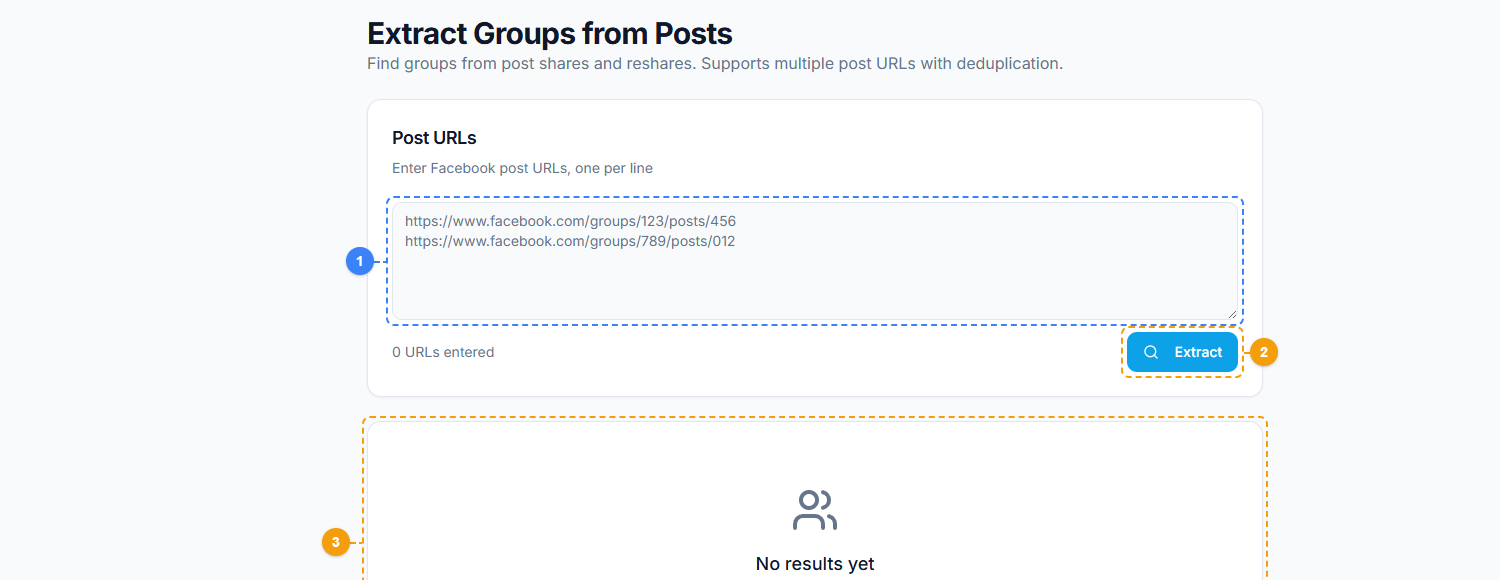
The Get Groups from Posts tool provides a content-first discovery interface. Enter a keyword or hashtag into the search field (1), click Search to find posts and extract their source groups (2), and review the discovered groups with names, member counts, and post frequency in the results panel (3).
🚀 Groups from Posts
Extract group data from search results
Try it Free Now — 24h Gold, 70+ Tools →How the Tool Works#
Step 1: Define Your Search#
Enter a keyword, phrase, or hashtag that represents the topic you want to find groups for. Examples:
- "meal prep for beginners"
- "shopify dropshipping tips"
- "#realestateinvesting"
- "remote work productivity"
The more specific your query, the more targeted your group results will be. Broad queries like "marketing" will return a wide range of groups. Specific queries like "Facebook ads for local businesses" will return a focused, relevant set.
Step 2: Post Discovery#
The tool searches Facebook for posts matching your query. It scans posts from the search results or hashtag feed and identifies which posts originate from groups. Posts from personal profiles and pages are filtered out -- only group-sourced posts are retained.
Step 3: Group Data Extraction#
For each group-sourced post, the tool extracts:
- Group ID (GID) -- the unique identifier
- Group name -- the human-readable name
- Member count -- the group's size (where accessible)
- Post count -- how many matching posts came from this group (higher counts indicate more active discussion of your topic)
- Privacy setting -- public or private
Step 4: Deduplicated Group List#
Multiple posts from the same group are deduplicated, and the group is ranked by the number of matching posts found. Groups with more matching posts are more actively discussing your topic, making them higher-value targets.
Step 5: Export#
Download the list as CSV or plain text. Use it to join groups, inform your content strategy, or feed into other extraction tools for deeper analysis.
Practical Use Cases#
Building a Marketing Group List#
If you are launching a group-based marketing campaign, you need a list of groups where your target audience is active. This tool builds that list from actual content rather than name matching. Search for terms your audience uses, and the tool returns the groups where those conversations are happening.
This works particularly well for niche markets where relevant groups do not always have obvious names. A search for "sourdough bread troubleshooting" might surface groups like "Home Bakers Unite," "Kitchen Experiments," and "Bread Making Worldwide" -- all relevant, all discoverable through content but not necessarily through a simple "sourdough" group search.
Hashtag-Based Group Discovery#
Hashtags on Facebook aggregate content across all sources, including groups. Searching by hashtag through this tool identifies which groups use specific hashtags actively. This is useful for:
- Finding communities around trending topics
- Identifying groups that align with your content strategy
- Discovering niche communities that use specialized hashtags
For deeper hashtag analysis, the hashtag posts analyzer provides additional detail on post performance and engagement within hashtag results.
Competitor Keyword Monitoring#
Search for your competitor's brand name or product name. The tool shows which groups are discussing your competitor -- revealing communities where competitive alternatives (your product) would be relevant. This is not about spamming competitor mentions; it is about understanding which communities are actively evaluating solutions in your space.
Trend Validation#
Before investing in a content strategy or product launch, validate that active communities exist around your topic. If a search for "AI-powered email marketing" returns groups with recent, active posts, the market interest is real. If it returns empty results, the topic may not have enough community traction yet.
Get Groups from Posts vs. Other Group Discovery Methods#
FaceBot offers multiple group discovery tools. Here is how they compare:
| Method | Input | Best For |
|---|---|---|
| Get Groups from Posts (this tool) | Keyword/hashtag search | Finding groups with active discussions about your topic |
| Extract Groups from Share | A viral post URL | Finding groups that shared specific content |
| Extract GID from Shared | Shared post URLs | Parsing group IDs from URLs you already have |
| Groups Extractor V2 | Discovery criteria | Broad group discovery with filters |
| Facebook Group Search (native) | Keywords | Basic keyword-matching group discovery |
The content-search approach of this tool is the most targeted for topic-based discovery. Combine it with other methods for comprehensive coverage. The complete guide to Facebook data extraction covers how to integrate multiple extraction tools into a cohesive research workflow.
🚀 Ready to try Groups from Posts?
Extract group data from search results
Try it Free Now — 24h Gold, 70+ Tools →Best Practices#
Use Specific, Long-Tail Keywords#
"Marketing" is too broad. "Facebook ads for e-commerce stores under $10k/month" is too narrow for Facebook's search to find many results. The sweet spot is specific but searchable: "Facebook ads for Shopify," "Instagram growth strategies," "WordPress SEO tips."
Run Multiple Searches#
Different keyword variations surface different groups. A search for "keto recipes" and a search for "low carb meal ideas" will return overlapping but different group sets. Running 5-10 keyword variations and combining the results gives you the most complete group landscape for your niche.
Sort by Post Count#
Groups that appear in your results with the most matching posts are the most actively discussing your topic. These high-frequency groups should be your first targets. A group that showed up once in 50 search results might have had a single tangential mention. A group that showed up 15 times has an active, ongoing conversation about your topic.
Verify Before Joining#
The tool tells you which groups are discussing your topic. It does not tell you whether those groups allow promotional content, have strict posting rules, or are well-moderated. Always visit the group, read its rules, and observe the content before posting anything.
Track Changes Over Time#
Run the same searches monthly. New groups appear, old groups become inactive, and the community landscape shifts. Regular extraction keeps your group list current and identifies emerging communities early.
Limitations#
- Search quality depends on Facebook's algorithm. The posts surfaced by Facebook's search determine the groups found. If Facebook's search does not surface group posts for your query, the tool cannot find them.
- Private group posts may not appear in search. Some private groups restrict their posts from appearing in Facebook's public search results. These groups may not be discoverable through this method.
- Rate limits apply. Large-scale searches processing hundreds of posts may be throttled. Work in batches for extensive research.
- Post recency bias. Facebook's search tends to prioritize recent posts. The tool is better at finding currently active groups than historically relevant ones.
- Language and region variation. Search results are influenced by your account's language and location settings. Groups in other languages or regions may not appear unless you adjust your search terms accordingly.
Frequently Asked Questions#
How many groups can I expect to find per search?#
It depends on the topic's popularity. A broad topic like "digital marketing" might surface 50-100+ groups from a single search. A narrow niche like "fermented hot sauce making" might surface 5-10. Running multiple keyword variations increases the total.
Can I use this tool with hashtags that include special characters?#
Stick to standard hashtag format: letters, numbers, and underscores. Facebook's hashtag system does not support special characters. If your topic uses a branded hashtag, enter it exactly as it appears on Facebook.
Does the tool show which specific posts came from each group?#
Yes. The output includes the source posts alongside the group information, so you can see what content triggered the group's inclusion in your results. This helps you understand what topics and formats resonate in each group.
Can I combine results from multiple searches?#
Yes. Export each search's results and merge them in a spreadsheet. Use the GID column to deduplicate groups that appeared in multiple searches. Groups appearing across multiple searches are your highest-priority targets.
Is this tool useful for groups I am already a member of?#
Yes. It can validate that your current groups are still actively discussing your target topics. It can also surface sub-topics within your niche that you were not tracking, helping you refine your content strategy for groups you already participate in.
Conclusion#
Get Groups from Posts takes a fundamentally different approach to group discovery. Instead of searching for groups by name, it finds groups by the content they produce. This content-first method surfaces communities that are actively engaged with your topic, including groups you would never find through name-based search.
For anyone building a group marketing strategy, this tool provides the most direct path from "what topic do I care about" to "which groups are actively discussing it."
Start discovering groups from post content now