
What Is Extract Groups from Share? Discover Where Facebook Posts Get Shared
Facebook shows you that a post has been shared 200 times. What it does not show you is where those 200 shares went. Some went to personal timelines. Some were sent through Messenger. And some -- often the most valuable ones -- were shared into Facebook groups.
Knowing which groups a post was shared to is one of the most direct ways to discover active, engaged communities in your niche. These are not groups you found through a search query. These are groups where real members actively shared real content because they thought their community would care about it.
FaceBot's Extract Groups from Share tool takes a Facebook post and reveals which groups it was shared to. You start with a single post URL. You end with a list of groups -- their names, IDs, and member counts -- that found the content relevant enough to share with their members.
Why Shared-To Group Data Matters#
Intent-Based Group Discovery#
Most group discovery methods are keyword-based: you search "digital marketing" and get a list of groups with that phrase in their name or description. This works for obvious groups but misses communities that are relevant to your niche but do not use your expected keywords.
Shared-to data flips the discovery method. Instead of matching keywords, you are matching behavior. If a post about email marketing automation gets shared to a group called "Solopreneur Productivity Hacks," that group is relevant to your niche even though you would never have found it by searching for "email marketing."
Quality Signal#
A group that actively shares content is a living community. Dead groups with 50,000 members but no activity are useless for marketing. The act of sharing content indicates that the group has engaged members and active moderation -- both signs of a healthy community worth your attention.
Competitive Intelligence#
Track where your competitors' best-performing posts get shared. This reveals their distribution channels -- the groups that amplify their content. You can join these same groups, understand what content resonates there, and develop your own content strategy for those communities.
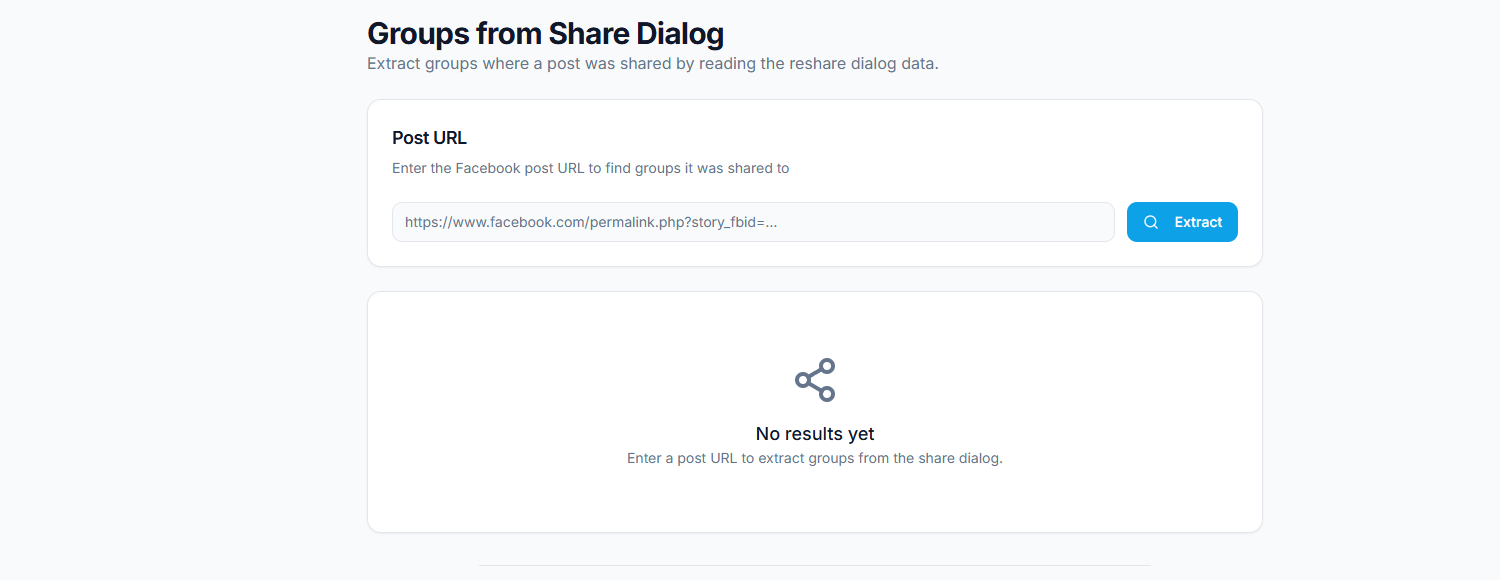
The Extract Groups from Share tool provides a simple research interface. Enter a Facebook post URL into the input field (1), click Extract to discover which groups shared the post (2), and browse the extracted group list with names, IDs, and member counts in the results panel (3).
🚀 Extract Groups from Share
Find every group where a post was shared
Try it Free Now →How the Tool Works#
Step 1: Provide a Post URL#
Enter the URL of any Facebook post that has accumulated shares. This can be:
- A post from your own page
- A post from a competitor's page
- A public post from any user or page
- A viral post in your industry
The more shares the post has, the more groups the tool is likely to discover. Posts with fewer than 10-20 shares may not have been shared to many groups.
Step 2: Extraction Process#
The tool analyzes the share data associated with the post and identifies instances where the post was shared to a Facebook group. For each group share found, it collects:
- Group ID (GID) -- the unique numeric identifier
- Group name -- the human-readable community name
- Member count -- how many members the group has (where accessible)
- Privacy setting -- whether the group is public or private
Step 3: Review and Export Results#
The results appear as a structured list sorted by relevance or member count. You can:
- Browse the list to identify promising groups
- Export as CSV for use in spreadsheets or other tools
- Filter by member count to focus on larger communities
- Feed the GIDs into other FaceBot extraction tools for deeper analysis
Practical Use Cases#
Content Distribution Mapping#
Every page owner should understand their content's distribution pattern. Which groups amplify your posts? Which communities consistently share your content? Over time, running this tool on your best-performing posts reveals your organic distribution channels -- the groups that function as unpaid amplifiers for your content.
This intelligence is actionable. If you know that three specific groups consistently share your posts, you can:
- Create content specifically tailored to those communities
- Engage directly in those groups to strengthen the relationship
- Identify similar groups that might also share your content
Niche Market Research#
Before entering a new market or launching a new product, understanding where relevant conversations happen is essential. Find 5-10 popular posts in your target niche and run each one through this tool. The aggregated group list reveals the community landscape for that niche -- which groups are active, how large they are, and what kind of content they engage with.
This is more efficient than manual group search because it surfaces communities based on actual engagement rather than name matching. The complete guide to Facebook data extraction provides additional context on combining multiple extraction methods for comprehensive market research.
Influencer and Content Creator Research#
If you are evaluating potential brand partnerships, knowing where a creator's content gets shared reveals their actual community reach. A creator with 10,000 followers whose content gets shared to groups with a combined 500,000 members has a much larger effective audience than their follower count suggests.
Competitor Group Strategy Reverse-Engineering#
Your competitor regularly posts content that performs well. Where does that content end up? Running their top posts through this tool maps their group distribution network. You discover not just which groups they participate in, but which groups their audience participates in -- a distinction that matters for understanding the organic spread of competitor content.
Extract Groups from Share vs. Extract GID from Shared#
FaceBot offers two related but distinct tools for group extraction from shared content. Understanding the difference helps you choose the right one.
Extract Groups from Share (this tool): You provide a single post URL. The tool finds all groups that post was shared to and returns group details (name, ID, member count).
Extract GID from Shared: You provide shared post URLs that already contain group IDs (URLs in the format /groups/123456/posts/789). The tool parses the GIDs from those URLs.
The key difference is the input. This tool starts from the original post and discovers groups. The GID tool starts from shared post URLs that already have group identifiers embedded. Use this tool when you have a viral post and want to know where it went. Use the GID tool when you already have a collection of shared URLs and need to extract the group IDs from them.
Best Practices#
Target Posts with High Share Counts#
A post needs meaningful share volume before this tool becomes productive. Posts with 50+ shares typically yield useful group lists. Posts with 500+ shares can reveal dozens of relevant communities.
Run Multiple Posts Through the Tool#
No single post captures the full group landscape. Different posts get shared to different groups based on topic, timing, and who sees them. For comprehensive group discovery, run 5-10 of the best-performing posts in your niche and aggregate the results.
Cross-Reference with Group Search#
Combine shared-to extraction with keyword-based group search for the most complete picture. Shared-to data catches groups you would never find through search. Search catches groups that exist but have not shared the specific posts you analyzed. Together, they cover most of the landscape.
For keyword-based approaches, see the guide on finding Facebook groups for marketing.
Prioritize Recurring Groups#
If the same group appears when you analyze multiple different posts, that group is consistently active in your niche -- not just a one-time coincidence. These recurring groups deserve priority attention in your engagement strategy.
🚀 Ready to try Extract Groups from Share?
Find every group where a post was shared
Try it Free Now →Limitations#
- Share visibility varies. Facebook's privacy settings affect which shares are visible. Shares to private groups by non-friends may not be accessible, limiting the completeness of results.
- Not all shares go to groups. Many shares go to personal timelines or Messenger. This tool specifically identifies group shares, which are typically a subset of total shares.
- Post must have shares. A post with zero shares has no group data to extract. The tool requires existing share activity to analyze.
- Rate limits apply. Processing posts with thousands of shares takes time and may be throttled. For very high-share-count posts, the tool may return partial results.
- Historical data limitations. Facebook may not retain complete share data for very old posts. Recent posts (within the last few months) tend to yield the most complete results.
Turning Discovered Groups Into a Prioritized Target List#
Finding groups from shared content is only step one — the value is in triaging what you find into a ranked list you can actually act on. A simple prioritization process:
- Capture everything, then dedupe. Collect every group the extraction surfaces, resolve each to its numeric Group ID, and remove duplicates so one group doesn't appear twice under different links.
- Score on relevance first, size second. A tightly on-topic 8,000-member group usually beats a loosely-related 200,000-member one. Rank by how precisely each group matches your audience before you look at member counts.
- Check activity. A large group with no recent posts is dead weight. Prioritise groups with genuine, recent engagement — that's where your effort will actually land.
- Note the promotion policy. Tag each group "promo-allowed" or "value-only" so later posting effort goes where it's both relevant and permitted.
- Tier the final list. Group into "core" (join and engage now), "secondary" (worth joining as capacity allows), and "skip" (off-topic or dead). Work the core tier first.
The output is a ranked, de-duplicated, activity-checked target list rather than a raw pile of links — which is the difference between a group strategy and a spreadsheet you never use. Feed the core tier into Auto Group Joiner at a safe pace, then research each with Group Viral Finder before posting. Discovery finds the groups; prioritization is what turns them into results.
Frequently Asked Questions#
Does this tool show every group a post was shared to?#
It shows all group shares that are accessible to your account. Shares to private groups where you are not a member may not be visible, depending on the privacy settings of the group and the sharing user. Public group shares are consistently captured.
Can I use this on my own page's posts?#
Yes. Running this tool on your own page's posts is one of the most valuable use cases. It shows you exactly which communities are organically amplifying your content, giving you a data-driven view of your organic distribution channels.
What should I do with the extracted group list?#
Common next steps include: joining the groups for direct engagement, creating content tailored to those communities, feeding the GIDs into FaceBot's UID extraction tool for audience analysis, or using the list as a targeting reference for group-based marketing campaigns.
How is this different from Facebook's built-in "shares" view?#
Facebook's shares dialog shows individual shares on a post, but it does not aggregate or filter by groups. It also does not provide group IDs, member counts, or export functionality. This tool structures the data specifically for group discovery and makes it exportable.
Can I extract groups from a post on a page I do not manage?#
Yes. As long as the post is publicly visible and has been shared, the tool can analyze its share data. You do not need to be the page administrator to extract group information from a public post's shares.
Conclusion#
Extract Groups from Share turns a single high-performing post into a map of the communities that care about your niche. It is group discovery driven by actual audience behavior rather than keyword guessing, and it surfaces communities you would never find through Facebook's built-in search.
If you have access to posts with meaningful share counts -- your own or competitors' -- this tool converts that share activity into a structured, actionable list of groups ready for engagement.
Discover groups from shared posts now