What Is Album With Link Post? Create Click-Worthy Album Posts on Facebook
Standard Facebook link posts show a single preview image, a headline, and a URL. They work, but they do not stand out. Standard photo album posts show multiple images in a grid, but they contain no clickable link to an external destination. Each format has a strength the other lacks. The Album With Link Post tool inside FaceBot combines both: you get a multi-image album layout with an embedded clickable link that drives traffic wherever you need it to go.
This post type is not a native Facebook feature in the traditional composer. It uses a specific API method that renders a hybrid format — visually rich like an album, functionally actionable like a link post. For page administrators who rely on organic reach and click-through rates, this format consistently outperforms both standalone alternatives.
What Does the Album With Link Post Tool Do?#
The Album With Link Post tool lets you create a Facebook Page post that displays multiple images in an album-style grid layout while attaching a clickable destination URL. When users see the post in their feed, they see several images arranged attractively, and clicking the post or the link takes them to your chosen URL.
Here is what the tool provides:
Multi-image layout. Upload two or more images that display in Facebook's album grid format. This occupies more visual real estate in the feed than a single-image post, which directly translates to higher stop-and-look rates.
Embedded destination link. Attach any URL to the post. Unlike a standard album where clicking an image opens the image viewer, this format routes clicks to your external destination — a product page, landing page, blog article, or sign-up form.
Custom post text. Add your caption, call-to-action text, hashtags, or any copy you want above the image grid. The text area works the same as any regular Facebook post.
Page selection. Choose which of your administered pages to publish to. If you manage multiple pages, you select the target page directly from the FaceBot dashboard.
Scheduling compatibility. Posts created with this tool can be scheduled for future publication, fitting into your existing content calendar workflow.
🚀 Album Card Post
Create albums with clickable image links
Try it Free Now — 24h Gold, 70+ Tools →Why Album Posts With Links Outperform Standard Formats#
The performance advantage comes from two compounding factors: visual real estate and click intent.
More Screen Space in the Feed#
A standard link post occupies a fixed amount of vertical space. An album post takes up significantly more space because the multi-image grid is taller and wider. The visual real estate advantage translates directly into performance:
- More time in the viewport as users scroll, increasing the probability they stop
- Multiple visual hooks that catch attention from different angles
- Higher dwell time because users browse through images before deciding to click
- Stronger engagement signals that Facebook's algorithm uses to expand distribution
- Consistent outperformance over single-image formats in both Facebook's ad studies and organic post data
Better Click-Through Rates#
When users see an album post, curiosity drives interaction. Multiple images suggest a story, a collection, or something worth exploring. The embedded link captures that curiosity and channels it to your destination. Compare this to a plain text post with a URL — there is no visual hook to stop the scroll.
Algorithm-Friendly Engagement Signals#
Posts that generate more clicks, longer dwell time, and higher interaction rates get shown to more people by Facebook's distribution algorithm. The album-link hybrid naturally produces all three signals. Users click through images, spend more time viewing, and are more likely to react or comment because the visual content gives them something to respond to.
Practical Use Cases#
E-Commerce Product Showcases#
Upload 3-5 product photos from different angles and link to the product page. This works especially well for fashion, home decor, electronics, and any product that benefits from multiple visual perspectives. The album format acts as a mini product gallery right in the feed.
Real Estate Listings#
Show exterior shots, interior rooms, and neighborhood highlights in one album post. Link to the full listing page. Real estate pages that use album-link posts report higher inquiry rates compared to single-image listing posts because potential buyers can preview the property before clicking through.
Blog Article Promotion#
Pull 2-3 key images or infographics from your blog post and use them as the album images. Link to the full article. This gives users a visual preview of the content, which is far more compelling than the standard link preview that Facebook auto-generates (which is often a poorly cropped header image).
Event Promotion#
Combine event photos — venue shots, speaker headshots, past event highlights — into an album and link to the registration page. This showcases the event experience while funneling interest directly to sign-ups.
Portfolio Showcases for Creatives#
Photographers, designers, and artists can display multiple pieces in one post and link to their portfolio site or commission page. The album format is a natural fit for visual work.
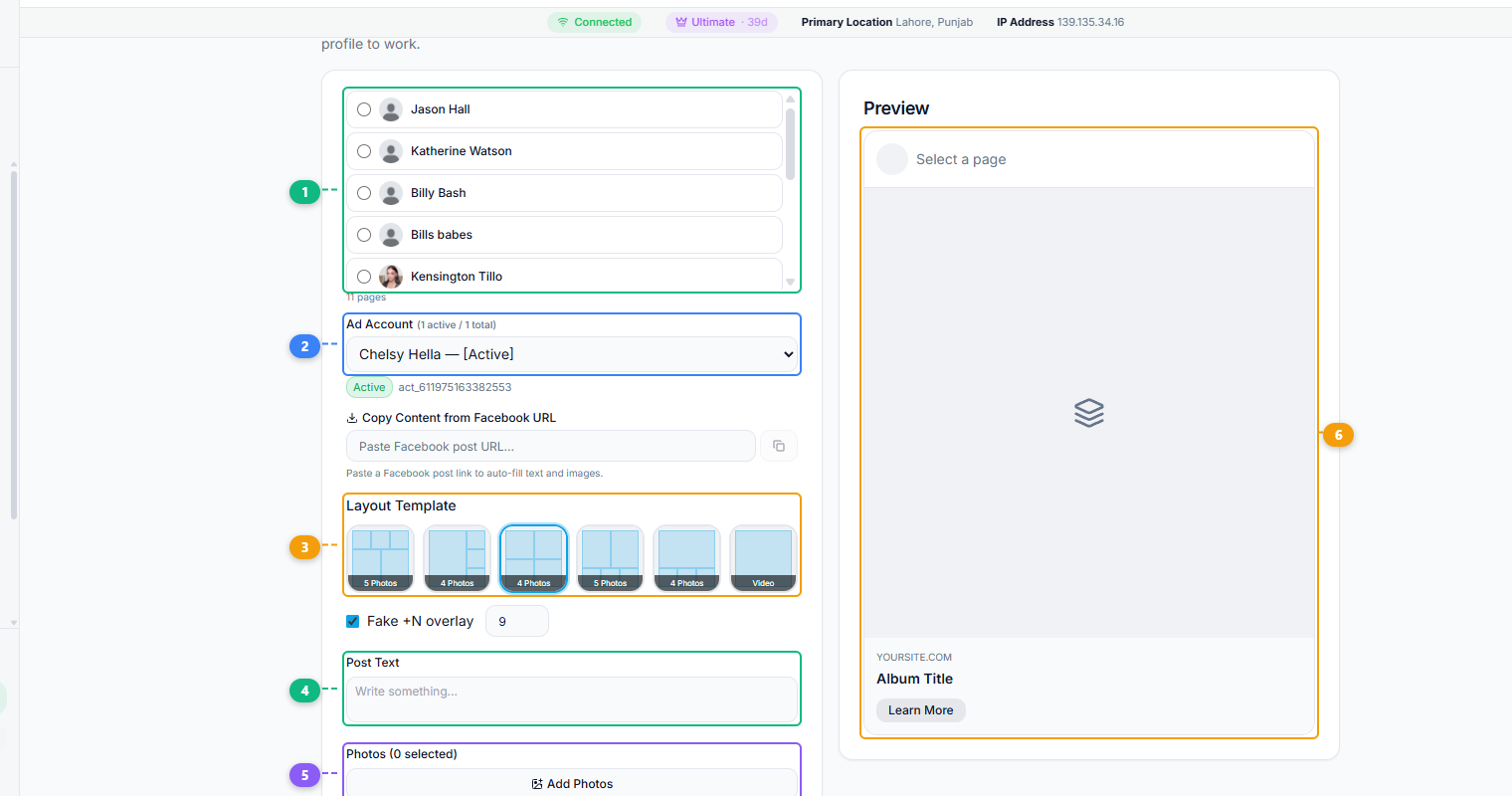
The Album With Link Post tool provides a complete creation interface. Select the target page from your administered pages (1), choose the active ad account (2), pick a layout template that determines how your images are arranged in the grid (3), write your post caption and call-to-action text (4), upload your album photos (5), and preview how the finished post will appear in the feed with its album title and link button (6).
How to Use Album With Link Post in FaceBot#
- Open the FaceBot dashboard and navigate to the Album With Link Post tool.
- Select the Facebook Page you want to post to.
- Upload your images. You need at least two images to create the album layout. More images create a richer grid.
- Enter your destination URL in the link field.
- Write your post caption. Include a clear call to action that tells users what they will find when they click.
- Review the post preview.
- Publish immediately or schedule for a later time.
The tool handles the API formatting that creates the hybrid album-link post type. You do not need to understand the technical details — the output appears in feeds as a polished album post with an active link.
Tips for Maximum Performance#
Lead with your strongest image. The first image in the album gets the most prominent placement in the grid. Make it the most visually compelling.
Use 3-5 images. Two images create a basic split layout. Three to five images create the most visually interesting grid arrangements. More than five can make the grid feel cluttered on mobile screens.
Match image dimensions. Using images with consistent aspect ratios produces a cleaner grid layout. Mixing landscape and portrait images can result in awkward cropping.
Write action-oriented captions. The album already provides the visual hook. Your caption should tell people what to do next: "See all 20 colors on our site," "View the full gallery," "Get the complete guide."
Test against standard link posts. Run both formats on the same page over a two-week period and compare click-through rates. The data from your specific audience is more valuable than any general benchmark.
If you are already using bulk posting tools like the Bulk Page Composer, the Album With Link Post tool fits naturally into the same workflow — it simply gives you a higher-impact post format for content that deserves more visual weight.
🚀 Ready to try Album Card Post?
Create albums with clickable image links
Try it Free Now — 24h Gold, 70+ Tools →Limitations to Know#
This tool creates posts on pages you administer. You cannot use it to post on pages you do not manage. The album-link format is specific to Facebook's API capabilities — the exact visual rendering may vary slightly between desktop and mobile feeds. Facebook occasionally adjusts how album posts display, which is outside any third-party tool's control.
Also, this format works best when you have genuinely good images. A multi-image layout with low-quality photos will underperform a clean single-image link post. Use this tool when you have strong visual assets to showcase.
When an Album Card Post Is the Right Format#
The album card post is a specific tool, and like any format it wins in some situations and loses in others. Knowing when to reach for it keeps your feed varied and effective:
| Use an album card post when… | Reach for something else when… |
|---|---|
| You have multiple related images that tell one story together | You have a single strong image — a single photo post is cleaner |
| Showcasing a product range, a portfolio, or an event recap | You need maximum discovery reach — a Reel does that better |
| Each image benefits from being seen alongside the others | The content is motion-based — use video |
| You want more visual real estate and dwell time in one post | The images are unrelated — post them separately for more reach |
The format's strength is cohesion and dwell time: several images presented as one designed unit hold attention longer than a single photo and let you tell a richer visual story in one post. That makes it ideal for product collections, before/after sequences, step-by-step visuals, and event galleries. Its weakness is that it's an engagement-and-presentation format, not a pure reach engine — so judge it on dwell time and engagement, not raw impressions, and use Reels when the goal is to reach non-followers. Mixing album card posts into a feed that also uses single images, video, and Reels gives your audience variety and gives you the right tool for each job. Export the images at consistent dimensions first using the image sizes cheat sheet so the cards present cleanly.
Frequently Asked Questions#
How many images can I include in an album link post?#
You need a minimum of two images. The practical sweet spot is three to five. Facebook supports larger albums through this format, but the feed preview grid becomes less impactful beyond five images because users only see a portion before needing to click into the album.
Does the link appear as a separate element or is it embedded in the images?#
The link is embedded in the post itself. Clicking the post or the link area takes users to your destination URL. It does not display as a standard link preview card below the images — the album layout and the link are integrated.
Can I use this tool to post to multiple pages at once?#
The Album With Link Post tool targets one page per post. If you need to publish to multiple pages, you can use the Bulk Page Composer for standard post types, or repeat the album post process for each page.
Will this format work for Facebook ads?#
This tool creates organic page posts. You can boost or promote the post through Facebook Ads Manager after it is published, but the tool itself does not create ad units directly. The album-link format often performs well as a boosted post because of its high organic engagement baseline.
How is this different from a Facebook carousel ad?#
Carousel ads are a paid format where each image has its own individual link. Album With Link Posts are organic posts where all images share a single destination link. The visual layout is similar, but the functionality and cost structure differ.
Conclusion#
The Album With Link Post tool gives page administrators a post format that combines the visual impact of multi-image content with the traffic-driving capability of link posts. It is a format that is not easily accessible through Facebook's standard composer, which is exactly why it performs well — fewer pages use it, so it stands out in feeds.
If your page strategy involves driving traffic to external destinations and you have visual content worth showcasing, this tool fills a gap that neither standard link posts nor regular album posts can address on their own. FaceBot makes the creation process straightforward regardless of your technical background.
Try the Album With Link Post tool
For the full walkthrough, see picture link posts.