What Is Link Grabber? Extract Every Link from Any Social Media Profile
Every social media profile contains links. Bio links, post links, story links, pinned URLs, affiliate links buried in captions, landing pages tucked into linktree alternatives. Manually clicking through a profile to collect all of them is tedious when you are looking at one account. When you need to do it across dozens of competitors or hundreds of influencer profiles, it becomes impossible without automation.
Link Grabber is a utility tool inside the FaceBot dashboard that extracts every link associated with a social media profile and returns them in a clean, exportable list. It works across seven major platforms: Facebook, Instagram, TikTok, Twitter (X), YouTube, LinkedIn, and Pinterest.
This article covers what Link Grabber does, which platforms it supports, the practical use cases that make it valuable, how to use it step by step, and answers to the most common questions.
What Does Link Grabber Do?#
Link Grabber takes a social media profile URL as input and returns every link it can extract from that profile. Depending on the platform, this includes:
Bio and about section links. The link in an Instagram bio, the website field on a Facebook Page, the URL in a Twitter profile, the about section on YouTube channels, and equivalent fields on other platforms.
Pinned content links. Links embedded in pinned posts, pinned tweets, featured videos, or highlighted stories that contain URLs.
Recent post links. URLs shared in recent posts, captions, descriptions, and comments by the profile owner. The depth of post scanning depends on the platform and the profile's public visibility settings.
Linktree and link-in-bio pages. If a profile's bio points to a Linktree, Beacons, Lnk.bio, or similar link aggregator, Link Grabber follows that link and extracts the individual URLs from the aggregator page as well.
Contact and external links. Email addresses formatted as mailto links, phone number links, map links, and any other clickable URL present on the profile.
The output is a structured list showing each link alongside its source location (bio, post, pinned content) so you know exactly where each URL came from.
🚀 Link Grabber
Extract every link from any profile or page
Try it Free Now — 24h Gold, 70+ Tools →Supported Platforms#
Link Grabber is not limited to a single social network. It supports the platforms where link extraction is most commonly needed:
Facebook#
Extracts links from Facebook Pages and public profiles, including the website field, about section, recent posts, pinned posts, and any links shared in the page's info tabs.
Instagram#
Pulls the bio link, any links in link-in-bio tools (Linktree, etc.), and links mentioned in recent post captions. Instagram does not make post links as easily accessible as other platforms, so the bio link and link aggregator extraction are the most valuable features here.
TikTok#
Extracts the bio link from TikTok profiles. TikTok is more restrictive about in-post links, so the primary value is capturing the bio URL and any links in the profile description.
Twitter (X)#
Grabs the website field, pinned tweet links, and links from recent tweets. Twitter profiles are often rich in shared URLs, making this one of the most productive platforms for link extraction.
YouTube#
Extracts links from the channel's about page, banner links, video descriptions (for recent uploads), and the channel's associated website and social links.
LinkedIn#
Pulls the website field, contact info links, and featured section links from LinkedIn profiles and company pages. LinkedIn is particularly useful for B2B competitor research.
Pinterest#
Extracts the profile website link and links from recent pins. Pinterest profiles often link directly to product pages and blog posts, making this valuable for e-commerce research.
Who Needs Link Grabber?#
The tool serves anyone who needs to systematically collect URLs from social media profiles. Here are the most common use cases:
Competitor Research#
Understanding where your competitors drive traffic is one of the most actionable forms of competitive intelligence. Link Grabber lets you map out a competitor's entire link ecosystem in seconds rather than manually visiting each platform and clicking through profiles. The insights are immediate:
- Instagram bio link pointing to a specific landing page rather than a homepage reveals their current campaign focus
- Twitter profile link to a lead magnet PDF signals they are building an email list
- Facebook Page about section with a link to a specific product page shows their priority offer
- YouTube channel links to affiliate programs reveal their monetization strategy
- LinkedIn featured section links expose their content funnel entry points
Influencer Vetting#
Before partnering with an influencer, brands need to know what else they are promoting. Link Grabber lets you quickly scan an influencer's profiles across platforms to see their affiliate links, brand partnerships, and the types of products they endorse. This is faster and more thorough than scrolling through their feed manually.
Content Audits#
If you manage social media for a brand, periodically auditing the links on your own profiles ensures nothing is broken, outdated, or pointing to the wrong destination. A link to a discontinued product page or an expired campaign landing page damages user experience and wastes traffic. Link Grabber gives you a snapshot of every active link so you can catch these issues quickly.
Bio Link Extraction at Scale#
Agencies and researchers who need to collect bio links from hundreds of profiles — for outreach campaigns, partnership databases, or market research — can feed profile URLs into Link Grabber sequentially and build a comprehensive link database without manual copying.
Affiliate Link Discovery#
Marketers researching which affiliate programs are popular in a niche can use Link Grabber to extract affiliate links from top creators. The link structure (Amazon Associates, ShareASale, Impact, etc.) reveals which programs are being used and which products are being promoted.
SEO and Backlink Analysis#
Social media profiles often contain backlinks to websites. While these are typically nofollow, they still contribute to brand visibility and referral traffic. Link Grabber helps SEO professionals map the social link footprint of a domain by checking profiles that link back to it.
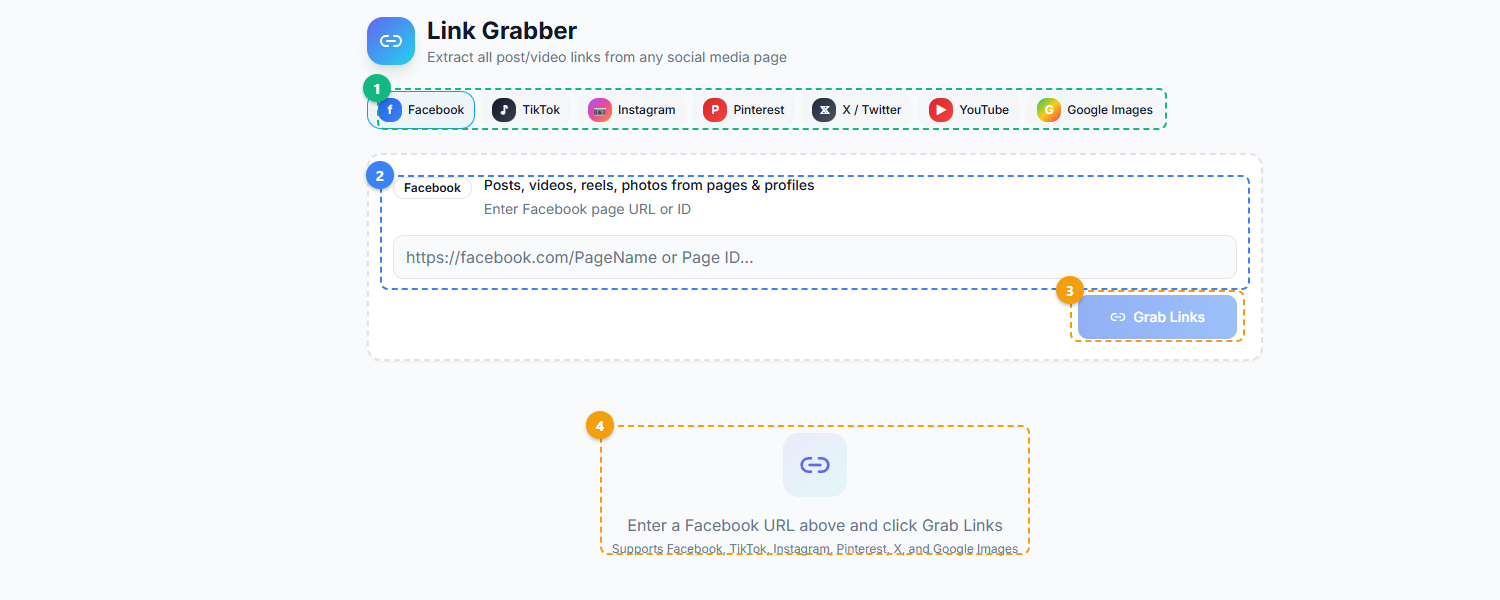
The Link Grabber provides a multi-platform extraction interface. Select a platform from the tabs — Facebook, TikTok, Instagram, Pinterest, X/Twitter, YouTube, or Google Images (1), enter a profile URL or page ID into the input field with platform-specific guidance shown above it (2), click Grab Links to begin extraction (3), and view the collected links in the results area below (4).
How to Use Link Grabber — Step by Step#
Step 1: Open the Tool#
Navigate to the FaceBot dashboard and open Link Grabber from the Utilities section. The tool is browser-based and requires the FaceBot Chrome extension to be installed and active.
Step 2: Enter the Profile URL#
Paste the full URL of the social media profile you want to extract links from. The tool accepts profile URLs from any of the seven supported platforms. Make sure you are using the profile URL, not a specific post URL — the tool is designed to scan profiles, not individual pieces of content.
Step 3: Select Extraction Depth#
Choose whether you want a quick scan (bio and about section only) or a deep scan (bio, about, pinned content, and recent posts). Quick scans return results in seconds. Deep scans take longer but capture links from post content as well.
Step 4: Run the Extraction#
Hit the extract button. Link Grabber processes the profile and returns a list of every link found, organized by source location. Each entry shows the URL, where it was found (bio, post caption, pinned content, etc.), and the anchor text if available.
Step 5: Export or Copy#
You can copy individual links, copy the entire list to clipboard, or export the results as a CSV file for further analysis in a spreadsheet or database.
Practical Tips for Getting the Most from Link Grabber#
Run extractions on a competitor's profiles across all platforms, not just one. A brand might use their Instagram bio for a product page and their Twitter bio for a newsletter signup. Scanning all platforms gives you the complete picture.
Check links monthly for your own profiles. Links break. Landing pages get taken down. Campaign URLs expire. A monthly extraction of your own profiles ensures every link is still active and pointing where you intend.
Combine with FaceBot's other research tools. Use Link Grabber alongside profile analysis and content discovery tools to build a comprehensive view of any account's strategy — not just their links, but the content driving traffic to those links.
Pay attention to link-in-bio tool usage. If most competitors in your niche use Linktree or a similar service, that is a signal about user behavior. If none of them do, going direct with your bio link might be the norm for your audience.
Use CSV exports for bulk analysis. When extracting links from dozens of profiles, export each result to CSV and combine them in a spreadsheet. You can then sort by domain, filter by affiliate program, or identify the most commonly linked landing pages in a niche.
🚀 Ready to try Link Grabber?
Extract every link from any profile or page
Try it Free Now — 24h Gold, 70+ Tools →Limitations Worth Knowing#
Private profiles cannot be scanned. Link Grabber can only extract links from public profiles and pages. If an Instagram account is set to private, the tool cannot access its posts or bio details beyond what is publicly visible.
Link depth varies by platform. Some platforms expose more link data than others. YouTube channel about pages are rich with links. TikTok profiles typically contain only one bio link. The tool extracts everything available, but the available data depends on the platform's structure.
Dynamic content may not be captured. Links rendered purely through JavaScript after page load (without corresponding data in the profile's underlying structure) may not be captured in all cases.
Rate limits apply for bulk extraction. If you are extracting from a large number of profiles in rapid succession, platform-level rate limiting may slow the process. The tool handles this gracefully, but very high-volume sessions may take longer to complete.
Try Link Grabber#
Ready to see every link on any social media profile, organized and exportable? Link Grabber is available now in the FaceBot dashboard.
Link Grabber pairs well with other FaceBot data tools. For a full overview of data extraction capabilities, see the complete guide to Facebook data extraction.
Frequently Asked Questions#
Does Link Grabber work on private Instagram accounts?#
No. Link Grabber can only extract links from publicly visible profiles. If an Instagram account is set to private, the tool can access the bio link (which is always public) but cannot scan post captions or stories. This is a platform limitation, not a tool limitation — Instagram restricts access to private account content.
Can I extract links from multiple profiles at once?#
The tool processes one profile at a time. For bulk extraction, you submit profiles sequentially and export each result. This approach keeps extractions reliable and avoids triggering platform rate limits that could affect accuracy. For large-scale projects, the CSV export makes it straightforward to combine results afterward.
Does Link Grabber follow shortened URLs to show the final destination?#
Yes, for most common URL shorteners (bit.ly, t.co, ow.ly, and similar services), Link Grabber resolves the redirect and shows both the shortened URL and the final destination URL. This is particularly useful for identifying affiliate links and tracking parameters that are hidden behind shorteners.
Is the extracted data stored anywhere?#
Link Grabber runs in your browser session. The extracted links are displayed in the dashboard and can be copied or exported by you, but they are not stored on FaceBot's servers after your session ends. Each extraction is a fresh scan of the profile at that moment in time.
How current are the extracted links?#
Link Grabber extracts links as they exist on the profile at the time of extraction. It is a real-time scan, not a historical archive. If a profile owner changes their bio link after your extraction, you would need to run a new extraction to see the updated link. For monitoring changes over time, run periodic extractions and compare your exported CSV files.
Conclusion#
Link Grabber solves a specific but widespread problem: collecting URLs from social media profiles without manually clicking through each one. For competitor researchers, influencer marketers, content auditors, and anyone managing links across multiple platforms, it replaces hours of manual work with a single extraction step. Combined with FaceBot's broader utility toolkit, it fits into research workflows where knowing what someone links to is just as important as knowing what they post.