How to Schedule TikTok Content to Facebook Pages Automatically
Short-form video content that performs well on TikTok often performs equally well on Facebook. The algorithms are different, but the audience appetite for engaging vertical video overlaps significantly. Facebook Reels, in particular, has been aggressively pushed by Meta, and creators who cross-post consistently report meaningful reach gains on their Facebook Pages.
The problem is that manual cross-posting is tedious. Download the TikTok video, remove or crop the watermark, open your Facebook Page, upload the video, write a caption, publish. Repeat for every video, every page, every day. If you manage multiple Facebook Pages, multiply that effort accordingly.
The TikTok to Facebook Page Scheduler inside the FaceBot dashboard automates this workflow. It monitors your TikTok content and reposts it to your designated Facebook Pages on a schedule you define. This article walks through the complete setup process, explains the strategic considerations behind cross-platform content reuse, and covers the practical details you need to make it work effectively.
Why Cross-Post TikTok Content to Facebook?#
Before diving into the how, it is worth understanding the why. Cross-posting is not just about saving time — it is about maximizing the return on content you have already created.
Reach a Different Demographic#
TikTok skews younger (16-34 is the core demographic). Facebook skews older (25-54 is the most active range). The same video that resonates with a 22-year-old on TikTok may perform well with a 38-year-old on Facebook who would never see it otherwise. Cross-posting extends your content's reach into a demographic you are not paying extra to access.
Facebook Reels Are Algorithmically Boosted#
Meta has been prioritizing short-form video content in the Facebook feed since 2023. Facebook Reels and short video posts receive disproportionate organic reach compared to static image or link posts. TikTok content is already optimized for this format — vertical, short, attention-grabbing — making it natural Reels material.
Content Amortization#
Every piece of content has a production cost — your time, your creative energy, potentially ad spend to boost it. If a TikTok video took two hours to script, shoot, and edit, posting it only on TikTok means that investment serves one platform. Cross-posting to Facebook (and potentially Instagram Reels, YouTube Shorts, and others) amortizes that cost across multiple platforms with minimal additional effort.
Page Activity and Consistency#
Facebook's algorithm favors pages that post consistently. If your primary content creation happens on TikTok and your Facebook Page sits dormant between occasional manual posts, cross-posting keeps your Page active and feeding the algorithm fresh content on a regular cadence.
🚀 TikTok Scheduler
Auto-post TikTok content to Facebook pages
Try it Free Now — 24h Gold, 70+ Tools →What the TikTok to Facebook Page Scheduler Does#
The scheduler connects your TikTok account to one or more Facebook Pages and handles the reposting pipeline:
Content monitoring. The tool monitors your TikTok profile for new video uploads. When you publish a new TikTok, the scheduler detects it and queues it for reposting.
Video processing. TikTok videos are downloaded and prepared for Facebook publishing. This includes handling format compatibility and ensuring the video meets Facebook's specifications for Reels and video posts.
Scheduling flexibility. You choose when cross-posted content goes live on Facebook. Options include immediate reposting (within minutes of TikTok publication), delayed reposting (a configurable gap between TikTok publish and Facebook publish), or specific time windows (e.g., only post to Facebook during peak engagement hours for your audience).
Multi-page support. If you manage multiple Facebook Pages, the scheduler can repost to all of them — the same TikTok video going to your main brand page, your regional pages, or any combination of administered pages.
Caption handling. You can configure whether to reuse the TikTok caption as-is, modify it with a template (e.g., adding "Originally posted on TikTok" or removing TikTok-specific hashtags), or write custom captions for the Facebook version.
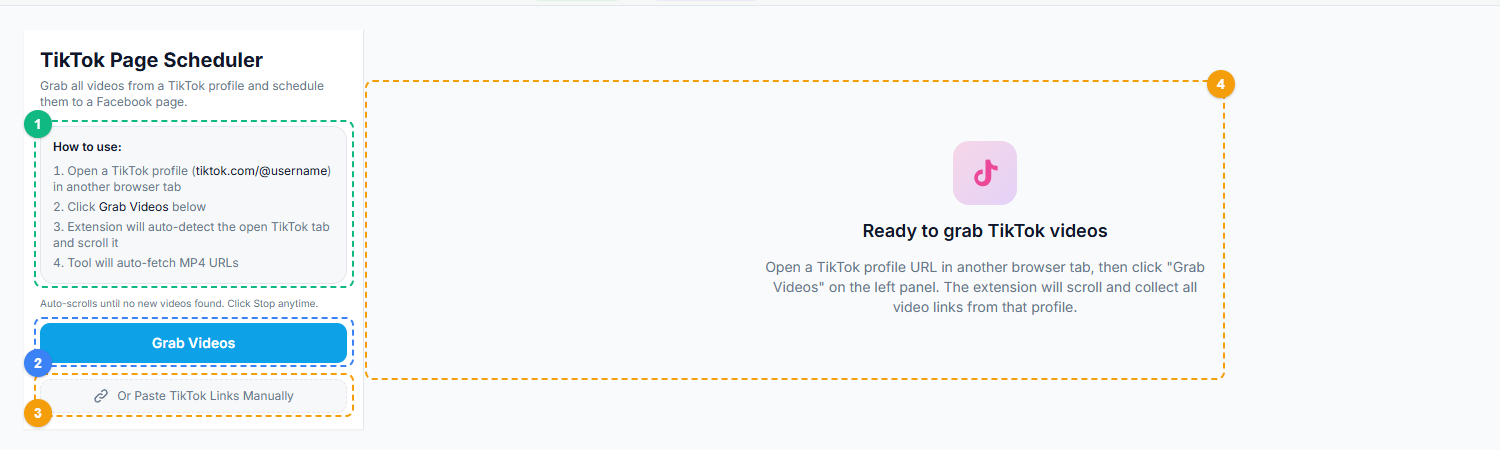
The TikTok Page Scheduler uses a two-panel layout. The left panel shows step-by-step instructions for connecting your TikTok profile (1), the Grab Videos button that auto-detects and scrolls through the open TikTok tab to collect video URLs (2), and an option to paste TikTok links manually instead (3). The right panel displays the video queue where grabbed videos appear ready for scheduling to your Facebook Pages (4).
Step-by-Step Setup Guide#
Step 1: Install the FaceBot Chrome Extension#
If you have not already, install the FaceBot Chrome extension from the dashboard. The extension handles the secure connection between your browser, the dashboard, and the platforms. The scheduler requires the extension to be active when configuring and when scheduled posts are being published.
Step 2: Open the TikTok to Facebook Page Scheduler#
Navigate to the FaceBot dashboard and find the TikTok to Facebook Page Scheduler in the Reels section. The tool opens with a configuration interface where you will connect your accounts and set your scheduling preferences.
Step 3: Connect Your TikTok Account#
The scheduler needs access to your TikTok profile to monitor new video uploads. Follow the connection prompts in the tool. You will need to be logged into TikTok in your browser for the connection to establish.
Step 4: Select Your Facebook Pages#
The tool displays all Facebook Pages you administer. Select which pages should receive cross-posted TikTok content. You can select one page or multiple pages. Each page can have independent scheduling settings if needed.
Step 5: Configure Scheduling Preferences#
Set your scheduling rules:
- Repost timing: Choose immediate, delayed (specify hours), or time-window based scheduling.
- Frequency cap: Optionally limit how many TikToks are cross-posted per day to avoid flooding your Facebook Page.
- Caption template: Define how TikTok captions should be adapted for Facebook. You can keep them identical, strip TikTok-specific hashtags, prepend or append text, or set a static caption template.
- Content filter: Optionally exclude TikToks that contain certain hashtags or keywords from being cross-posted (useful if some of your TikTok content is platform-specific and would not make sense on Facebook).
Step 6: Run a Test Post#
Before activating the full schedule, run a manual test. Select a recent TikTok video and cross-post it to one Facebook Page. Verify that the video appears correctly, the caption renders as expected, and the aspect ratio looks right on Facebook.
Step 7: Activate the Schedule#
Once the test post confirms everything works, activate the scheduler. From this point, new TikTok videos will be automatically queued and posted to your selected Facebook Pages according to your scheduling rules.
Step 8: Monitor Initial Performance#
For the first week, check your Facebook Pages daily to verify posts are appearing on schedule and rendering correctly. Watch for any formatting issues, caption problems, or scheduling delays. Once you are confident the automation is running smoothly, you can reduce monitoring to periodic spot-checks.
Strategic Tips for Effective Cross-Posting#
Do Not Repost Everything Blindly#
Not every TikTok belongs on Facebook. Duets, stitches, and TikTok-specific trend participation often rely on context that Facebook audiences do not have. Use the content filter to exclude TikToks with platform-specific hashtags like #duet, #stitch, or trend-specific tags that only make sense in the TikTok ecosystem.
Adjust Captions for the Facebook Audience#
TikTok captions tend to be short, hashtag-heavy, and use platform-specific slang. Facebook audiences respond better to slightly longer, more descriptive captions. Use the caption template feature to strip excessive hashtags and add context that helps a Facebook viewer understand the content without TikTok's algorithm providing discovery context.
Time Your Facebook Posts Strategically#
TikTok and Facebook have different peak engagement windows. If your TikTok audience is most active at 10 PM and your Facebook audience peaks at 12 PM, posting the same content at the same time means one platform gets optimal timing and the other does not. Use the scheduling delay to shift Facebook posting to your Facebook audience's peak hours, even if the TikTok original went live at a different time.
Let High Performers Lead#
Consider configuring the scheduler to delay cross-posting by 24-48 hours. This lets you see which TikToks gain traction organically before pushing them to Facebook. Videos that flop on TikTok might still work on Facebook (different audience), but videos that go viral on TikTok are almost certainly worth cross-posting promptly. The delay gives you a data point to work with.
Maintain Platform-Native Content Too#
Cross-posting should supplement your Facebook content strategy, not replace it entirely. Pages that post only repurposed TikTok content can feel like afterthoughts. Mix cross-posted videos with Facebook-native content — text posts, photos, link shares, longer-form video — to maintain a well-rounded page presence.
Track Performance Separately#
A video's performance on TikTok does not predict its Facebook performance. Track engagement metrics on each platform independently. Over time, you will identify patterns — certain content types or topics might consistently perform better on Facebook than TikTok, or vice versa. This data should inform not just your cross-posting decisions but your content creation strategy overall.
🚀 Ready to try TikTok Scheduler?
Auto-post TikTok content to Facebook pages
Try it Free Now — 24h Gold, 70+ Tools →Common Issues and Solutions#
Video quality looks lower on Facebook. Facebook recompresses uploaded videos. There is no way to completely prevent this, but starting with the highest quality source helps. Ensure your TikTok export settings are set to maximum quality.
Captions look cluttered with TikTok hashtags. Use the caption template to strip hashtags or replace them with Facebook-appropriate alternatives. Thirty hashtags that boost discovery on TikTok look spammy on Facebook.
Some TikToks fail to cross-post. Check whether the failed video uses a copyrighted sound. Facebook's content matching system is more aggressive than TikTok's, and videos with certain audio tracks may be blocked or muted on upload. The scheduler will report these failures so you can address them.
Facebook reach is low despite consistent posting. Cross-posting gets content onto the platform, but reach depends on content quality, audience engagement, and page history. If your Facebook Page has been dormant for months, expect a ramp-up period as the algorithm relearns your posting pattern and audience interest.
Try TikTok to Facebook Page Scheduler#
Ready to put your TikTok content to work on Facebook? The TikTok to Facebook Page Scheduler is available in the FaceBot dashboard.
Open TikTok to Facebook Page Scheduler
If you manage multiple Facebook Pages, see the complete guide to Facebook page management for tips on organizing and scaling your page operations. For downloading TikTok videos to repurpose manually, check our complete guide to downloading social media content.
Frequently Asked Questions#
Will Facebook penalize my page for cross-posting TikTok content?#
No. Facebook does not penalize pages for posting content that was originally created on another platform. What Facebook does deprioritize is content with visible TikTok watermarks in some cases. The scheduler handles video processing to minimize this issue. The content itself — vertical short-form video — is exactly what Facebook's Reels algorithm is designed to promote.
Can I cross-post to Facebook Groups instead of Pages?#
The TikTok to Facebook Page Scheduler is designed specifically for Facebook Pages. Group posting has different mechanics and permissions. FaceBot offers separate tools for group content management if you need to share videos to Groups as well.
Does the scheduler work while my computer is off?#
The scheduler requires the FaceBot Chrome extension to be active in your browser for posts to be published. If your browser is closed or the extension is inactive, scheduled posts will queue and publish when the extension is next active. For fully unattended operation, keep a browser session with the extension running on a dedicated machine or during your working hours.
How many Facebook Pages can I schedule to simultaneously?#
There is no hard limit from the tool side. You can select as many Facebook Pages as you administer. In practice, users commonly schedule to 5-20 pages simultaneously. Very large numbers of pages may require staggered scheduling to stay within Facebook's publishing rate limits.
Can I edit a TikTok video before it cross-posts to Facebook?#
The scheduler reposts the video as published on TikTok. It does not include a video editor. If you want to make edits (trimming, adding text overlays, changing the thumbnail), you would need to edit the video before publishing it to TikTok, or manually download and edit it before posting to Facebook separately. The scheduler is optimized for automated, hands-off cross-posting of content as-is.
Conclusion#
Cross-posting TikTok content to Facebook Pages is one of the highest-return, lowest-effort content strategies available to social media managers and creators. The content already exists. The audience is already there. The TikTok to Facebook Page Scheduler in FaceBot removes the manual labor from the equation, turning a repetitive download-upload-caption-publish cycle into an automated pipeline. Set it up once, tune your scheduling preferences, and let your TikTok content work for you on both platforms.