What Is Page Content Cloner? Replicate Top Facebook Page Content Instantly
Content creation is the most time-consuming part of managing a Facebook Page. Coming up with original posts every day, sourcing images, writing captions, finding the right formats — it adds up fast, especially when you manage multiple pages.
Page Content Cloner is a FaceBot tool that takes a different approach: instead of creating everything from scratch, it lets you pull content from other Facebook Pages and republish it to your own pages. The idea is not to steal content — it is to curate, repurpose, and adapt proven content from pages in your niche, much like media companies syndicate articles or curators share relevant content with attribution.
This article explains what Page Content Cloner does, the right and wrong ways to use it, step-by-step instructions, and honest answers to common concerns.
What Does Page Content Cloner Do?#
Page Content Cloner connects to a source Facebook Page and lets you select specific posts to clone to one or more of your own pages. Here is the feature breakdown:
Source page browsing. Enter any public Facebook Page URL and browse its content directly in the FaceBot dashboard. You see post text, media, publish dates, and engagement metrics.
Selective cloning. You choose which posts to clone. This is not an automated scraper that copies everything — you pick the specific content that fits your page's strategy.
Multi-page publishing. Clone selected content to one page or distribute it across multiple pages you manage.
Content adaptation. Before publishing, you can edit the post text, swap media, or modify the content to fit your brand voice. The cloned content is a starting point, not a final product.
Media handling. Photos and videos from the source post are carried through to the cloned version. The tool handles the media download and re-upload process automatically.
🚀 Page Content Cloner
Clone winning content to your page in one click
Try it Free Now — 24h Gold, 70+ Tools →When Is Content Cloning Appropriate?#
Content cloning raises legitimate questions about originality and ethics. Here is when it makes sense and when it does not:
Appropriate Use Cases#
Curating industry news and memes. If your page is a niche aggregator — tech news, sports highlights, viral memes — your audience expects curated content. Cloning a trending post from a source page, adding your own commentary or credit, and sharing it with your audience is standard curation practice.
Repurposing your own content across pages. If you manage multiple pages, cloning your best-performing content from one page to another is entirely legitimate. A cooking tutorial that went viral on your recipe page can be repurposed for your general food page.
Studying and adapting competitor formats. Cloning a competitor's post to your dashboard so you can study its structure — caption length, media type, call to action — and then create original content inspired by it. The clone serves as a reference, not the final published post.
Time-sensitive content distribution. Breaking news, event announcements, or trending topics move fast. Cloning a well-written post about a trending event and adapting it for your audience saves critical time when speed matters.
Filling content gaps during low-creation periods. Every page manager goes through periods where original content production slows down. Curating quality content from relevant sources keeps your page active and your audience engaged.
When Not to Clone#
Do not clone and publish without any modification or attribution. Posting someone else's original content word-for-word without credit is plagiarism, regardless of the tool used.
Do not clone copyrighted creative work. Professional photography, original artwork, and branded creative assets belong to their creators. Cloning a photographer's portfolio posts to your page is not curation — it is theft.
Do not clone content that is clearly personal. A business sharing its founder's personal story, a creator sharing a vulnerable moment — this content is context-dependent and should not be replicated.
How to Use Page Content Cloner — Step by Step#
Step 1: Open the Tool#
Navigate to Page Content Cloner in the FaceBot dashboard under Page Management.
Step 2: Enter the Source Page#
Provide the URL or Page ID of the Facebook Page you want to browse for content. The page must be public. Set an optional date range and max posts limit to narrow the source content.
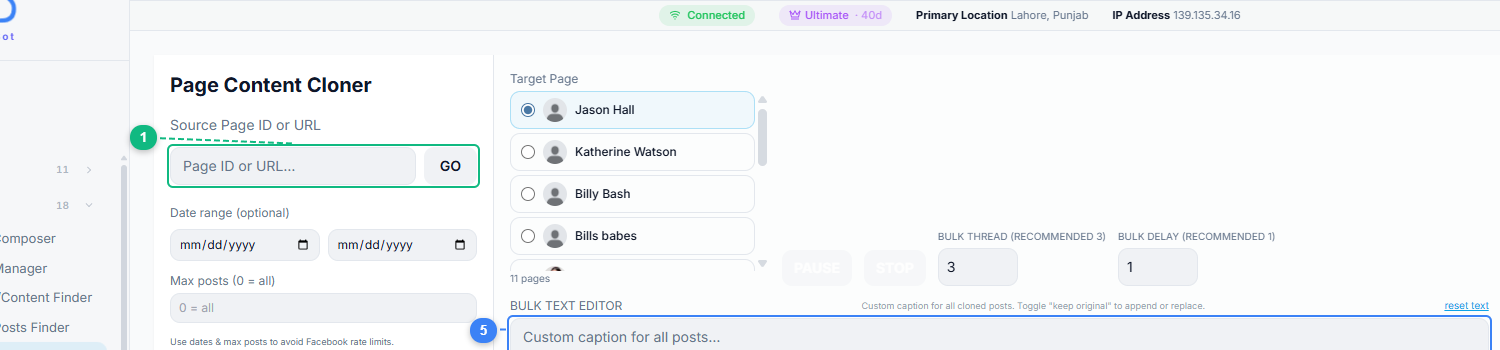
The interface has two panels: the left side configures your source page and filters, while the right side shows your target pages, bulk text editor for custom captions, logo watermark option, and find-and-replace for bulk text modifications.
Step 3: Browse and Select Content#
The tool loads the source page's posts. Browse through them and select the posts you want to clone. Use the Viral Page Posts Finder beforehand to identify which of the source page's posts have the highest engagement — so you are cloning winners, not random content.
Step 4: Edit Before Publishing#
For each selected post, review and modify the content:
- Rewrite the caption in your brand voice
- Add attribution if publishing as curated content
- Swap or supplement the media if needed
- Remove any references specific to the source page
Step 5: Select Destination Pages#
Choose which of your pages should receive the cloned content. You can publish to a single page or distribute across multiple pages.
Step 6: Publish#
Execute the publish action. The tool handles media uploading and post creation on each destination page.
Best Practices for Content Cloning#
Always add value. The bar for ethical curation is adding value beyond the original. This means adding your own analysis, commentary, a different angle, or additional context. "Here is what Page X posted" with a link is curation. Copying and pasting without any addition is not.
Credit the source when appropriate. If you are sharing someone's insight, tip, or creative work, mention the source page. This is not just ethical — it builds relationships with other page operators in your niche.
Use cloning as research, not as your content strategy. The most effective use of Page Content Cloner is as an inspiration engine. Clone five competitor posts, study their structure, then create five original posts that follow the same proven patterns but with your own content and perspective.
Pair with the Viral Page Posts Finder. Do not clone randomly. Use FaceBot's Viral Page Posts Finder to identify the highest-engagement content on a source page first, then clone only the top performers. This ensures you are working with content that has already been validated by an audience.
Track which cloned content performs. Keep notes on which cloned-and-adapted posts perform well on your pages versus your fully original content. Over time, this reveals which types of curated content your audience values and which types they ignore.
Respect Facebook's policies. Facebook's terms of service prohibit misleading attribution. If you clone content, do not present it as your own original work when it clearly is not. The platform's integrity systems can detect mass-duplicated content across pages.
Limitations#
- Public pages only. The tool can only browse and clone content from pages whose posts are publicly visible.
- Media quality depends on the source. The cloned media quality matches what the source page uploaded. If the original photo was low-resolution, the clone will be too.
- No automated scheduling. Cloned content is published immediately or held for manual review. There is no built-in scheduling for future publish times.
- Duplicated content risk. If you and other page operators clone the same viral post, your audiences may see the same content multiple times from different pages. Facebook's algorithm may deprioritize duplicate content.
🚀 Ready to try Page Content Cloner?
Clone winning content to your page in one click
Try it Free Now — 24h Gold, 70+ Tools →Try Page Content Cloner#
Ready to streamline your content workflow with smart curation? Page Content Cloner is available in the FaceBot dashboard.
The Line Between Curation and Copying#
This tool is powerful precisely because it sits near a line you must respect. Get the distinction right and it's a legitimate curation workflow; get it wrong and it's plagiarism that hurts your pages and risks takedowns:
- Curation is adding value. Sharing a relevant post with attribution and your own perspective is what media curators, newsletters, and aggregators do every day. The value you add — context, commentary, a tie-in to your audience — is what makes it curation.
- Copying is passing off. Lifting someone's original photo, video, or caption and republishing it as if it were yours is copyright infringement. Facebook's rights-management systems detect duplicate media, and repeat offenses can restrict or unpublish a page.
- The safe default is transformation. Use cloned content as a starting point you rewrite, re-angle, or pair with your own media — never a finished product you ship unchanged.
- Always credit original creators. When you share someone's work as-is because it's genuinely worth sharing, attribute it clearly. Credit turns a potential infringement into a legitimate share.
The mental model: clone to curate and adapt, never to duplicate and claim. That keeps the tool a time-saver instead of a liability.
What to Adapt Before You Republish#
Cloned content almost never performs as-is — the posts that work are the ones you make your own. A quick adaptation checklist before publishing:
- Rewrite the caption in your brand voice. Even keeping the idea, phrase it the way your audience expects to hear it. This also avoids duplicate-text detection.
- Swap or refresh the media where you can. Your own image or video is always safer and usually more on-brand than a carried-over asset — and it sidesteps copyright entirely.
- Localize the angle. Reframe the point for your specific niche or audience ("here's what this means for [your audience]") so it reads as made-for-them, not borrowed.
- Update anything time-sensitive. Dates, stats, and references in the source post may be stale — refresh them so your version is the better one.
- Add a genuine call to action. Point the post at your next step, not the source's.
Done this way, the tool compresses the hardest part of page management — constant ideation — into "start from proven, then make it better and yours." For publishing the adapted result across your pages, hand off to the Bulk Page Composer.
Frequently Asked Questions#
Is content cloning the same as content stealing?#
No — with an important caveat. Cloning a post to study its structure, adapting it with your own voice and perspective, and adding original value is content curation. Copying and pasting someone else's original work without modification or attribution is plagiarism. The tool gives you the ability to clone; how you use the cloned content determines whether it is ethical. Always modify, adapt, and add value.
Can I clone video posts, or just text and images?#
Page Content Cloner supports all standard post types including text, photos, videos, and link shares. Video posts are downloaded from the source page and re-uploaded to your destination page. Keep in mind that very long videos may take more time to process during the cloning operation.
Will the source page know I cloned their content?#
No. The tool reads publicly available content from the source page — the same content any visitor can see by browsing the page. There is no notification sent to the source page, and no record of the clone is created on their end.
How is this different from sharing a post?#
Sharing a post on Facebook creates a reference back to the original post on the source page. If the source page deletes the original, your share breaks. Cloning creates an independent copy on your page — it stands on its own regardless of what happens to the original. The tradeoff is that cloning does not automatically attribute the source, so you should add attribution manually when appropriate.
Can I clone content from pages in any language?#
Yes. The tool handles content in any language that Facebook supports. The post text, media, and metadata are carried through regardless of language. If you are cloning content from a page in a different language and need to translate it, you would handle the translation during the editing step before publishing.
Conclusion#
Page Content Cloner is a time-saver and an inspiration engine — but only if used responsibly. The tool is most powerful when combined with a genuine content strategy: use the Viral Page Posts Finder to identify what works, clone the best examples as references, adapt them with your own voice and value, and distribute via Bulk Page Composer. Used this way, it accelerates your content production without sacrificing originality.