
How to Bulk Collaborate on Facebook Pages: Cross-Promote at Scale
Facebook introduced page collaborations as a way for two or more pages to co-author a post, with the content appearing on both pages' feeds. It is essentially cross-promotion built into the platform — when two pages collaborate on a post, both pages' audiences see it, both pages get engagement signals, and both benefit from the combined reach.
For individual pages, setting up a collaboration is straightforward. You create a post, invite a collaborator page, they accept, and the post goes live on both feeds. But if you manage multiple pages and want to set up collaborations across all of them — pairing each page with relevant partners, sending invitations, and managing acceptances — the manual process becomes a logistical nightmare.
This guide explains how to bulk collaborate across Facebook Pages using FaceBot's Bulk Collab tool, including the strategy behind effective collaborations and step-by-step instructions.
What Are Facebook Page Collaborations?#
A Facebook Page collaboration is a co-authored post that appears on multiple pages simultaneously. When two pages collaborate:
- The post shows both page names as co-authors
- The post appears in both pages' feeds
- Engagement (reactions, comments, shares) is aggregated and visible on both
- Both pages' followers can see the post organically
This is different from tagging or mentioning another page in a post. A collaboration is a formal co-authorship — both pages have equal ownership of the content. It signals to the algorithm that the content is endorsed by multiple pages, which can boost distribution.
Facebook rolled out this feature primarily for creators and brands to collaborate, but it is equally useful for page networks, multi-location businesses, and agency portfolios.
🚀 Bulk Collaboration
Cross-promote across all your pages automatically
Try it Free Now — 24h Gold, 70+ Tools →Why Bulk Collaboration Matters#
Audience Cross-Pollination#
The primary value of collaboration is audience sharing. If Page A has 50,000 followers and Page B has 30,000 followers with minimal overlap, a collaborative post reaches up to 80,000 people organically — far more than either page could achieve alone.
Algorithm Boost#
Collaborative posts tend to receive higher algorithmic distribution than regular posts. Facebook promotes the collaboration format because it encourages interconnection between pages — something Facebook values for platform engagement metrics.
Trust Transfer#
When two pages co-author content, their audiences implicitly trust the co-author. If your audience trusts your fitness page and sees it collaborating with a nutrition page, that nutrition page inherits a measure of credibility. This trust transfer is powerful for growing new pages.
Efficient Growth for Page Networks#
If you manage a network of related pages — sports, entertainment, news, niche communities — bulk collaboration lets every page benefit from the network's total audience. A single collaborative post across five pages with 20,000 followers each reaches 100,000 people.
Agency Portfolio Cross-Promotion#
Agencies managing client pages can facilitate collaborations between non-competing clients in complementary niches. A real estate page collaborating with a home decor page, a gym collaborating with a nutrition brand — these partnerships benefit both clients and demonstrate the agency's strategic value.
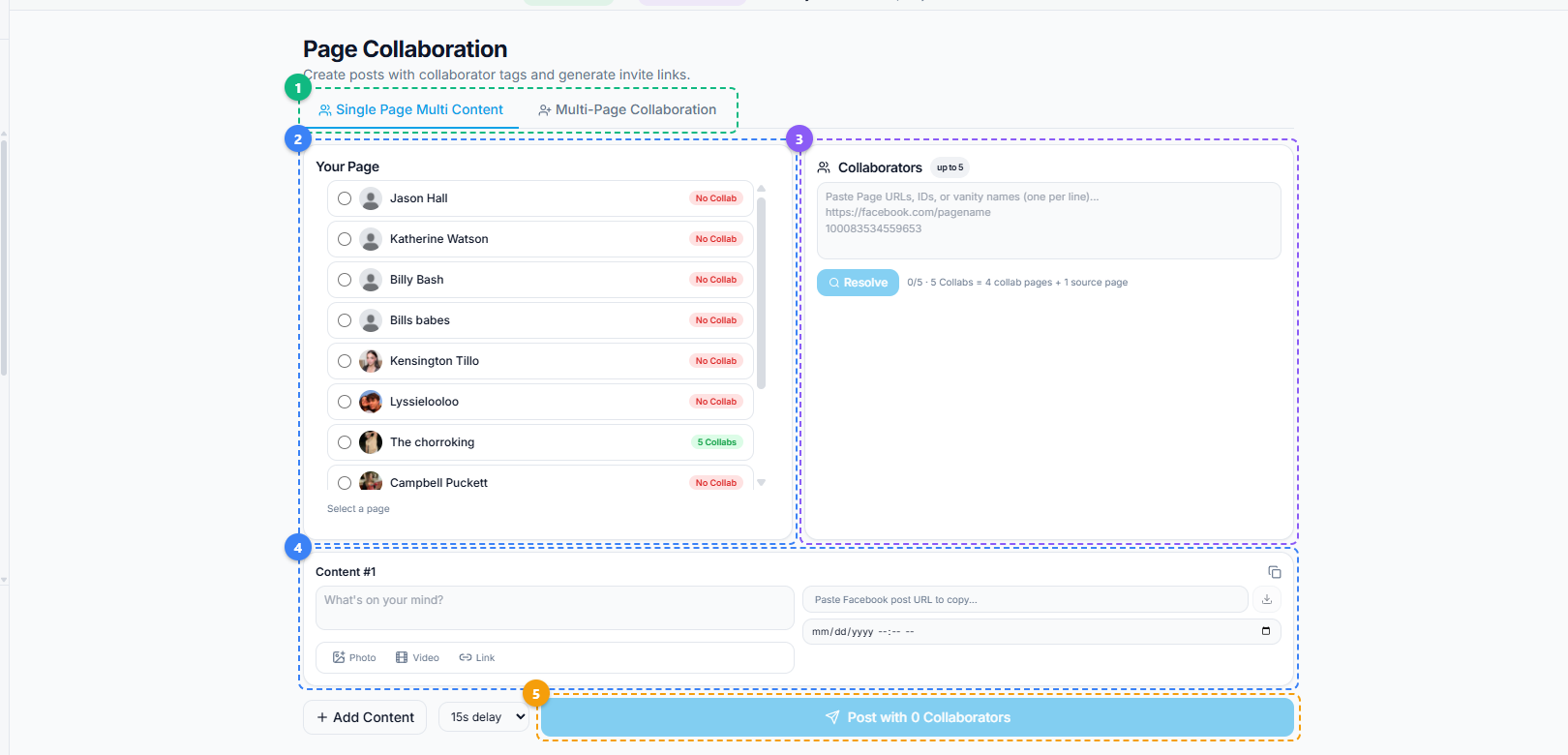
The Page Collaboration tool uses a multi-panel layout. Switch between Single Page Multi Content and Multi-Page Collaboration modes (1), select your source page from the list showing collab status for each page (2), paste collaborator page URLs or IDs into the Collaborators panel and click Resolve to validate them (3), compose your post content with text, photo, video, or link options and optional scheduling (4), then click Post to publish the collaboration across all selected pages (5).
How to Set Up Bulk Collaborations — Step by Step#
Step 1: Plan Your Collaboration Pairs#
Before opening the tool, map out which pages should collaborate with which:
- Complementary niches. Pair pages whose audiences would genuinely find each other valuable. A cooking page with a kitchen equipment page. A travel page with a photography page.
- Similar audience sizes. Collaborations work best when both pages have comparable follower counts. A 500K-follower page collaborating with a 500-follower page creates asymmetric value that the larger page may not agree to.
- Non-competing. Do not collaborate with direct competitors. The goal is audience sharing, not audience splitting.
Step 2: Open Bulk Collab#
Navigate to the FaceBot dashboard and open Bulk Collab from the Page Management section.
Step 3: Select Your Source Pages#
Choose the pages you manage that will initiate the collaborations. These are the pages from which the collaboration invitations will be sent.
Step 4: Specify Collaboration Partners#
For each source page, specify the partner page(s) to collaborate with. You can:
- Pair each of your pages with a specific partner
- Set up multiple collaborations per page
- Configure cross-collaborations within your own page network
Step 5: Compose the Collaborative Content#
Write the post that will appear on both pages. Since the content appears on multiple pages, ensure it is relevant and appropriate for all audiences involved.
Tips for collaborative content:
- Keep the tone neutral enough to fit both pages' brands
- Mention both pages naturally in the caption if appropriate
- Use media (images or video) that represents both collaborators
- Include a clear value proposition for both audiences
Step 6: Send Collaboration Invitations#
Execute the bulk collaboration. The tool sends collaboration invitations from your source pages to the partner pages.
Important: If the partner pages are also managed by you, the tool can handle both sides of the collaboration — sending and accepting. If the partner pages are managed by someone else, they will need to accept the collaboration invitation on their end.
Step 7: Monitor Acceptance#
Track which collaborations have been accepted and which are pending. Follow up on pending invitations if needed.
Step 8: Review Published Collaborations#
Once collaborations go live, verify the posts appear correctly on both pages' feeds with proper co-authorship attribution.
Collaboration Strategies That Drive Results#
The Content Exchange#
Each page in the collaboration creates content that is specifically valuable to the other page's audience. Page A writes "5 Nutrition Tips for Athletes" and Page B writes "5 Training Mistakes to Avoid." Both pages collaborate on both posts, giving each audience fresh expertise from a trusted source.
The Joint Campaign#
Two or more pages collaborate on a series of posts around a shared theme or event. A week-long fitness challenge co-authored by a gym page and a supplement brand, for example. The series format builds anticipation and keeps audiences engaged across multiple touchpoints.
The Network Roundup#
If you manage a network of niche pages, create a weekly "best of" collaborative post that aggregates highlights from across the network. Each page in the network collaborates on the roundup, exposing every page's audience to the full network.
The Expert Feature#
Collaborate with pages in your niche that are recognized authorities. The collaboration post features their expertise on a topic your audience cares about. This positions your page as a connector and curator while giving the expert page access to your audience.
The Seasonal Push#
Around major events, holidays, or industry milestones, set up bulk collaborations across all relevant pages in your portfolio. A coordinated push ensures maximum reach during the period when audience attention is highest.
Best Practices#
Do not collaborate indiscriminately. Every collaboration signals to your audience that you endorse the partner page. Choose partners whose content quality and values align with yours.
Rotate collaboration partners. Using the same collaboration pair repeatedly yields diminishing returns as the audience overlap increases. Rotate through different partners to continuously access fresh audiences.
Track collaboration performance. Compare the reach and engagement of collaborative posts versus regular posts. This data tells you which partnerships are most valuable and which niches have the most audience overlap.
Combine with other FaceBot tools. Use Viral Page Posts Finder to identify which content types perform best on your partner's page before proposing collaboration content. Use Bulk Page Composer to push complementary non-collaborative content alongside your collaborative posts.
Respect partner page guidelines. If collaborating with pages you do not manage, ensure the content aligns with their brand guidelines and posting standards. A collaboration that damages the partner's brand reputation will not be repeated.
🚀 Ready to try Bulk Collaboration?
Cross-promote across all your pages automatically
Try it Free Now — 24h Gold, 70+ Tools →Limitations#
- Both parties must agree. Collaborations require acceptance from the partner page. Bulk Collab can send invitations at scale, but it cannot force acceptance.
- Content must suit all pages. A collaborative post appears on every participating page's feed. Content that is perfect for one page but off-brand for another creates friction.
- Facebook's collaboration feature may have eligibility requirements. Not all pages may have access to the collaboration feature depending on Facebook's rollout status in your region.
- Audience overlap reduces effectiveness. If two pages share most of the same followers, the collaboration's cross-promotion value is minimal. Prioritize partnerships with low audience overlap.
Try Bulk Collab#
Ready to scale your cross-promotion strategy? Bulk Collab is available in the FaceBot dashboard.
Frequently Asked Questions#
Do I need to manage both pages to create a collaboration?#
No. You can send collaboration invitations to any Facebook Page, regardless of who manages it. However, the partner page's admin must accept the invitation for the collaboration to go live. If you manage both pages yourself, the process is faster because you can accept on both sides.
Can I collaborate with more than one page on a single post?#
Facebook's collaboration feature is designed for two-page collaborations — one initiating page and one collaborating page. To involve more than two pages, you would need to create separate collaboration pairs. Bulk Collab simplifies this by letting you set up multiple pairs in one session.
Will collaborative posts perform better than regular posts?#
Generally, yes. Collaborative posts reach both pages' audiences, which means a larger initial distribution pool. Combined with the algorithmic preference for collaborative content, these posts typically outperform single-page posts in reach and engagement. However, the actual performance depends on the content quality and the relevance to both audiences.
How often should I collaborate with the same partner page?#
There is no hard rule, but once every two to four weeks per partner is a reasonable cadence. More frequent than that and the audience overlap grows too quickly, reducing the cross-promotion value. Rotating through multiple partners keeps the benefit fresh.
Does the collaboration show both page names on the post?#
Yes. The post displays both page names as co-authors, and users can click through to either page. This is one of the key benefits — it provides direct exposure and a clickable path to the partner page, not just an indirect mention.
Conclusion#
Page collaboration is one of Facebook's most underutilized growth features, largely because setting up collaborations manually is tedious — especially across multiple pages. Bulk Collab removes that friction, letting you manage collaboration partnerships at the same scale as your page network. Whether you are cross-promoting within your own page portfolio or building strategic partnerships with external pages, the combination of planned collaboration pairs and FaceBot's bulk execution turns a manual, one-at-a-time process into an efficient growth engine. For the best results, pair collaboration efforts with content insights from the Viral Page Posts Finder and distribute complementary content using Bulk Page Composer.