What Is Page Auto Responder? Automate Facebook Page Comment Replies
Comment engagement is one of the strongest signals the Facebook algorithm uses to determine post reach. A post that gets 50 comments in the first hour will reach significantly more people than one that gets 50 reactions. And when the page itself replies to those comments, the algorithm treats it as a genuine conversation — boosting the post even further.
The problem is obvious: replying to every comment on every post across multiple pages is humanly impossible at scale. A busy page can receive hundreds of comments per day. A viral post can generate thousands. No social media manager can keep up in real time — and by the time you get around to replying six hours later, the algorithmic window has closed.
Page Auto Responder is a FaceBot tool that monitors your Facebook Page posts for new comments and automatically sends replies. It is not a replacement for genuine human engagement — it is a tool that ensures no comment goes unanswered during the critical engagement window when algorithmic reach is being decided.
What Does Page Auto Responder Do?#
Page Auto Responder watches for new comments on your selected Facebook Page posts and replies to them automatically based on rules you configure. Here is how it works:
Comment monitoring. The tool monitors your specified posts for incoming comments. When a new comment is detected, it triggers the auto-reply workflow.
Customizable reply templates. You write the reply templates. These can be thank-you messages, answers to common questions, links to resources, or promotional responses. You control the tone and content of every automated reply.
Multiple reply variations. To avoid repetitive-looking responses, you can set up multiple reply variations. The tool rotates through them so that consecutive comments do not receive identical replies.
Selective targeting. Configure which posts get auto-replies. You might enable it on promotional posts where comment volume is high but disable it on sensitive posts where personal responses are more appropriate.
Speed. The tool replies faster than any human can. When a post starts going viral and comments pour in at high velocity, the auto-responder keeps up — ensuring every comment gets a reply during the critical first few hours.
🚀 Page Auto Responder
Auto-reply to every comment on your page
Try it Free Now — 24h Gold, 70+ Tools →Why Auto-Responding to Comments Matters#
The Algorithm Rewards Conversations#
Facebook's ranking algorithm treats comment threads as conversations. A post with 100 comments where the page never replies is a monologue — the algorithm gives it moderate reach. The same post with 100 comments where the page replies to 80 of them is a conversation — the algorithm gives it significantly more reach. Auto-responding converts monologues into conversations at scale.
First-Hour Engagement Is Critical#
The Facebook algorithm evaluates a post's engagement velocity heavily in the first 60-120 minutes after publishing. Comments that receive fast replies from the page signal active engagement, which feeds the algorithmic loop: more reach leads to more comments, which leads to more replies, which leads to more reach.
Users Expect Responses#
Modern social media users — especially those commenting on business pages — expect a response. Research consistently shows that unanswered comments decrease brand trust and reduce the likelihood of future engagement. An automated response is better than no response.
Scaling Engagement Across Multiple Pages#
If you manage 10 pages and each gets 50 comments per day, that is 500 manual replies. Even at 30 seconds per reply, you are looking at over four hours of daily work just on comment responses. Auto-responding handles the bulk, freeing you to focus on comments that genuinely need a personal touch.
How to Set Up Page Auto Responder — Step by Step#
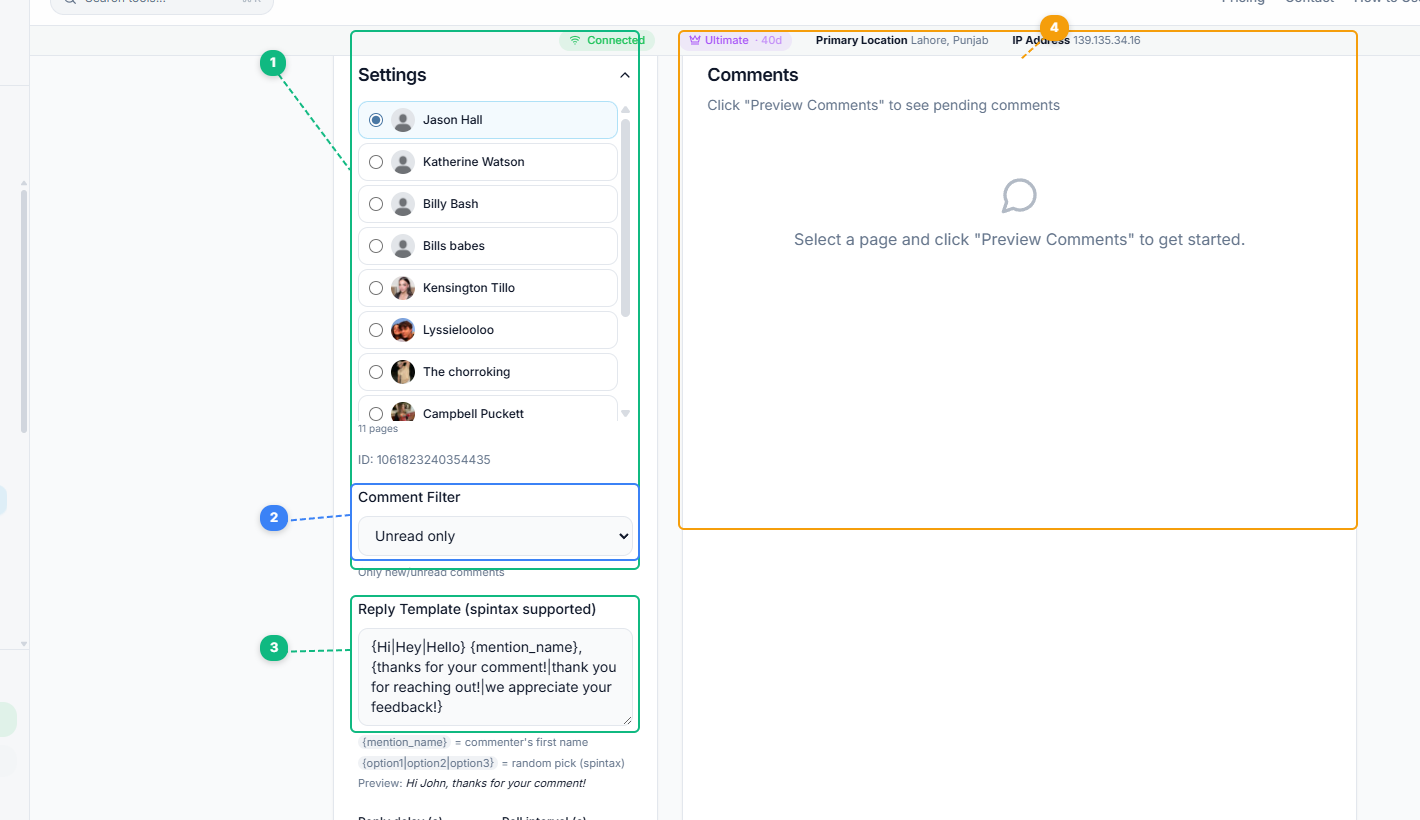
The Page Auto Responder uses a two-panel layout. Select which page to monitor from your full page list (1), choose a comment filter to target unread or all comments (2), write your spintax reply template with dynamic variables like {mention_name} for personalized responses (3), and view incoming comments in the preview panel (4) before activating auto-replies.
Step 1: Open the Tool#
Navigate to Page Auto Responder (listed as Comments Bot) in the FaceBot dashboard under Page Management.
Step 2: Select Your Page#
Choose the Facebook Page you want to enable auto-responding on.
Step 3: Configure Reply Templates#
Write your reply templates. Best practices for templates:
- Keep them natural. Write how a real person would reply, not how a corporate bot sounds. "Thanks for your comment! Glad you liked this" beats "Thank you for engaging with our content."
- Create 5-10 variations. This prevents the repetitive-bot appearance. Each variation should say the same thing differently.
- Include a call to action where appropriate. "Check the link in our bio for more" or "We just posted a full tutorial on this" turns engagement into traffic.
- Avoid overly promotional language. Comments that look like ads get reported by users and flagged by Facebook.
Step 4: Set Targeting Rules#
Decide which posts should receive auto-replies:
- All new posts going forward
- Specific posts you select manually
- Posts that meet certain criteria (optional, depending on available filters)
Step 5: Activate#
Enable the auto-responder. It begins monitoring immediately and will reply to new comments as they come in.
Step 6: Monitor and Adjust#
Check the auto-responder's activity after a few hours. Review the replies it has sent:
- Do they look natural in context?
- Are any reply templates awkward for certain types of comments?
- Are there comments that clearly need personal attention instead of an automated reply?
Adjust your templates and targeting based on what you observe.
Smart Strategies for Auto-Responding#
Layer automated and manual responses. Use the auto-responder for the first reply — the fast engagement signal the algorithm needs — and then follow up manually on comments that ask genuine questions, report problems, or present sales opportunities. The auto-reply buys you time; your manual follow-up adds depth.
Tailor templates to post types. A promotional post about a product launch deserves different auto-replies than a behind-the-scenes photo. If possible, create template sets for different content categories and assign them accordingly.
Use auto-replies to drive traffic. Comments on a post about a topic you have written about in detail? Template the reply with a link: "We wrote a full guide on this — [link]." This turns engagement into website traffic.
Avoid auto-responding on crisis or sensitive posts. If your page is dealing with a PR issue, customer complaint thread, or sensitive topic, automated replies will look tone-deaf. Disable the auto-responder for those specific posts and handle them personally.
Monitor for context failures. Automated systems do not understand context. A user commenting "This is terrible" on your product post will receive the same thank-you reply as a user commenting "This is amazing." Check periodically for these mismatches and adjust your templates to be more neutral if they occur frequently.
Combine with Bulk Page Composer for maximum impact. Publish a post with Bulk Page Composer across multiple pages, then activate Page Auto Responder on all of them. This creates a publish-and-engage workflow that maximizes both reach and engagement signals from the moment the post goes live.
Limitations and Honest Considerations#
- Automated replies lack contextual understanding. The tool replies based on templates, not based on understanding the commenter's intent. This means occasional awkward mismatches — a thank-you reply to a negative comment, for example.
- Overuse can feel spammy. If every single comment on every post gets an identical-feeling automated reply, regular followers will notice and may feel the engagement is inauthentic. Use reply variations and selective targeting to mitigate this.
- Facebook may flag extremely high-volume replies. Replying to hundreds of comments per minute can trigger Facebook's spam detection. The tool manages pacing, but extremely viral posts may still encounter rate limits.
- Not a replacement for community management. Auto-responding handles the volume; it does not handle the substance. Customer questions, complaints, and sales inquiries still need human attention.
🚀 Ready to try Page Auto Responder?
Auto-reply to every comment on your page
Try it Free Now — 24h Gold, 70+ Tools →Try Page Auto Responder#
Ready to keep your comment engagement running even when you are away from the screen? Page Auto Responder is available in the FaceBot dashboard.
Writing Auto-Responses That Feel Human#
The risk with any auto-responder is sounding like a robot — which can do more harm than no response at all. The craft is writing automated replies that feel like a real, prompt human:
- Acknowledge, then direct. A good auto-reply confirms you heard them ("Thanks for reaching out — we've got your message") and sets an expectation ("someone will reply within a few hours"). That alone reassures most people.
- Answer the predictable questions instantly. Hours, pricing, location, how to order — the questions you get constantly can be answered accurately and immediately by the auto-responder, which genuinely helps the customer rather than stalling them.
- Keep the tone matching your brand. A playful brand should have playful auto-replies; a professional service should sound professional. A generic corporate template feels colder than the rest of your page.
- Avoid dead-ends. Every auto-reply should point somewhere — a FAQ link, a menu of options, or a clear "reply with X for Y." Never leave the person with a response that invites nothing back.
- Be honest that it's automated when it matters. For anything requiring a real decision, signal that a human will follow up, so no one feels misled by a confident-sounding bot.
- Review and refresh the scripts. Read the actual conversations periodically; if people keep asking something your auto-replies don't cover, add it.
Done well, auto-responses raise customer experience — instant acknowledgment and instant answers to common questions beat waiting hours for a human to type the same thing. Done lazily, they frustrate. The difference is writing them like a helpful person who happens to be fast, not a machine deflecting work.
Frequently Asked Questions#
Will people know the reply is automated?#
Not unless your templates are obviously generic. Well-written reply variations that sound natural and conversational are indistinguishable from manual replies. The key is writing templates that read like a real person — use contractions, keep the tone casual, and create enough variations to avoid repetition.
Can I disable auto-replies for specific comments or users?#
The tool operates based on post-level targeting. You select which posts receive auto-replies. Individual comment-level filtering (such as skipping replies to specific users) depends on the tool's current filter capabilities. You can always manually delete an auto-reply if it was inappropriate for a specific comment.
Does auto-responding actually increase post reach?#
Yes, when used correctly. The mechanism is indirect but well-documented: comments with page replies signal active conversation to Facebook's algorithm, which increases the post's reach to more followers and potentially to non-followers through the "suggested" feed. The speed of the reply matters — fast replies during the first hour have the strongest impact on reach.
How many reply variations should I create?#
A minimum of five variations is recommended to avoid obvious repetition. Ten or more is better for pages with high comment volume. If your page regularly gets 100+ comments per post, more variations ensure that followers scrolling through the comments section do not see the same reply repeated.
Can I use this on multiple pages simultaneously?#
Yes. You can configure Page Auto Responder for each page you manage and run them concurrently. Each page can have its own set of reply templates tailored to that page's audience and tone.
Conclusion#
The gap between knowing that comment engagement drives reach and actually being able to respond to every comment at scale is where most page managers lose the algorithm game. Page Auto Responder closes that gap by ensuring every comment gets a reply during the window when it matters most. Used thoughtfully — with varied templates, selective targeting, and a complementary manual engagement strategy — it turns your page into an engagement machine without requiring you to be online 24 hours a day. Pair it with FaceBot's Bulk Page Composer for publishing and Viral Page Posts Finder for content strategy, and you have a complete publish-engage-optimize workflow.
Related reading: What Is Page Link in Comment? Auto.