What Is Hidden Post Remover? Find and Delete Hidden Facebook Page Posts
Hidden posts are the ghosts of your Facebook Page. They are invisible on your public timeline but they still exist — occupying space in your content inventory, potentially containing outdated information, and accessible to anyone with a direct link. If you have been hiding posts over months or years (or if a previous page manager hid posts you never reviewed), you may have dozens or hundreds of hidden posts that you cannot see but that still technically live on your page.
Facebook does not make it easy to find and manage hidden posts. The Activity Log can show you hidden posts, but filtering and acting on them in bulk is cumbersome. If you want to permanently delete posts that were hidden — completing the cleanup that hiding only started — you need a way to surface and act on those invisible posts.
The Hidden Post Remover in FaceBot finds all posts currently hidden from your page timeline and gives you the option to permanently delete them. It completes the lifecycle that the Bulk Page Post Hider begins.
What Does the Hidden Post Remover Do?#
The tool locates posts on your Facebook Page that are currently in a hidden state and lets you permanently remove them. Here is what it provides:
Discovery of hidden posts. The tool surfaces all posts that have been hidden from your page's public timeline, making invisible content visible again to you as the administrator.
Post preview. See the content, date, engagement metrics, and type of each hidden post before deciding what to do with it. You are not blindly deleting — you are reviewing and then deciding.
Bulk permanent deletion. Select multiple hidden posts and permanently delete them in a single action. This removes them entirely from Facebook, not just from your timeline.
Selective action. You do not have to delete every hidden post. Review the list and choose which ones to permanently remove. Posts you want to keep hidden (but not delete) can remain as they are.
Unhide option. For hidden posts that you discover should actually be visible again — perhaps they were hidden by mistake or their context has changed — you can restore them to your public timeline.
The Hidden Post Problem#
Posts Hide But They Do Not Disappear#
When you or a previous page manager hides a post, it stops appearing on your page's public timeline. But it continues to exist. The post's URL still works. If someone shared that post, the share still points to a live post. If someone commented on it, the comment thread is still active. The post's engagement data is still counted in various metrics.
For most page managers, "hide" feels like "done." But hidden posts can surface in unexpected ways:
- Direct link access. Anyone with the post's URL can still view it. If the post was shared before hiding, all those share links still function.
- Search results. Depending on indexing timing, hidden posts may still appear in Facebook search results or external search engine results.
- Data exports. If you export your page data, hidden posts appear in the export.
- Ad associations. If a hidden post was ever boosted or used in an ad, the ad system may still reference it.
Hidden Posts Accumulate Over Time#
A page that has been active for years may have hundreds of hidden posts from various sources:
- Previous page managers who hid content instead of deleting it.
- Posts hidden by Facebook's automated systems due to policy violations.
- Seasonal content that was hidden after a campaign ended.
- Posts hidden during a crisis or controversy that were never revisited.
Without a tool to surface and audit these hidden posts, they accumulate silently.
Practical Use Cases#
Completing a Content Cleanup#
You ran a content audit and used the Bulk Page Post Hider to hide 200 outdated posts. Six months later, you have confirmed that none of them need to be restored. The Hidden Post Remover lets you find all 200 hidden posts and permanently delete them, completing the cleanup.
New Page Manager Audit#
When a new administrator takes over a page, one of the first tasks should be auditing hidden content. The Hidden Post Remover surfaces everything that previous managers hid, giving the new manager a complete picture of the page's content — visible and invisible.
Compliance and Data Hygiene#
In regulated industries, hidden posts that contain outdated claims, expired offers, or non-compliant content may need to be fully removed rather than just hidden. The Hidden Post Remover ensures that compliance-sensitive content is genuinely deleted, not just out of sight.
Pre-Sale or Pre-Transfer Page Cleanup#
If you are selling a Facebook Page or transferring it to a new owner, hidden posts should be reviewed. The new owner may not know those posts exist, and legacy hidden content could create problems. Deleting unnecessary hidden posts before transfer creates a clean handoff.
Storage and Data Minimization#
While individual posts do not take up significant "storage" in a meaningful sense, the principle of data minimization — only keeping data you have a reason to keep — applies to page management. Hidden posts with no future utility are data you do not need to retain.
How to Use the Hidden Post Remover#
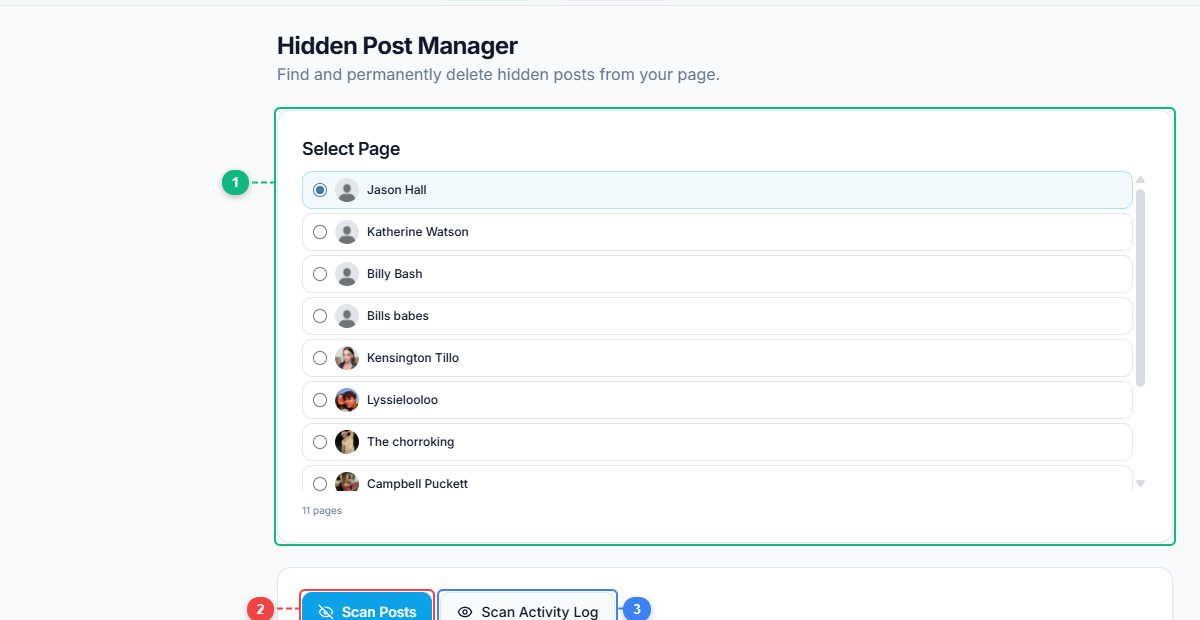
The Hidden Post Manager gives you multiple ways to find hidden posts. Select your page from the list (1), scan all posts automatically (2), scan through your Activity Log for a more thorough search (3), or paste specific post URLs directly (4) if you already know which posts to check.
- Open the FaceBot dashboard and navigate to the Hidden Post Remover tool.
- Select the Facebook Page you want to audit.
- The tool scans for all posts currently in a hidden state on your page.
- Review the list of hidden posts. Each one shows the post content, original publication date, and engagement data.
- Select the posts you want to permanently delete.
- Execute the deletion.
- Verify that the deleted posts are no longer accessible via their direct URLs.
Tips for Managing Hidden Posts#
Audit hidden posts at least quarterly. Set a reminder to review hidden posts every few months. Posts that you hid "temporarily" six months ago should either be unhidden or permanently deleted — leaving them in limbo serves no purpose.
Document before deleting. If hidden posts contain information that might be useful for internal reference (campaign data, customer feedback, historical pricing), export or screenshot that information before permanent deletion. Once deleted, the data is gone.
Use the Hidden Post Remover alongside the Bulk Page Post Hider. These two tools form a complete content lifecycle workflow: the Hider handles the initial removal from your timeline, and the Remover handles the eventual permanent deletion. Together, they give you a two-stage cleanup process — stage one (hide) is reversible, stage two (delete) is permanent.
Check for hidden posts you did not hide. Facebook's automated systems can hide posts that violate community standards. These posts may not appear in your regular timeline review because they were hidden by Facebook, not by you. The Hidden Post Remover surfaces these too, so you know what Facebook has flagged on your page.
Coordinate with your team. If multiple people manage a page, establish a protocol for who can hide posts and who can permanently delete hidden posts. The complete guide to Facebook page management covers team coordination strategies for multi-admin pages.
🚀 Ready to try Hidden Post Remover?
Find and manage hidden posts on your page
Open it Now →Limitations#
Permanent deletion is irreversible. Once you delete a hidden post through this tool, it cannot be recovered. Facebook does not maintain a recycle bin for page posts. Review each post carefully before executing deletion.
The tool finds posts that are in a hidden state at the time of scanning. If a post was hidden and then unhidden before you run the tool, it will not appear in the hidden post list. The tool shows current state, not historical actions.
Hidden posts that were hidden by Facebook due to policy violations may have restrictions on what actions you can take. In some cases, Facebook-hidden posts can be appealed but not manually unhidden by the page administrator.
Hide vs. Delete vs. Keep: A Decision Guide#
Not every underperforming or old post should be removed — and hiding, deleting, and keeping each have different consequences. A quick framework for deciding what to do with a post:
| Situation | Best action | Why |
|---|---|---|
| Outdated promo / expired offer | Delete | It can mislead visitors and clutters the page; no reason to keep it |
| Low-engagement filler dragging your average | Hide/remove | A page full of dead posts signals weak content to new visitors and the algorithm |
| Off-brand or mistaken post | Delete | Protects brand perception; mistakes shouldn't linger publicly |
| Still-relevant evergreen post with low recent views | Keep | Evergreen content keeps earning over time; low recent views isn't a reason to cut it |
| Post with meaningful comments/community value | Keep or hide, don't delete | Deleting destroys the conversation and any SEO/social proof it holds |
| Spam or policy-risky content | Delete immediately | Leaving it risks page penalties |
The principle: curate your page like a storefront. A visitor (and Facebook's quality signals) judge your page by what's visible, so clearing genuine dead weight raises your average quality — but don't reflexively delete posts that still hold value, community, or evergreen relevance. When in doubt between hiding and deleting, hiding is reversible; deletion isn't. Use bulk removal to clear the clutter efficiently, then keep the posts that still earn their place.
Frequently Asked Questions#
Can I recover a post after permanently deleting it with this tool?#
No. Permanent deletion removes the post from Facebook entirely. This is why the tool shows you the post content before deletion — review carefully and only delete posts you are certain you no longer need.
What is the difference between hiding and deleting?#
Hiding removes a post from your public page timeline but the post continues to exist and is accessible via direct link. Deleting removes the post from Facebook permanently — no direct link access, no comment thread, no engagement data.
Will deleting hidden posts affect my page's overall engagement metrics?#
Deleting posts removes their historical engagement data from your page's totals. If you are deleting high-engagement posts, your cumulative metrics will decrease. For low-engagement hidden posts, the impact is negligible.
How many hidden posts can the tool find?#
The tool scans your entire page for hidden posts. There is no artificial limit on how many it can discover. Pages that have been active for years and have had multiple managers may have hundreds of hidden posts.
Can I unhide posts instead of deleting them?#
Yes. The Hidden Post Remover gives you the option to unhide posts — restoring them to your public timeline — in addition to permanently deleting them. It is a management tool, not just a deletion tool.
Conclusion#
The Hidden Post Remover addresses a gap in Facebook's native page management: there is no easy way to find, review, and act on posts that have been hidden from your timeline. For pages with a long history, hidden posts accumulate into an invisible content layer that most page managers forget about.
FaceBot's Hidden Post Remover surfaces that invisible layer and gives you the tools to either restore hidden posts to your timeline or permanently delete them. Combined with the Bulk Page Post Hider, it creates a complete two-stage content lifecycle management system.
Try the Hidden Post Remover tool