What Is Swipe Up Video Post? Drive Traffic From Facebook Page Videos
Facebook video posts generate strong engagement — views, reactions, comments, shares. But turning that engagement into website visits, sign-ups, or purchases is a different problem entirely. A standard video post on Facebook keeps users on Facebook. The video plays, they might react or comment, and then they scroll on. There is no built-in mechanism to funnel viewers from the video to an external destination without adding a link in the caption and hoping people click it.
The Swipe Up Video tool in FaceBot changes this equation. It creates Facebook page video posts with an embedded swipe-up call-to-action that sends viewers directly to a URL of your choice — a landing page, product page, sign-up form, or any external destination. The CTA is integrated into the video post itself, not buried in a caption. Users see it as a natural part of the viewing experience, and the action of swiping up or tapping the CTA is a direct path to your destination.
What Is a Swipe Up Video Post?#
A Swipe Up Video post is a Facebook page video post that includes an interactive call-to-action overlay. When a viewer watches the video, they see a CTA prompt — typically at the bottom of the video player — that they can tap or swipe to navigate to an external URL.
This is fundamentally different from:
- Adding a link in the caption — most users never read the full caption, and Facebook truncates long text. Links in captions get minimal click-through rates.
- Pinning a comment with a link — requires users to open comments and find the pinned one. Multiple friction points.
- Using Facebook's native CTA button on pages — this applies to the page itself, not individual video posts.
The Swipe Up Video format places the CTA where the user's attention already is: on the video. The viewer does not need to leave the video player, scroll down, or open comments to find the link. The call to action is part of the content.
Key capabilities:
- Custom destination URL — link to any external page: product, landing page, signup form, article
- CTA button text — choose from action-oriented labels (Learn More, Shop Now, Sign Up, Watch More, Get Offer, etc.)
- Full video quality — the CTA overlay does not degrade video quality or resolution
- Works on mobile and desktop — the CTA renders appropriately on both interfaces
- Standard video post distribution — the post receives the same algorithmic treatment as any other video post
- No ad spend required — this is an organic post feature, not a paid ad format
🚀 Swipe Up Video Post
Add clickable links to your video posts
Try it Free Now — 24h Gold, 70+ Tools →Why Swipe Up Videos Matter for Page Operators#
Facebook's organic reach for page posts has been declining for years. The posts that do reach your audience need to work harder — every impression needs to drive a measurable action. Swipe Up Videos address the core gap between engagement and conversion.
The Engagement-to-Conversion Problem#
Consider a typical organic video post on a Facebook page:
- The video appears in followers' feeds
- Some percentage watch it (view rate)
- Some percentage react, comment, or share (engagement rate)
- To visit your website, they need to: stop watching, scroll to the caption, find the link, click it
- Each step loses 50-80% of the remaining audience
By step 4, your actual click-through rate from video views to website visits is typically under 1% for organic video posts with caption links. The Swipe Up format collapses steps 4 and 5 into a single action that happens while the user is already engaged with the video.
Video Is Already the Highest-Reach Format#
Facebook prioritizes video content in feed distribution. Video posts reach 2-3 times more of your page's followers compared to link posts or image posts. Combining video's reach advantage with an embedded CTA means your traffic-driving content gets the best of both worlds: the distribution of video and the conversion mechanism of a link post.
Mobile-First Behavior#
Over 80% of Facebook usage happens on mobile devices. On mobile, swiping is a native interaction — it is how users navigate Stories, Reels, and feeds. A swipe-up CTA feels natural within the mobile experience. Tapping a tiny link in truncated caption text does not.
Who Should Use Swipe Up Video Posts?#
E-Commerce Businesses#
Product videos that end with a "Shop Now" swipe-up CTA create a direct path from product discovery to product page. Unboxing videos, product demos, and feature highlights convert significantly better when the purchase path is one swipe away instead of buried in a comment.
Service Businesses#
Consultants, agencies, SaaS companies, and professional service providers can use Swipe Up Videos to drive appointment bookings, demo requests, and free trial signups. A 30-second explainer video with a "Book a Call" CTA is more effective than any text post.
Content Publishers and Bloggers#
Driving website traffic from Facebook is the core challenge for publishers. A video teaser of an article, guide, or resource with a "Read More" swipe-up CTA gives followers a reason to leave Facebook and visit your site — something Facebook's algorithm otherwise discourages.
Event Promoters#
Event teaser videos with a "Get Tickets" or "RSVP" swipe-up CTA convert interest into registrations. The video creates excitement; the CTA captures the intent while it is fresh.
Course Creators and Educators#
Preview videos for online courses, workshops, or webinars paired with a "Sign Up" CTA convert curious viewers into registered students. The format works especially well for free webinar signups where the commitment barrier is low.
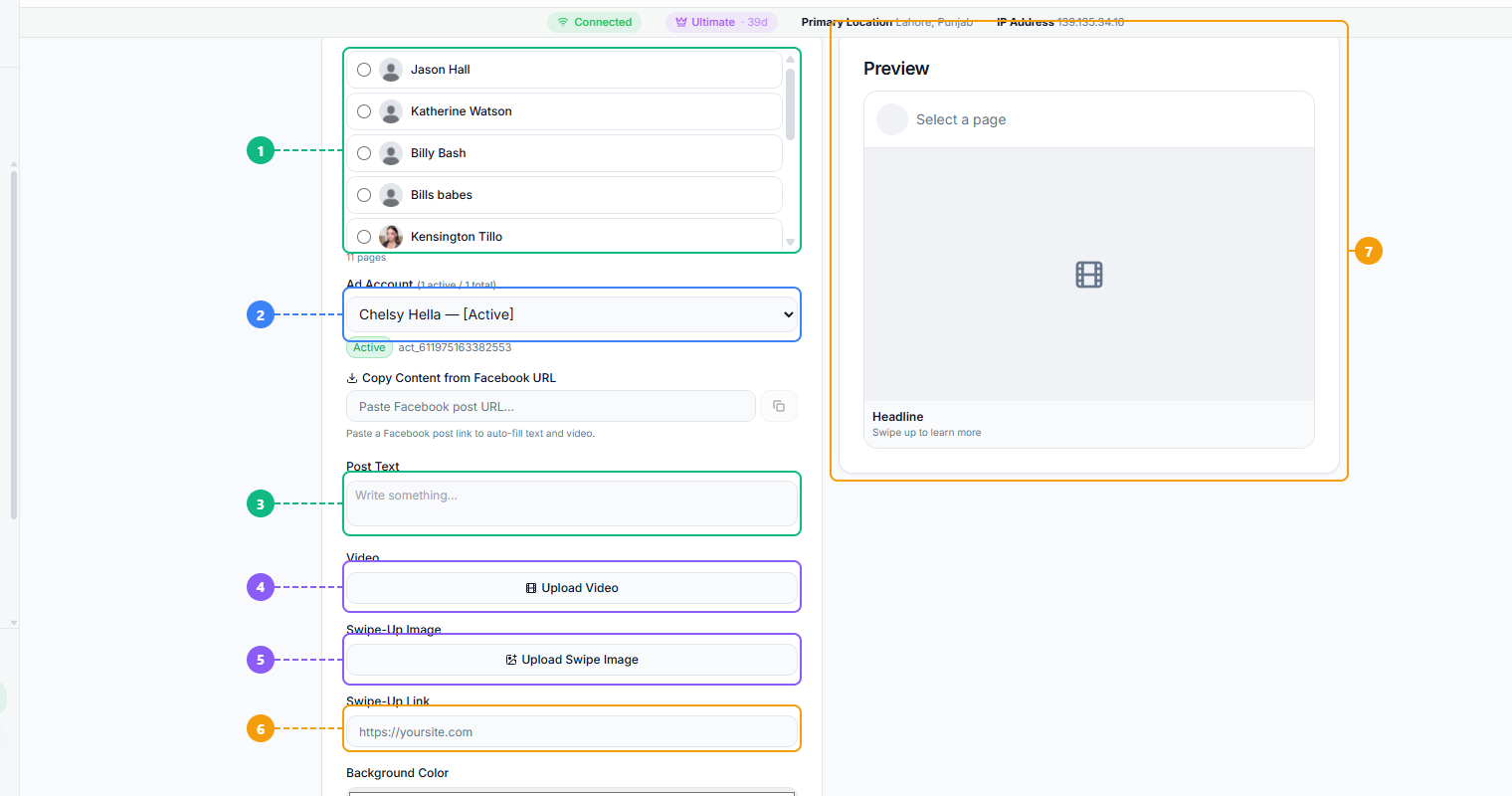
The Swipe Up Video tool provides a complete creation workflow. Select the Facebook page to post to (1), choose your active ad account (2), write the post caption text (3), upload your video file (4), upload the swipe-up cover image (5), enter the destination URL where viewers will land when they swipe up (6), and preview how the finished post will appear with its headline and CTA (7).
How to Create a Swipe Up Video Post With FaceBot#
Step 1: Prepare Your Video#
Record or produce the video you want to post. Optimize for the first 3 seconds — this is where Facebook users decide whether to keep watching or scroll past. Include a verbal or visual mention of the CTA near the end of the video so the swipe-up prompt feels like a natural next step.
Video specifications:
- Format: MP4 (H.264 encoding)
- Resolution: 1080p minimum recommended
- Aspect ratio: 1:1 (square) or 4:5 (vertical) for maximum feed real estate on mobile
- Duration: 15-60 seconds for organic posts. Shorter videos have higher completion rates, which improves distribution.
- Audio: Include audio, but ensure the message works with captions too — many users watch with sound off
Step 2: Open the Swipe Up Video Tool#
Navigate to the Swipe Up Video tool in the Content Creation suite under Pages tools. Select the Facebook page you want to post to.
Step 3: Upload and Configure#
Upload your video. Then configure the CTA:
- Destination URL: The full URL where users will land when they swipe up or tap the CTA
- CTA button label: Choose the text that appears on the button (Learn More, Shop Now, Sign Up, etc.)
- Post caption: Write the text that appears above the video in the feed
Step 4: Preview and Publish#
Review how the video and CTA will appear on both mobile and desktop. Check that the destination URL loads correctly. Publish the post.
Tips for High-Converting Swipe Up Videos#
Hook in the first 3 seconds. Facebook's feed is a battlefield for attention. Your video needs to stop the scroll immediately. Start with motion, a bold visual, or a question — never a static title card or slow fade-in.
End with a clear verbal CTA. In the final 3-5 seconds of the video, tell viewers explicitly what to do: "Swipe up to shop," "Tap below for the full guide," "Get your free trial — link is right here." The swipe-up button is more effective when the video itself directs attention to it.
Keep it short. Completion rate directly affects distribution. A 15-second video that 80% of viewers finish will outperform a 2-minute video that only 10% finish — even if the longer video has "better" content. Aim for 15-30 seconds for most organic Swipe Up Videos.
Match the video to the destination. If your video shows a product, the CTA should go to that product page — not your homepage. If your video teases an article, the CTA should go to that article. Mismatches between video content and landing page increase bounce rates.
Use captions and text overlays. A significant portion of Facebook video views happen with sound off. Add captions or text overlays so your message and CTA are clear even without audio.
Post when your audience is active. The first hour of a video post's life is critical for algorithmic distribution. Post during peak activity hours for your page's audience. Check your Page Insights for audience online times.
🚀 Ready to try Swipe Up Video Post?
Add clickable links to your video posts
Try it Free Now — 24h Gold, 70+ Tools →Swipe Up Video vs. Standard Video Post vs. Link Post#
| Feature | Swipe Up Video | Standard Video Post | Link Post |
|---|---|---|---|
| Organic reach | High (video priority) | High (video priority) | Low (suppressed by algorithm) |
| External link | Embedded CTA | Caption only | Prominent link preview |
| Click-through path | One tap/swipe | Find link in caption | Click link preview |
| Video content | Yes | Yes | No (thumbnail only) |
| Mobile experience | Native swipe interaction | No link integration | Small link preview |
| Engagement signals | Views + swipes + reactions | Views + reactions | Clicks + reactions |
The Swipe Up Video format combines the distribution advantage of video content with the conversion mechanism of link posts — something neither format achieves independently.
How to Get Started#
The Swipe Up Video tool is available in FaceBot's Content Creation suite under Pages tools. If your Facebook strategy involves driving traffic from organic video posts to external destinations — product pages, landing pages, signup forms, articles — this format significantly improves the conversion path compared to caption links.
For other ways to create engaging Facebook page content, explore the complete guide to Facebook content creation, which covers carousels, image-to-video conversion, AI-generated images, and more.
Conclusion#
Standard Facebook video posts generate views but rarely drive traffic, because viewers have no clear path from the video to your website. Swipe Up Video Posts solve this by embedding a tappable link card directly into the video format, turning passive viewers into active visitors. For anyone whose Facebook strategy depends on moving people off-platform — to product pages, signup forms, or articles — this format delivers measurably better results than caption links alone.
FaceBot's Swipe Up Video tool makes creating these posts as simple as uploading a video and entering a URL. No manual workarounds, no restricted format access, no minimum follower count. If you are already posting videos to Facebook Pages, switching to the swipe-up format adds a conversion layer with zero additional production effort.
→ Try FaceBot's social media tools free
Frequently Asked Questions#
Q: Do Swipe Up Video posts require ad spend?#
No. The Swipe Up Video tool creates organic page posts, not paid advertisements. The post is published to your page's feed and distributed through Facebook's organic algorithm. No ad budget is needed. However, you can boost or promote the post through Ads Manager after publishing if you want additional reach.
Q: Can I use Swipe Up Videos on a personal profile?#
Swipe Up Video posts are a page-level feature. Facebook pages have access to CTA button functionality that personal profiles do not. If you are running a business, brand, or public figure presence, you need a Facebook page to use this feature.
Q: What CTA button options are available?#
Common CTA labels include Learn More, Shop Now, Sign Up, Watch More, Book Now, Get Offer, Download, and Contact Us. The available options may vary based on your page category. Choose the label that most accurately describes what happens when someone clicks — misleading CTAs hurt trust and increase bounce rates.
Q: Is there a minimum follower count to use this feature?#
No minimum follower count is required. Any Facebook page can create Swipe Up Video posts regardless of page size. However, the effectiveness of the feature scales with your audience size and engagement rate — a page with active followers will see more conversions than a new page with minimal reach.
Q: Can I change the destination URL after publishing?#
Once a post is published, the CTA destination URL is set. If you need to update the link, you would need to delete the post and create a new one with the corrected URL. Double-check your destination URL before publishing to avoid this situation.