FaceBot Video Studio: AI Clipping, Subtitles, Voiceover and Faceless Videos on Your Own PC
Short vertical video now carries most of the reach on Facebook, Instagram, TikTok and YouTube. The work behind it is what slows people down: finding the good moments in a long recording, adding captions word by word, recording a voiceover, finding pictures for every sentence, or designing quote posts one by one.
FaceBot Video Studio is our answer to that work. It is a free Windows desktop app with ten video tools in one place, and the AI that powers them runs on your own computer. You don't buy per-video credits; your FaceBot plan includes daily minutes. This guide explains what each tool does, what you need, and how to get started. We make FaceBot, so weigh our enthusiasm accordingly; everything below describes how the app actually works today.
Download FaceBot Video Studio (Windows 10 / 11, free download, needs a Gold, Pro or Ultimate plan)
What Is FaceBot Video Studio?#
FaceBot Video Studio is a desktop app for Windows that turns raw material — a long video, a script, a topic or a list of quotes — into finished, ready-to-post content. It combines:
| Tool | What it makes |
|---|---|
| AI Clipping | Vertical Shorts, Reels and TikToks from a long video or podcast |
| Add Subtitles | Word-by-word captions burned into your video, plus an .srt file |
| Voiceover | A natural AI voice (MP3) from your script, with subtitles |
| Faceless Videos | A complete narrated video from one topic, with pictures, clips, captions, music and motion graphics |
| Quote Maker | Quote posts in your design, or with an automatic matching background picture |
| AI Auto Edit | A tight edit of a talking-head video: silences and filler words cut, zooms, captions, a hook title |
| Video Editor | A timeline editor with layers, text, transitions, music and memory-safe export |
| Screen Recorder | Screen, window or webcam recordings with system sound and microphone |
| Split, Merge & Spice-up | Cut, join and refresh videos |
| Reaction & Split-screen | Reaction videos and stacked two-video layouts |
You sign in once with your FaceBot account and every tool is available, within the daily limits of your plan.
Why Run the AI on Your Own PC?#
Most AI video tools upload your footage to a cloud service and charge credits for every minute they process. FaceBot Video Studio downloads a Smart AI pack once (speech recognition, a vision-language model and the voices), then does the heavy work locally:
- Privacy — your videos don't have to be uploaded to be clipped, transcribed or captioned.
- No per-video credits — daily minutes come with your plan; there are no paid AI credits to top up.
- Speed on good hardware — a graphics card is used automatically when one is available.
FaceBot's servers only do what must be central: they check your account, your plan and your daily limit before a job starts, and send the app the instructions it needs for that job.
🚀 FaceBot Video Studio
AI clipping, subtitles, voiceover and faceless videos on your own PC
Try it Free Now — 24h Gold, 70+ Tools →AI Clipping: Long Videos Into Shorts#
Give AI Clipping a podcast, interview, livestream or tutorial and it returns the strongest moments as vertical clips. It transcribes the speech with the most accurate model your PC can run, scores moments for hooks, emotional peaks, quotable lines and payoffs, keeps the speaker in frame with smart reframing, and adds animated captions in the style you pick. Each clip is a normal file you can post straight away or open in the Video Editor.
Add Subtitles#
Add Subtitles burns accurate, word-by-word captions onto the whole video using the same caption styles as AI Clipping — and saves an .srt subtitle file next to it for YouTube and Facebook uploads. You can move and resize the captions on a live preview before exporting.
Voiceover: Natural AI Voices From a Script#
Paste or open a script, choose from 40+ voices (English, Hindi, Urdu, Spanish, French, Italian and Portuguese), listen to a sample, and export an MP3 with a matching subtitle file. Speed and pauses are adjustable. Voiceover is charged in voice minutes, and the app shows how long your script will be before you start.
Faceless Videos: From One Topic to a Finished Video#
Faceless Videos is the most complete tool in the app. Type a topic — or paste your own script — and it:
- Writes the narration with the local AI, in the language of the voice you choose.
- Records the voice with natural timing.
- Finds a picture or video clip for every few seconds. No scene stays on screen longer than about five seconds, and pictures come from free libraries with licences that allow commercial use: Openverse, Wikimedia Commons, NASA and The Met, plus Pixabay, Pexels and Unsplash with your own free key.
- Checks every picture with the local AI before it is used: it must fit what the narration says, be a real photo (not a cartoon or meme), carry no big watermark and show nothing disturbing.
- Never repeats a picture. Each picture gets a visual fingerprint, so the same photo from two libraries — or a re-cropped copy — is never shown twice.
- Adds motion graphics on the exact spoken word: numbers count up on a card, names and dates get a tag, key words slam in, with transitions and sound effects.
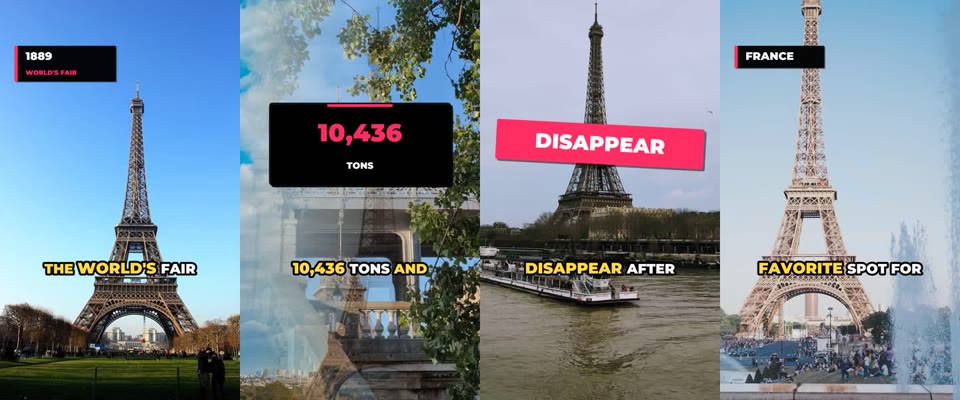
Choose a style — Documentary, Energetic, News, Minimal — or Auto, which gives every video a different look so a channel never looks like it was made from one template. Before rendering you can swap any picture, use your own pictures in bulk, or open the whole project in the Video Editor. A credits list is saved next to every video.

A note on YouTube: since 2025, YouTube's monetisation rules target mass-produced, near-identical videos. Use Faceless Videos as a fast first draft — review the script, swap pictures and add your own angle — rather than publishing hundreds of untouched videos.
🚀 Ready to try FaceBot Video Studio?
AI clipping, subtitles, voiceover and faceless videos on your own PC
Try it Free Now — 24h Gold, 70+ Tools →Quote Maker: Aesthetic Quote Posts in One Click#
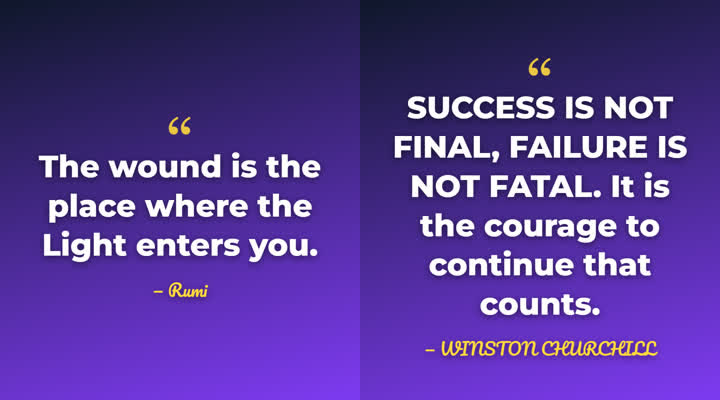
Quote Maker recreates quote images in your own design, or builds them from text you type. Add quote images and the built-in AI reads the quote and its author for you; or use Add as text and put an empty line between quotes.
With Auto picture, every quote gets its own background that fits its meaning and mood — a calm sea, a mountain road, a candle by a window — and the app sets the darkness behind the text automatically so white text always reads. Change any picture with one click, adjust the darkness per quote, and export all posts with a picture-credits file.

Prefer your own look? Pick from 60+ templates or set your fonts, colours, page name and a character image.
AI Auto Edit, Video Editor and More#
- AI Auto Edit turns a raw talking-head recording into an edited video: silences and filler words removed, zoom cuts, transitions, captions, a hook title, keyword pop-ups and chapter markers — every change is a normal clip you can adjust.
- Video Editor is a full timeline with layers, text, captions, transitions, zoom, music that ducks under the voice, and memory-safe export.
- Screen Recorder, Split / Merge / Spice-up and Reaction & Split-screen cover the everyday jobs around them, and are unlimited on every paid plan.
Plans and Daily Limits#
The app is a free download. To use the tools you sign in with a FaceBot Gold, Pro or Ultimate plan:
| Tool | Gold / day | Pro / day | Ultimate / day |
|---|---|---|---|
| AI Clipping, Add Subtitles, AI Auto Edit | 200 video min | 500 video min | 5,000 video min |
| Voiceover | 60 voice min | 200 voice min | 1,000 voice min |
| Faceless Videos | 30 video min | 100 video min | 500 video min |
| Quote Maker (saved images) | 500 | 1,000 | 5,000 |
| Quote AI (reading + Auto picture) | 1,000 | 2,000 | 10,000 |
| Video Editor, Recorder, Split / Merge, Reaction | Unlimited | Unlimited | Unlimited |
Limits reset daily, and a job that fails gives its minutes back (up to three failed jobs a day).
How to Get Started#
- Download the installer from the FaceBot Video Studio page and run it.
- If Windows shows "Windows protected your PC", click More info → Run anyway. This appears for apps that are new to Windows SmartScreen; always download the installer from fb0t.com only.
- Sign in with your FaceBot account. The Smart AI pack downloads once in the background, and the tools unlock as it finishes.
System requirements: Windows 10 or 11 (64-bit), 8 GB RAM (16 GB recommended for long videos), about 6 GB of free disk space and an internet connection while you use it. A graphics card helps but isn't required.
Conclusion#
FaceBot Video Studio puts the slow parts of short-form video — finding moments, captioning, voicing, illustrating and designing — into one app that runs on your own PC, without per-video credits. If you already have a FaceBot Gold, Pro or Ultimate plan, it's included: download it, sign in and make your first video in minutes.
Frequently Asked Questions#
Q: Is FaceBot Video Studio free?#
The download is free. Using the tools needs a FaceBot Gold, Pro or Ultimate plan, which includes daily minutes for the AI tools and unlimited use of the editor, recorder, split/merge and reaction tools.
Q: Does it work on Mac?#
Not yet — FaceBot Video Studio is currently available for Windows 10 and 11 (64-bit).
Q: Do my videos get uploaded?#
No. Transcription, clipping, captions, picture checks and voices run on your PC. FaceBot checks your account and daily limits, and Faceless Videos and Quote Maker search free picture libraries from your PC.
Q: Can I use the pictures commercially?#
The pictures come from libraries whose licences allow commercial use, and the app saves a credits list with every video and quote post. Some licences (such as CC BY, Pexels and Unsplash) ask for a credit, which you can paste into your post description.
Q: Which languages are supported?#
Voiceover and Faceless Videos support English, Hindi, Urdu, Spanish, French, Italian and Portuguese voices. AI Clipping and Add Subtitles transcribe many more languages.
Q: What happens if a job fails?#
The minutes it took are given back automatically (up to three failed jobs a day), so a failed job doesn't eat into your daily limit.